Customer Visit Verification: GPS, Photo, OTP and Geofencing Explained
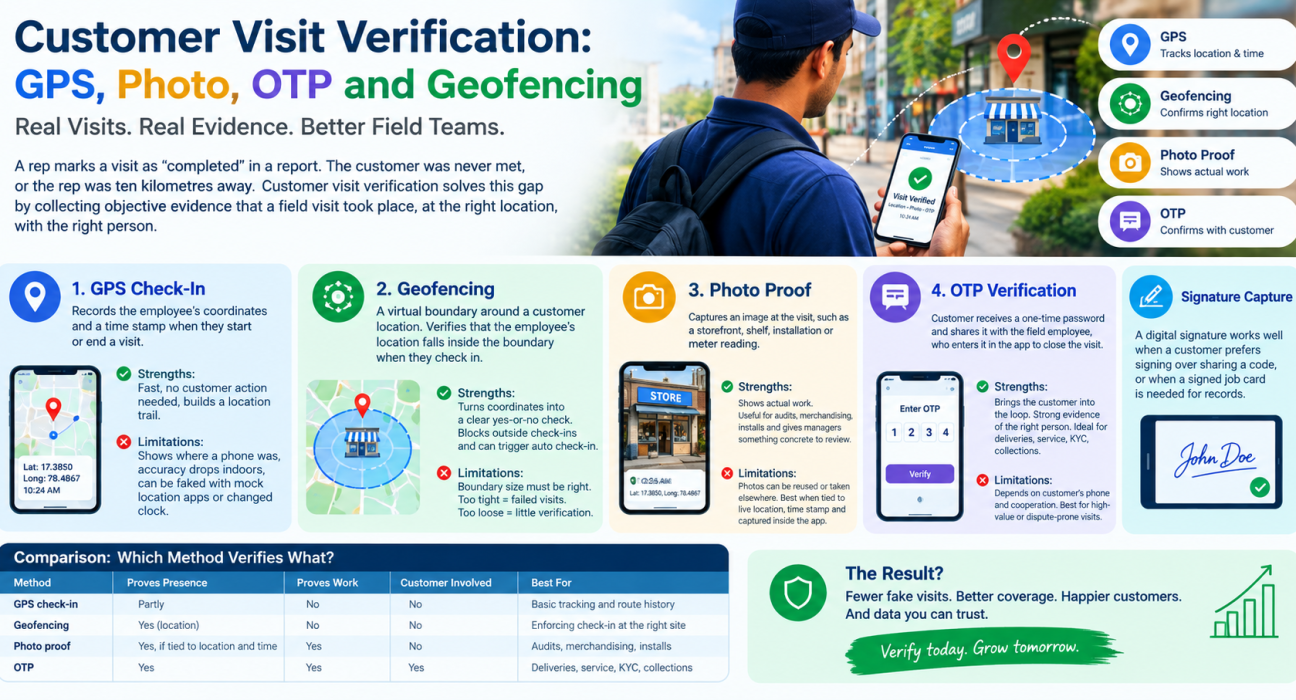
A rep marks a visit as “completed” in a report. The customer was never met, or the rep was ten kilometres away. This gap between what is reported and what happened is the problem customer visit verification solves.
Verification means collecting objective evidence that a field visit took place, at the right location, with the right person. Four methods do most of the work: GPS, geofencing, photo proof and OTP. This guide explains how each works, where each can be beaten, and how to combine them into a process your team will follow.
What Is Customer Visit Verification?
Customer visit verification is the process of confirming, using digital evidence, that a field employee physically visited a customer or site and completed the intended work. It typically combines location data, time stamps and customer-side confirmation.
Good verification captures two things:
- Proof of presence: the employee was at the right place at the right time.
- Proof of work: the employee did what the visit required, such as a sales call, service job, collection or audit.
Presence alone is not enough. A rep can stand outside a shop for two minutes and leave. Proof of work closes that gap.
Why Manual Visit Reporting Breaks Down
Most teams start with phone calls, WhatsApp messages and spreadsheets. These share the same weaknesses:
- Self-reported data. Nobody independently confirms a visit.
- No timing information. You can’t tell whether a visit lasted two minutes or forty.
- Delayed reporting. Reports filed at day’s end are often reconstructed from memory.
- Disputes. Customers, managers and reps disagree about what happened, with nothing to settle it.
The result is paid-for visits that never happened, weak coverage of high-value accounts and no reliable data for coaching.
The Four Core Methods of Customer Visit Verification
1. GPS Check-In
GPS check-in records the employee’s coordinates and a time stamp when they start or end a visit.
Strengths: It is fast, needs no action from the customer and builds a location trail.
Limitations: GPS alone shows where a phone was, not whether the visit was genuine. Accuracy also drops indoors and in dense areas. Without safeguards, location can be faked using mock-location apps or by changing the phone’s clock.
2. Geofencing
A geofence is a virtual boundary drawn around a customer location. Geofencing verifies a visit by checking that the employee’s location falls inside that boundary when they check in.
Strengths: Geofencing turns raw coordinates into a clear yes-or-no check. It can block check-ins from outside the boundary and can trigger automatic check-in on arrival.
Limitations: The boundary has to be sized sensibly. Too tight and legitimate visits fail at large campuses or in poor GPS conditions. Too loose and it verifies little.
3. Photo Proof
Photo proof asks the employee to capture an image at the visit, such as a storefront, a shelf, a completed installation or a meter reading.
Strengths: Photos show the actual work. They are useful for merchandising audits, service jobs and site inspections, and they give managers and customers something concrete to review.
Limitations: Photos can be reused or taken elsewhere if the app allows uploads from the gallery. They work best when tied to a live location and time stamp and captured inside the app.
4. OTP Verification
With OTP verification, the customer receives a one-time password and shares it with the field employee, who enters it in the app to close the visit.
Strengths: It is the only method here that brings the customer into the loop. A valid OTP is strong evidence that the employee met the right person. It suits deliveries, service completions, loan or KYC visits and collections.
Limitations: It depends on the customer’s phone and cooperation. It is best used for high-value or dispute-prone visits rather than every routine call.
Signature Capture
A digital signature is a useful companion to OTP. It works well when a customer prefers signing over sharing a code, or when a signed job card is needed for records.
Comparison: Which Method Verifies What?
| Method | Proves Presence | Proves Work | Customer Involved | Best For |
|---|---|---|---|---|
| GPS check-in | Partly | No | No | Basic tracking and route history |
| Geofencing | Yes (location) | No | No | Enforcing check-in at the right site |
| Photo proof | Yes, if tied to location and time | Yes | No | Audits, merchandising, installs |
| OTP | Yes | Yes | Yes | Deliveries, service closure, collections |
No single method is enough. GPS tells you where, a photo shows what, and an OTP confirms who.
How to Choose the Right Verification Method
Match the method to the risk and value of the visit.
- Routine sales or relationship visits: geofenced check-in plus a short checklist.
- Retail and merchandising audits: geofenced check-in plus photo proof.
- Service calls and installations: geofence, before-and-after photos and customer OTP or signature.
- Collections and recoveries: geofence, receipt photo and OTP.
- Deliveries: location stamp plus OTP or signature on completion.
Applying every method to every visit adds friction and slows reps down. Reserve heavier proof for visits where a dispute would be costly.
Common Loopholes and How to Close Them
Verification is only as strong as the weakest step. Watch for these gaps:
- Mock location apps. Choose a system that detects spoofed GPS.
- Device clock changes. Use server-side time stamps rather than the phone’s clock.
- Gallery uploads. Require photos to be captured live in the app.
- Check-in from the car park. Set geofence radii that match the real site size.
- Poor connectivity. Look for offline capture that syncs later, so reps aren’t tempted to skip steps in weak-network areas.
- Verification without review. Evidence nobody looks at deters nothing. Managers need exception reports and a live view of what is happening.
How to Set Up Customer Visit Verification: Step by Step
- Define what counts as a completed visit. Write down the required evidence for each visit type.
- Create accurate customer locations. Geofences are only as good as the address data behind them.
- Choose your proof by visit type. Use the risk-based approach above.
- Add checklists and forms. Capture structured outcomes such as order taken, issue found or payment collected.
- Set time and SLA expectations. Define visit windows and response commitments where relevant.
- Train the team and explain the why. Frame verification as protection for honest reps, not surveillance.
- Review exceptions weekly. Look at missed geofences, unusually short visits and repeated failures, and coach from the data.
- Refine over time. Adjust radii, proof requirements and workflows based on what you see.
Privacy and Rep Buy-In
Location data is sensitive. Track employees only during working hours and duty status. Tell them clearly what is collected and why, get their consent, and follow applicable data protection rules, including India’s Digital Personal Data Protection Act, 2023. Transparency also improves adoption. Reps accept verification more readily when it reduces disputes about their own work.
How Software Makes Customer Visit Verification Practical
Doing this manually doesn’t scale. Once a team passes a handful of reps, you need software that captures evidence automatically and surfaces it in one place.
Look for field force management software that offers:
- Server-side time stamps and geofence enforcement
- Spoofed-location detection
- In-app photo, signature and OTP capture
- Configurable checklists and forms
- Offline capture with later sync
- A live map and location trail for managers
- Reports on visit duration, missed visits and exceptions
Businesses looking to simplify these processes can use field force management software such as FieldExecutives.
How FieldExecutives Supports Customer Visit Verification
FieldExecutives is a field force management platform built around proof-backed field work. Based on the platform’s published features, it supports verification in these ways:
- Geofenced, server-time punch-ins with mock-GPS spoof detection, so attendance and check-ins aren’t tied to the phone’s clock.
- Auto check-in by geofence, so reps don’t have to remember to log arrival.
- Photo, signature and OTP capture before a job can be closed, giving both proof of presence and proof of work.
- Guided checklists and SLA timers that structure each visit.
- Custom forms, so you can capture exactly the data your visit type needs.
- Offline-first capture, so evidence still gets recorded in low-network areas and syncs when the rep reconnects.
- A live team map with a GPS breadcrumb trail, so managers can see where each rep actually went.
The same approach works across industries such as FMCG, pharma, microfinance and field service, where verification requirements differ but the principle is the same.
Conclusion
Effective customer visit verification rests on layering evidence. GPS shows where, geofencing enforces the right place, photos show the work, and OTP confirms the customer was there. Choose proof by visit risk, close the common loopholes, and review exceptions regularly so the data leads to coaching.
For teams still relying on reports and WhatsApp updates, moving to a purpose-built platform is the practical next step. FieldExecutives brings geofencing, photo, signature and OTP proof into one workflow for managing field teams.