How to Improve Communication Between Field Staff and Head Office
When a field executive finishes a visit at 2 p.m. and the office hears about it at 7 p.m., that gap is more than a delay. Managers can’t re-plan the day. Customers wait for follow-ups. Reports are built from memory instead of facts.
Poor communication between field staff and head office rarely comes from lazy people. It comes from scattered tools, unclear processes and no shared source of truth. This guide covers why the gap appears, the practices that close it, and how field team communication software gives both sides one connected workflow.
Why Field and Head Office Communication Breaks Down
Short answer: Communication breaks down when field work happens outside the systems the office uses. Updates travel through calls, WhatsApp groups and end-of-day messages. They arrive late, in different formats, and without proof.
Common Causes
- Too many channels. Instructions go out on calls, texts and chat groups. Nobody knows which message is the latest.
- No real-time visibility. The office cannot tell who is at a customer site, who is travelling and who is idle.
- Unstructured updates. A message like “visit done, will follow up” gives the office nothing it can measure.
- Patchy connectivity. Reps in low-network areas hold their updates until they get signal, so the office sees the day in batches.
- One-way instructions. Head office sends tasks down but has no clean way to receive blockers, customer feedback or requests for approval.
- Manual reporting. Reps spend evenings writing summaries that managers then re-enter into spreadsheets.
What It Costs the Business
Weak communication shows up in business results:
- Missed or duplicated visits
- Slow responses to urgent customer requests
- Delayed expense approvals and collections
- Disputes over whether a visit actually happened
- Managers coaching on opinion instead of data
What Makes Field Communication Different From Office Communication
Office teams can walk to a desk or open a shared document. Field teams work on the move, often on mobile, and often without a stable network. They need communication that is short, structured and tied to the work itself.
That is why generic chat apps fall short. They carry messages, but they don’t connect those messages to a task, a customer, a location or a deadline.
7 Ways to Improve Communication Between Field Staff and Head Office
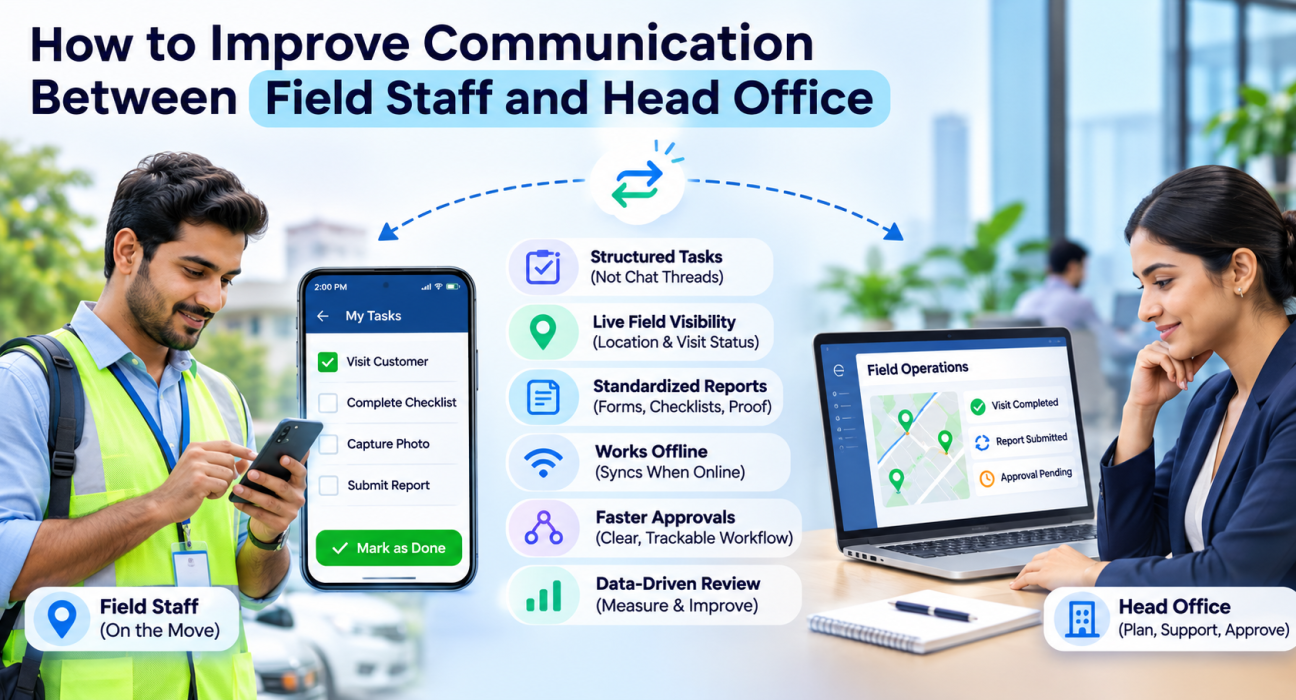
1. Move Instructions Into Tasks, Not Chat Threads
Answer: Assign work as structured tasks with a customer, location, checklist, priority and deadline. Do not send it as a free-text message.
A task is clearer than a chat message because it has an owner, a status and an outcome. The rep knows what to do. The manager can see whether it is open, in progress or done, without asking.
2. Give Head Office a Live View of the Field
When the office can see team locations and visit status on one map, most “where are you?” calls stop. Managers can spot idle time, reassign a nearby rep to an urgent request, and answer customers with confidence.
Live visibility also changes the tone of communication. It becomes about support and decisions rather than checking up.
3. Standardize What Field Staff Report
Free-form updates are hard to compare. Structured updates are easy to act on.
Replace open-ended messages with:
- Custom forms for visit outcomes, surveys and inspections
- Checklists that must be completed before a job closes
- Required photo, signature or OTP capture where proof matters
This gives head office consistent data. It also saves reps from writing long summaries.
4. Use One Channel for Work Communication
Pick one place where task updates, questions and approvals live. When work communication spreads across personal phones and several chat groups, context gets lost and accountability gets blurred.
One channel also makes onboarding easier. New joiners learn one system instead of absorbing years of informal habits.
5. Design for Poor Connectivity
Field teams in many markets work in areas with weak signal. If the app stops working without a network, reps fall back to calls and messages.
Look for an offline-first approach. Reps should be able to record visits and capture photos without a connection, and everything should sync when the network returns. Head office then gets complete data instead of gaps.
6. Close the Loop on Approvals and Requests
Field staff often wait on head office for expense approvals, leave decisions or special pricing. Slow responses frustrate reps and delay customer commitments.
Set clear approval paths with named approvers and expected response times. Digital workflows with a visible status stop reps from having to chase.
7. Review Communication With Data, Not Impressions
Track a few simple indicators:
- How quickly tasks are acknowledged and completed
- How many visits have complete, proof-backed reports
- How often urgent requests are reassigned
- How long approvals take
These show where communication is working and where it stalls.
What Is Field Team Communication Software?
Field team communication software is a mobile-first platform that connects field employees with head office through tasks, messaging, live status, structured reports and approvals in one system. Instead of relying on calls and chat groups, teams work from shared, real-time information.
Unlike a general messaging app, it links every update to a job, a visit or a location. Communication becomes part of the work record instead of sitting in a separate thread.
Features to Look For
| Feature | Why It Matters for Communication |
|---|---|
| Task assignment with checklists and SLAs | Makes instructions clear and trackable |
| Live map and status | Gives the office real-time visibility |
| In-app messaging and activity feed | Keeps conversations attached to the work |
| Custom forms | Standardizes field reports |
| Proof of visit (photo, signature, OTP) | Confirms what happened, without back-and-forth |
| Offline-first sync | Keeps updates flowing in low-network areas |
| Approval workflows | Speeds up expenses and leave decisions |
| Real-time KPIs and reports | Replaces manual end-of-day reporting |
Field Team Communication Software vs. WhatsApp and Calls
| Factor | WhatsApp / Calls | Field Team Communication Software |
|---|---|---|
| Task ownership and status | Informal, easy to lose | Assigned, tracked, timestamped |
| Visit proof | Screenshots, claims | Photo, signature, OTP, location |
| Reporting | Manual | Captured as work happens |
| Searchable history | Scattered | Tied to each task or customer |
| Visibility for managers | Depends on replies | Live map and status |
| Offline use | Messages queue, work does not | Work continues and syncs later |
Messaging apps are fine for quick questions. They are weak as a system of record for field operations.
How FieldExecutives Supports Field and Head Office Communication
Businesses looking to simplify these processes can use field force management software such as FieldExecutives. Its published features cover several of the practices above:
- Assign and dispatch: Managers create tasks and visits with checklists, priority and an SLA, and the work reaches the rep’s phone.
- Live visibility: Every rep, route and visit status appears on one real-time map, with a GPS breadcrumb trail.
- Proof on every visit: Reps capture photos, signatures and OTPs, and jobs close with evidence.
- In-app messaging and activity feed: Conversation stays inside the platform alongside the work.
- Custom forms and workflows: Teams build their own forms, checklists, approvals and SLAs without code.
- Offline-first mobile app: Reps work without a network, and data syncs when they reconnect.
- Expense and leave workflows: Receipt-backed claims and leave requests move through approvals in the same system.
- Real-time KPIs and reports: Managers see performance data without waiting for manual summaries.
FieldExecutives runs as three connected surfaces on the same live data: a mobile app for field staff, a web console for managers and an admin portal for owners. Everyone sees the same information in the format their role needs.
It also connects with CRM, ERP, accounting and HR systems through APIs, which helps avoid duplicate entry between the field and head office tools.
How to Roll Out Better Field Communication: A Simple 5-Step Plan
- Audit current channels. List where instructions, updates and approvals travel today.
- Define what must be reported. Decide the minimum data every visit should produce.
- Set response expectations. Agree on how fast tasks are acknowledged and approvals handled.
- Pilot with one team. Start small, collect feedback from reps and managers, then refine forms and workflows.
- Retire old channels gradually. Once the new workflow is stable, stop using parallel chat groups for work updates.
Best Practices to Keep Communication Healthy
- Keep messages short and task-linked.
- Explain the purpose of tracking and reporting to the team. Adoption is higher when reps see it saves them effort.
- Collect feedback from the field regularly. They know where the process breaks.
- Use data for coaching conversations, not only for correction.
- Review forms and workflows every quarter and remove fields nobody uses.
Conclusion
Better communication between field staff and head office comes from structure. Assign work as tasks. Standardize what gets reported. Give the office live visibility. Support reps when the network is weak. Review the results with data.
Field team communication software puts these practices into one system, so the office and the field work from the same information in real time. For businesses that want to replace scattered calls and chat groups, FieldExecutives offers tasks, live tracking, proof of visit, messaging, forms and approvals in one platform.