How to Automate Field Expense Claims and Reimbursements
A field sales executive submits a fuel bill three weeks after the trip. The finance team can’t verify if the visit actually happened. The reimbursement gets delayed, the employee follows up twice, and someone in accounts spends an afternoon matching receipts to expense sheets. This cycle repeats every month, for every field employee, across every branch.
This is the exact problem field expense management software is built to solve. It replaces manual claim submission, paper receipts, and spreadsheet-based approvals with a digital process that captures expenses at the source, verifies them against actual field activity, and moves claims to reimbursement faster.
In this article, you’ll learn why manual expense processes break down at scale, what automated expense management actually looks like, the core features to look for, and how field force management platforms like FieldExecutives fit into this workflow.
Why Manual Field Expense Claims Don’t Scale
Field expense management is different from regular office expense tracking. Field employees — sales reps, service technicians, delivery staff, collection agents — incur expenses while they’re outside the office: travel, fuel, daily allowance, client entertainment, lodging. Tracking this manually creates predictable problems.
Common challenges with manual expense claims:
- Delayed submissions. Employees often submit claims in bulk at month-end instead of in real time, making it hard to verify details.
- Lost or illegible receipts. Paper receipts fade, get misplaced, or are hard to read by the time they reach finance.
- No link to actual field activity. Without visit or location data, finance teams have no way to confirm that a claimed expense corresponds to a real visit or trip.
- Slow approval chains. Claims routed through email or physical forms pass through multiple people, each adding delay.
- Policy violations going unnoticed. Without built-in rules, claims that exceed policy limits or lack required documentation often get approved anyway, simply because no one catches them.
- Reimbursement delays. Employees wait weeks for reimbursement, which affects morale and, in some cases, their willingness to travel for work.
These issues compound as a field team grows. A process that “just about works” for 10 employees becomes unmanageable for 100 or 500.
What Is Field Expense Management Software?
Field expense management software is a digital system that lets field employees submit expense claims directly from their phone — often with photo receipts, GPS location, and expense category — while giving managers and finance teams a structured way to review, approve, and process reimbursements.
Instead of paper forms or scattered spreadsheets, everything happens on one platform: submission, approval, tracking, and reporting.
At its core, this type of software answers a simple question for every claim: what was spent, by whom, where, why, and was it approved according to policy?
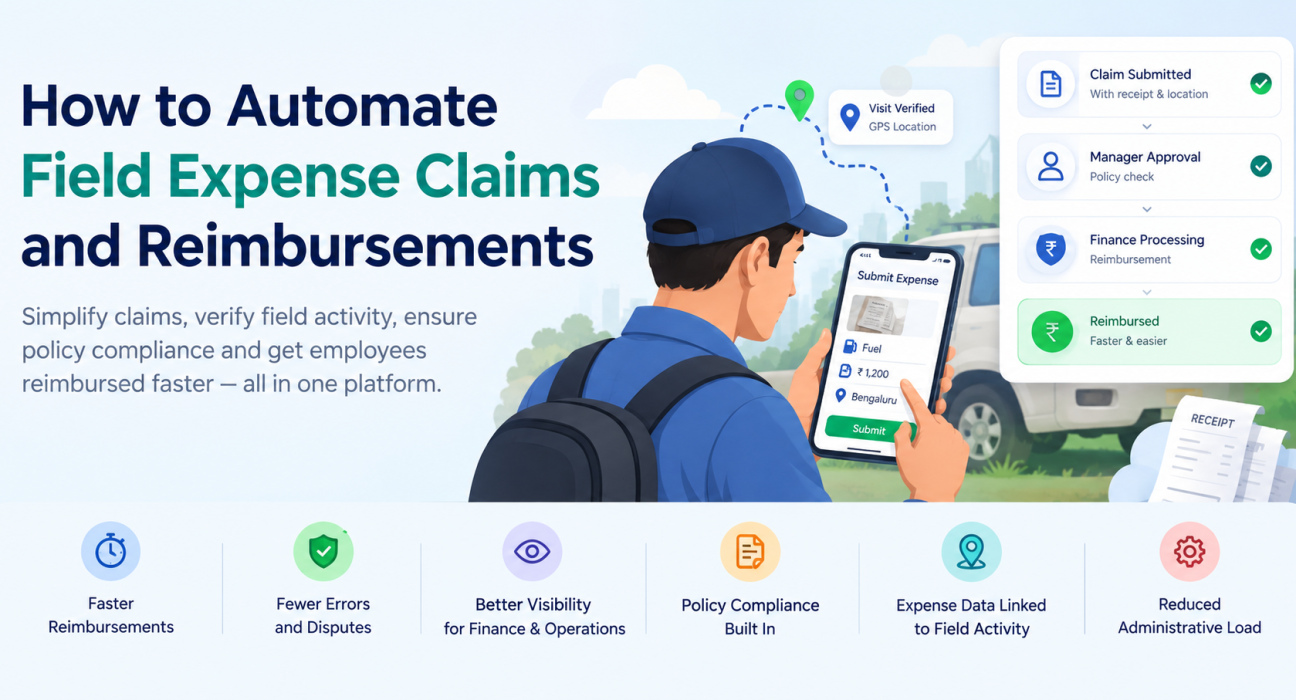
Key Benefits of Automating Field Expense Claims
1. Faster Reimbursements
When claims are submitted digitally with all required details attached, approvers can review and act on them within the same platform — no waiting for physical forms to reach an office.
2. Fewer Errors and Disputes
Digital claims reduce manual data entry, which cuts down on the calculation errors and mismatched receipts that create back-and-forth between employees and finance.
3. Better Visibility for Finance and Operations
Managers get real-time visibility into pending, approved, and rejected claims instead of waiting for a monthly report to understand where expenses stand.
4. Policy Compliance Built Into the Process
Automated systems can flag claims that exceed set limits or fall outside expense policy, so violations are caught before approval rather than discovered during an audit.
5. Expense Data Linked to Field Activity
When expense claims are connected to visit records, route plans, or attendance data, finance teams can cross-check whether a claimed expense matches actual field movement — reducing the chance of inflated or fraudulent claims.
6. Reduced Administrative Load
Automating routine steps — data entry, receipt filing, approval routing — frees up finance and HR teams to focus on exceptions and analysis instead of paperwork.
Core Features to Look For in Field Expense Management Software
Not all expense tools are built for field teams. When evaluating options, look for these capabilities:
| Feature | Why It Matters |
|---|---|
| Mobile expense submission | Lets field employees log expenses immediately, with photo receipts, from wherever they are. |
| Custom expense categories | Supports different claim types — travel, fuel, daily allowance, lodging — based on your company’s policy. |
| Approval workflows | Routes claims to the right manager automatically, with multi-level approval where needed. |
| GPS and visit data integration | Connects expense claims to actual field visits or routes for verification. |
| Real-time reporting and dashboards | Gives finance and operations teams visibility into expense trends by employee, team, or region. |
| Policy rule enforcement | Automatically flags or blocks claims that exceed defined limits. |
| Custom forms | Allows businesses to capture the specific expense fields relevant to their operations. |
How to Automate Field Expense Claims: A Step-by-Step Approach
If you’re moving from a manual process to an automated one, it helps to approach it in stages rather than switching everything overnight.
- Map your current expense workflow. Document how claims are submitted, approved, and reimbursed today, including where delays typically happen.
- Define clear expense policies. Set limits and documentation requirements for each expense category before automating, so the system reflects your actual policy.
- Choose a platform built for field teams. Look for software that connects expense management with field activity tracking, not a generic expense tool built only for office staff.
- Set up approval hierarchies. Configure who approves what, and at what claim value a second level of approval is required.
- Train field employees on mobile submission. Adoption depends on employees finding the process easier than the paper alternative, not harder.
- Monitor reports and refine policy. Use expense data over the first few months to identify patterns — repeated policy violations, unusually high claims from specific regions — and adjust rules accordingly.
Connecting Expense Management to Broader Field Operations
Expense claims rarely exist in isolation. They’re tied to whether a visit happened, whether an employee followed their assigned route, and whether their reported activity matches their location data. This is where standalone expense apps fall short — they capture the claim but not the context around it.
Businesses looking to simplify these processes can use field force management software such as FieldExecutives, which brings expense management together with [field employee tracking](internal link opportunity: relevant FieldExecutives feature page), [route and beat planning](internal link opportunity: relevant FieldExecutives feature page), and [customer visit verification](internal link opportunity: relevant FieldExecutives feature page) on one platform. Because expense claims sit alongside real-time location and visit data, finance teams get more context when reviewing a claim, without depending on manual cross-checks.
For field sales teams specifically, this also connects to [sales team tracking and reporting](internal link opportunity: relevant FieldExecutives solution page), giving sales managers a fuller picture of both activity and cost per visit or territory.
Best Practices for a Smooth Rollout
- Start with a pilot team before rolling out company-wide, so you can identify workflow gaps early.
- Keep expense categories simple at first; you can add granularity once employees are comfortable with the basic process.
- Communicate the “why” to field staff — faster reimbursement is a direct benefit to them, not just an operations improvement.
- Set realistic approval SLAs so claims don’t sit unreviewed even after the process is digitized.
- Review expense data regularly, not just during audits, to catch patterns early.
Frequently Asked Questions
What is field expense management software? Field expense management software is a digital tool that lets field employees submit, track, and get approval for work-related expenses — such as travel, fuel, and daily allowance — from their mobile device, replacing manual paper-based claims.
How does automating expense claims speed up reimbursement? Automation removes manual steps like physical form submission and paper receipt matching. Claims move directly to the approver with all required details attached, which shortens the time between submission and payout.
Can field expense management software prevent fraudulent claims? It reduces the risk by linking claims to actual field data, such as visit records or location logs, and by enforcing policy limits automatically. It doesn’t eliminate fraud entirely, but it makes inconsistencies easier to spot.
What expense categories can be tracked using this type of software? Most platforms support common field expense categories such as travel, fuel, daily allowance, lodging, and client-related expenses, and often allow businesses to add custom categories based on their policy.
Is field expense management software only useful for large field teams? No. Smaller teams benefit too, since even a handful of employees generate expense claims that are easier to manage digitally than through spreadsheets or paper, especially as the team grows.
Does field expense management software integrate with attendance or visit tracking? Platforms built specifically for field force management, like FieldExecutives, typically connect expense claims with attendance, GPS tracking, and visit data, giving finance teams more context for each claim.
How do approval workflows work in automated expense management? Claims are routed automatically to the designated approver based on rules set by the business — for example, by claim amount, department, or employee role — with options for multi-level approval when needed.
Conclusion
Manual expense claims create delays, disputes, and blind spots that get worse as a field team grows. Automating the process with field expense management software gives businesses faster reimbursements, better policy compliance, and clearer visibility into where field expenses actually go — without the back-and-forth of paper forms and spreadsheets.
The real advantage comes when expense management isn’t a standalone tool but part of a broader field force management system, where claims are backed by actual visit and location data. That’s the approach FieldExecutives takes, connecting expense tracking with the rest of your field operations on one platform.