Introduction
Most PG owners can tell you how many beds are occupied. Fewer can say which geysers are out of order, how many tenants use the laundry service, or whether the extra AC charge was collected last month. Small gaps like these turn into disputes, missed income, and unhappy tenants.
Good PG amenity management means knowing what you offer, what condition it is in, who uses it, and what it costs you and the tenant. This guide shows how to track both included amenities and paid add-on services with a simple system. You can start with a register or spreadsheet and later move to PG and hostel management software as you grow.
What Is PG Amenity Management?
PG amenity management is the practice of listing, maintaining, and monitoring every facility your PG provides, such as Wi-Fi, water, laundry, and meals, and recording which ones are free and which are paid add-ons. The goal is to keep services working, billing accurate, and tenant expectations clear.
It covers three things:
- Inventory: what exists in each building, floor, and room.
- Condition: whether it works and when it was last serviced.
- Usage and billing: who uses it and whether they pay extra.
Core Amenities vs Add-On Services
Core amenities come with the rent. Add-on services cost extra or are optional. Write this distinction into your rental agreement so tenants know what they are paying for.
| Type | Examples | Usually included in rent? |
|---|---|---|
| Core amenities | Bed, cupboard, water supply, common bathroom, basic electricity, Wi-Fi | Yes. |
| Shared facilities | Common room, dining hall, terrace, parking, water purifier | Usually yes |
| Paid add-ons | AC usage, laundry, extra meals, mess-only plans, single-occupancy upgrade, dedicated parking, room cleaning | No, charged separately. |
| Occasional charges | Late-rent fines, guest stay fees, damage charges | No |
What counts as core or add-on differs from PG to PG. What matters is that yours is defined and consistent.
Why Tracking Amenities and Add-Ons Matters
Amenities drive tenant satisfaction and decide whether people renew. Untracked add-ons quietly leak revenue. Here is what a tracking system gives you:
- Fewer disputes. A written list of what is included avoids arguments about “I was told Wi-Fi was free.”
- No missed income. Paid services get billed every cycle instead of being forgotten.
- Faster repairs. You know which facilities are broken before tenants complain repeatedly.
- Better pricing. Once you see what tenants actually use, you can set fair add-on rates.
- Cleaner expenses. Amenity running costs (internet, water tankers, laundry machine servicing) can be matched against the income they generate.
- Easier handovers. A new manager can understand the property from records instead of memory.
How to Track PG Amenities: Step by Step
Follow these steps to build a reliable amenity tracking system.
- Create a master amenity list for each building.
- Assign every amenity to a location (building, floor, room, or common area).
- Record its condition and service history.
- Mark it as included or paid.
- Set a maintenance schedule.
- Log complaints against the amenity.
- Review the data monthly.
Step 1: Build a Master Amenity List
Walk through each building and list everything a tenant can use. Split the list into room-level and common-area items.
Room-level examples: bed, mattress, cupboard, study table, fan, AC, attached bathroom, geyser.
Common-area examples: Wi-Fi router, kitchen, dining area, washing machine, RO purifier, inverter or generator, CCTV, lift, parking.
Step 2: Tie Each Amenity to a Location
“AC is not working” is not useful. ” Room 203, Bed C, AC”. Always record the building, floor, and room. This makes repairs and billing traceable.
Step 3: Record Condition and Service History
For each item, note:
- Date installed or purchased
- Last service date
- Current status (working, needs repair, under repair, replaced)
- Vendor or technician contact
A simple status column is enough. The point is that you can filter for everything currently broken.
Step 4: Mark What Is Included and What Is Paid
Add a column that says “included” or “paid add-on,” along with the rate. This single column prevents most billing confusion.
Step 5: Schedule Preventive Maintenance
Some amenities need regular attention: water tank cleaning, RO filter changes, AC servicing, pest control, and fire equipment checks. Set a recurring date for each so you fix problems before tenants notice them.
Step 6: Log Complaints Against Amenities
Every complaint is data. Record what broke, who reported it, when, its priority, and when it was closed. If the same geyser fails three times in two months, replacing it is cheaper than repeated repairs.
Step 7: Review Monthly
Once a month, check three things: which amenities failed most, which add-ons earned the most, and which cost more to run than they bring in.
How to Track Add-On Services and Charges
Amenities are what you provide. Add-ons are where money is made or lost. These practices keep them under control.
Define Each Add-On Clearly
For every paid service, decide and write down:
- What exactly is included
- The price and billing period (monthly, per use, or per meal)
- Who is eligible
- How a tenant starts or stops the service
Example: “Laundry: two washes per week, ₹X per month, starts on the 1st.” Vague terms cause the most disputes.
Choose a Pricing Model
| Model | How it works | Best for |
|---|---|---|
| Fixed monthly fee | Same charge every month | Laundry, Wi-Fi upgrade, parking |
| Per-use charge | Billed on actual usage | Extra meals, guest stays |
| Room-based charge | Attached to the room type | AC rooms, single occupancy |
| One-time fee | Charged once | Key replacement, damage |
Fixed monthly fees are the easiest to track. Per-use charges need a daily or weekly log.
Record Who Uses What
Keep a per-tenant record of active add-ons. When a tenant opts in, note the start date. When they opt out, note the end date. A common leak is a service that a tenant stopped using but still gets billed for, or one they use but never get billed for.
Bill Add-Ons Alongside Rent
Show add-ons as separate lines on the rent amount so tenants can see exactly what they pay. Collect them in the same cycle to avoid chasing small amounts separately. If you accept cash and UPI, tag every payment to a tenant so add-on income does not get mixed up.
Reconcile at Month-End
Compare three numbers: what you should have collected from add-ons, what you actually collected, and what the service cost you. Differences point to missed billing or services that are priced too low.
Common Amenity Tracking Mistakes to Avoid
- Relying on memory. Managers change, and memory fails.
- Not defining “free.” Tenants assume anything unlisted is included.
- Ignoring small repairs. A dripping tap or weak Wi-Fi becomes a reason to leave.
- Skipping preventive maintenance. Breakdowns cost more than servicing.
- Mixing add-on income with rent. You cannot tell which services are profitable.
- No record of complaints. Repeat problems stay invisible.
- Changing charges without notice. This damages trust quickly.
Manual Tracking vs Software
You can manage a small PG with a notebook or spreadsheet. As buildings and tenants grow, the manual approach gets harder to maintain.
| Task | Register or spreadsheet | Management software |
|---|---|---|
| Amenity list per building | Separate sheets, easy to lose | Kept in one place |
| Complaint follow-up | Manual notes, easy to forget | Logged with status |
| Rent and charges | Calculated by hand | Tracked per tenant |
| Expense records | Scattered bills | Organized by category |
| Multi-building view | Very difficult | Combined view |
| Access for staff | Shared file or physical book | Individual logins |
The right choice depends on your size. If you spend more time updating records than acting on them, it is time to switch.
How PG Management Software Supports Amenity Tracking
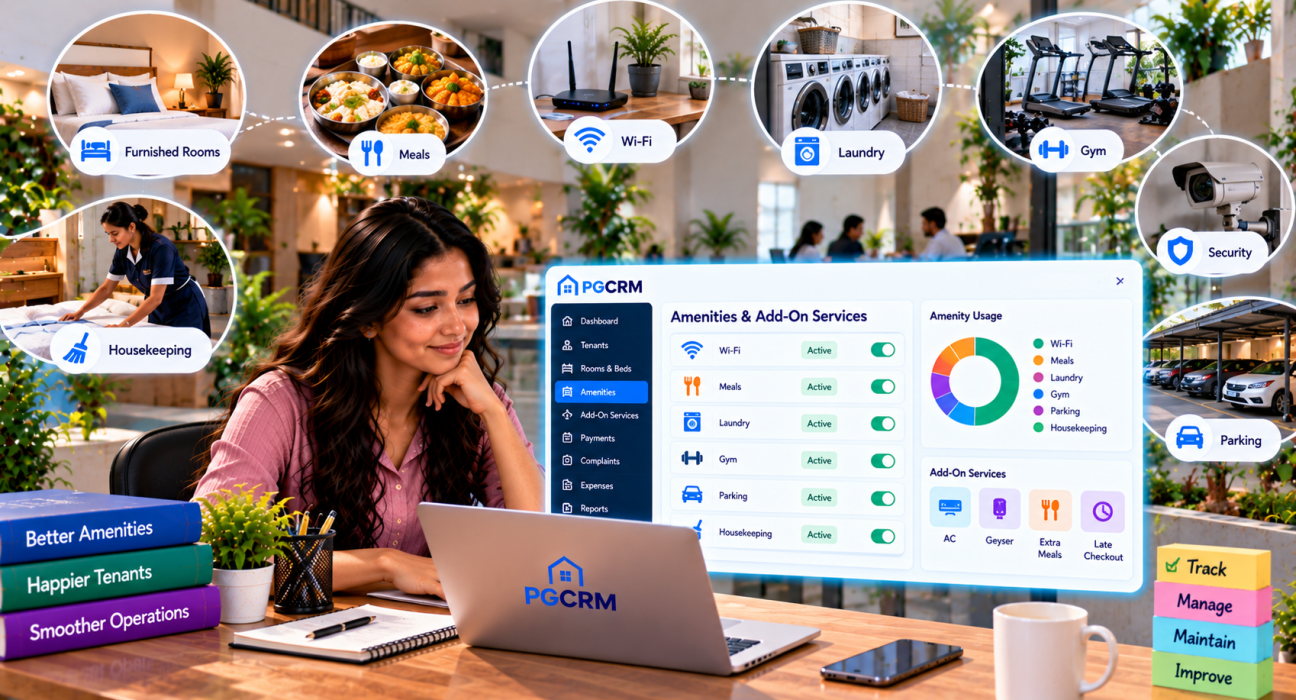
A PG management platform will not replace physical inspections, but it can keep the surrounding information organized. PGCRM, for example, offers several tools that support amenity and add-on tracking:
- Buildings, rooms, and beds: see what is full, free, or under repair, so unusable rooms do not show up as available.
- Complaints and maintenance tracking: log issues, set priority, and close them with a clear status trail.
- Expense tracking by category and building: record what amenities cost to run and see where money goes.
- Rent, deposits, and fines: collect payments by cash or UPI and keep the records per tenant.
- Billing cycles: monthly or join-date cycles with automatic invoices.
- Mess-only admissions: useful if you offer meals to people who do not stay in the PG.
- Reports: occupancy, income, and expense reports to review at month-end.
- Manager logins: give staff access only to what they need.
The PGCRM website does not describe a dedicated amenity inventory module, so check the features page or request a demo to confirm how it fits your add-on setup before you decide.
A Simple Monthly Amenity Review Checklist
Use this at the end of each month:
- Are all amenities working? List anything under repair.
- Which complaints were repeated?
- Were all preventive maintenance tasks done?
- Were all paid add-ons billed correctly?
- Do add-on collections match the active service list?
- Did any amenity cost more than expected?
- Should any rates be revised (with notice to tenants)?
Fifteen minutes on this checklist can save far more in missed income and avoidable repairs.
Frequently Asked Questions
What is PG amenity management?
PG amenity management is the process of listing, maintaining, and monitoring the facilities a PG provides, such as Wi-Fi, water, laundry, meals, and furniture. It also includes deciding which services are free, which are paid add-ons, and how they are billed and reviewed.
What amenities should a PG provide?
Typical basics include a bed, storage, water, electricity, cleaning, and Wi-Fi. Many PGs add meals, laundry, AC, power backup, CCTV, and parking. The right set depends on your location, tenant type, and rent range. Whatever you offer, define it in writing.
What are add-on services in a PG?
Add-on services are optional or paid extras beyond basic rent. Common examples include AC usage, laundry, additional meals, single occupancy, parking, room cleaning, and guest stays. They are usually billed monthly or per use and should be described clearly in the rental agreement.
How do I charge tenants for extra services in a PG?
Decide a clear price and billing period for each service. Record which tenants use it, show it as a separate line with rent, and collect it in the same cycle. Inform tenants of any rate change in advance, and match collections to the active service list every month.
How can I track amenity complaints and repairs?
Log each complaint with the location, issue, priority, date, and status, then close it after the repair. Reviewing this log monthly shows repeat problems. A notebook works for a small PG, while software with complaint tracking helps when you manage several buildings.
Do I need software for PG amenity management?
Not always. A small PG can manage with a register or spreadsheet. Software becomes useful when you have more tenants, multiple buildings, staff, and add-on billing, since it keeps rent, complaints, expenses, and reports in one place.
Conclusion
PG amenity management comes down to a few habits: list what you offer, note its condition, define what is free and what is paid, bill add-ons consistently, and review the numbers every month. These steps reduce disputes, protect your income, and keep tenants comfortable.
Start with a simple master list and a monthly checklist. When manual records become hard to maintain, a platform like PGCRM can help centralise rooms, tenants, rent, complaints, and expenses. Explore PGCRM to simplify your PG and hostel management.