How to Track Proof of Visit for Field Employees
Ask any operations manager how they know a field visit actually happened, and you’ll often get a shrug. Maybe the rep sent a text. Maybe there’s a name scribbled in a register. None of that holds up when a customer disputes a visit or a technician claims to have finished a job they never showed up for. Proof of visit software fixes this by attaching real evidence — location, time, sometimes a photo — to every visit a field employee logs.
This guide walks through what proof of visit tracking actually means, why the old paper-and-phone-call approach breaks down at scale, and how field teams use software to close the gap.
What Is Proof of Visit?
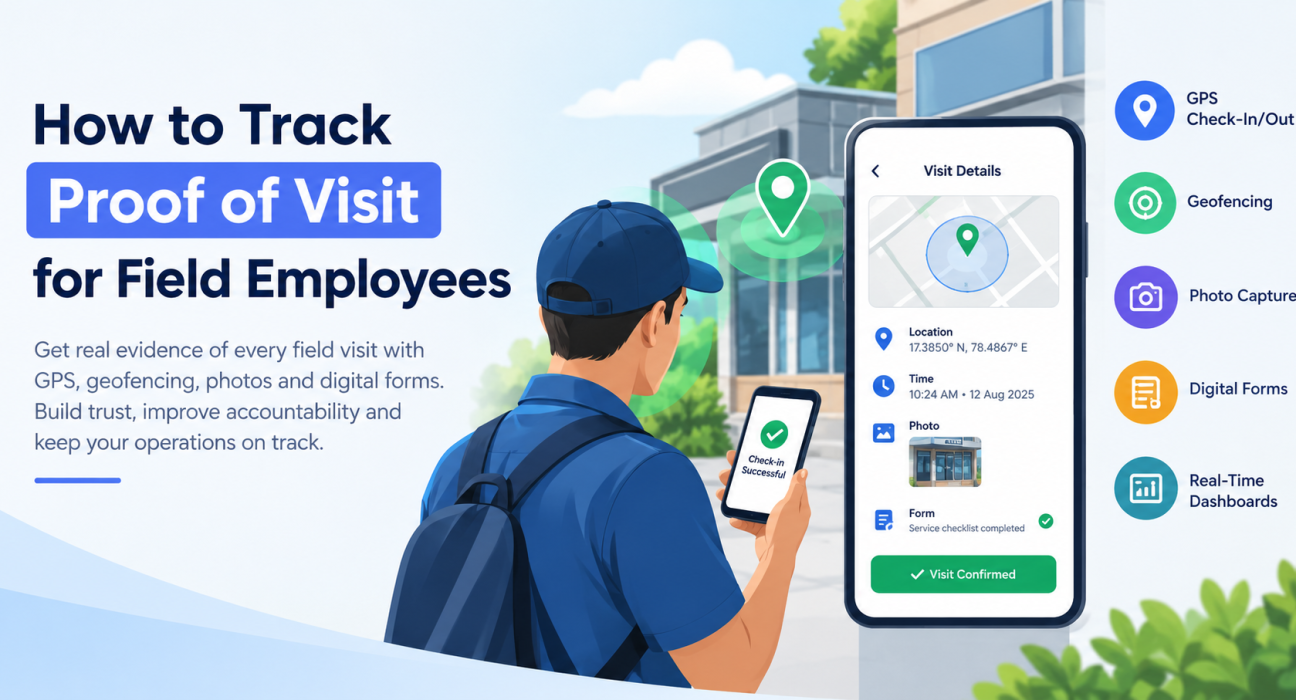
Proof of visit is verifiable evidence that a field employee was physically present at a specific location, at a specific time. Usually that means some mix of GPS coordinates, a timestamp, a geofenced check-in, a photo, or a completed digital form.
The point isn’t to spy on employees. It’s to replace “trust me, I went” with something a manager — or a customer, in a dispute — can actually look at.
Why Businesses End Up Needing This
Most companies don’t set out to build a visit verification system. They get pushed into it. A few situations tend to trigger the search:
- A sales rep’s reported visit count doesn’t match what the customer remembers.
- A technician logs a completed job, but the customer says nobody showed up.
- Payroll is tied to field attendance, and the numbers don’t add up.
- An audit or compliance requirement (common in pharma, BFSI, FMCG) demands documented proof.
- Managers realize they have no idea how field hours are actually being spent until it’s too late to fix it.
None of these are edge cases. They’re what happens once a field team grows past the size where everyone still knows everyone.
Where Manual Tracking Falls Apart
Paper registers, WhatsApp check-ins, end-of-day phone calls — these all work fine for a five-person team. Past that, they start creating more problems than they solve.
No real-time visibility. By the time a missed visit surfaces, it’s usually days later, and the customer’s already annoyed.
Data that’s easy to fudge. A handwritten entry or a backdated spreadsheet row is trivial to alter. There’s no way to catch it after the fact.
Hours lost to reconciliation. Someone in the office ends up cross-checking claimed visits against… nothing, really, because there’s no independent record to check against.
Reports that don’t match. Every rep fills out their log a little differently, which makes it nearly impossible to compare performance across a team.
Zero location verification. A rep can say they visited a client without anyone confirming they were ever near that address.
Put together, these gaps quietly eat into productivity, customer trust, and — eventually — revenue.
How Proof of Visit Software Actually Works
The mechanics are fairly straightforward once you see them laid out. Here’s the typical flow:
1. GPS Check-In and Check-Out
The employee opens the app on arrival and checks in. The system logs GPS coordinates and a timestamp automatically — no manual entry, so there’s nothing to backdate or edit later.
2. Geofencing
A geofence is basically an invisible fence drawn around the customer’s location. If the employee’s device isn’t inside that boundary, the check-in doesn’t go through. This is what stops someone from “checking in” from their couch.
3. Photo Capture
For visits where visual proof actually matters — a delivered package, a completed repair, a shelf that’s now stocked — the app lets the employee snap and upload a photo on the spot, tied directly to that visit record.
4. Digital Forms
Instead of a paper checklist that gets lost or filled in later from memory, employees complete a digital form during the visit itself. Service checklist, customer sign-off, feedback — whatever the visit requires, it’s captured with a timestamp attached.
5. Live Dashboards
Managers can see what’s happening as it happens — completed visits, missed ones, visits still in progress — rather than waiting for an end-of-day summary that may or may not be accurate.
6. Route and Beat Plan Comparison
Good systems also cross-check actual visits against the planned route or beat, so a skipped stop or an out-of-sequence visit gets flagged automatically instead of slipping through.
What to Actually Look For in a Proof of Visit Tool
| Feature | Why it matters |
|---|---|
| GPS check-in/check-out | Confirms the employee was physically present |
| Geofencing | Blocks check-ins from outside the actual site |
| Photo capture | Adds visual evidence for visits that need it |
| Custom forms | Standardizes what gets recorded per visit |
| Real-time dashboards | Gives managers live visibility, not next-day reports |
| Route/beat plan tracking | Flags skipped or out-of-order stops |
| Offline capture | Keeps working when there’s no signal, syncs later |
| Automated reporting | Cuts down manual reconciliation work |
Not every business needs all of these equally. A delivery operation cares a lot about photo proof; a field sales team cares more about route adherence and check-in accuracy. Match the feature set to what your team actually does.
Different Industries, Same Underlying Need
Proof of visit tracking shows up across a lot of field-based industries, even though the specifics vary:
- Field sales — confirming reps actually met the retailers or prospects on their beat plan, not just claimed to.
- Field service — verifying a technician was genuinely on-site for a repair or installation.
- FMCG and distribution — checking that merchandising visits, stock checks, and shelf audits happened as reported.
- Collections — confirming an agent actually visited the right customer for a payment follow-up.
- Pharma and healthcare — verifying medical rep visits to doctors and hospitals.
- Facility and site audits — making sure inspectors physically covered every site on the list.
Different industries, same underlying question: did this person actually go where they said they went?
Rolling It Out Without It Backfiring
Introducing proof of visit software badly — as a surprise surveillance tool with no explanation — tends to create resistance. A few things help it land better:
- Say why you’re doing this. Frame it around accurate reporting and fair evaluation, not “we’re watching you now.”
- Define what counts as a valid visit up front. Geofence radius, required photos, minimum time on-site — spell it out before launch.
- Keep the forms short. A ten-field checklist gets filled in properly. A forty-field one gets rushed or skipped.
- Actually look at the dashboard. Weekly, not just when something goes wrong.
- Pair it with route planning. Verified visits mean a lot more when there’s a planned route to compare them against.
- Train people on the edge cases. Especially what to do when there’s no signal at the customer site.
Businesses looking to simplify this whole process can use field force management software such as FieldExecutives, which pulls GPS check-ins, geofencing, custom forms, and live reporting into one place — instead of stitching together three or four separate tools that don’t talk to each other.
Where FieldExecutives Fits In
FieldExecutives is built for companies running distributed field teams — sales reps, technicians, delivery staff, collection agents. On the proof of visit side specifically, the platform covers:
- GPS-verified check-in and check-out at every customer or site location.
- Geofencing so a visit only counts if the employee was actually there.
- [Internal Link Opportunity: Custom forms and workflows feature page] for capturing checklists, sign-offs, and visit-specific data.
- [Internal Link Opportunity: Route and beat planning feature page] to line up actual visits against what was planned.
- [Internal Link Opportunity: Real-time reporting and dashboards page] so managers aren’t waiting until 6 PM to find out something went wrong.
The idea is to swap out guesswork and end-of-day reconciliation for a running, verifiable record of what actually happened in the field.
Proof of Visit vs. Regular Attendance Tracking
Worth clearing up, since the two get lumped together a lot:
| Aspect | Attendance Tracking | Proof of Visit Tracking |
|---|---|---|
| What it confirms | Employee working hours | A specific visit to a specific customer/site |
| Data captured | Login/logout time, general location | Location, timestamp, photos, forms — per visit |
| Level of detail | Daily or per-shift | Per visit, per customer |
| Typical use | Payroll, shift compliance | Sales verification, service completion, audits |
Plenty of field force platforms, [Internal Link Opportunity: FieldExecutives homepage or product overview page] included, handle both in one system, so you’re not running two separate tools for what’s really one problem.
FAQs
What is proof of visit software? It’s a digital tool that verifies field employee visits using GPS location, timestamps, geofencing, photos, or digital forms — instead of relying on self-reported logs.
How does it actually confirm a visit happened? Mainly through geofencing paired with GPS check-in/check-out: the system only accepts a check-in if the device is physically within a set radius of the customer or site. Photos and digital forms add another layer on top of that.
Isn’t this the same as regular GPS tracking? Not quite. GPS tracking shows where someone is throughout the day. Proof of visit tracking specifically confirms that a visit to a defined location took place, usually combining GPS with a check-in, a photo, or a form.
Does it work without internet access at the site? Most field force platforms support offline capture — the check-in or form gets stored on the device and syncs once there’s a connection again.
Which industries rely on this the most? Field sales, field service, FMCG distribution, pharma, collections, and facility auditing are the most common users, though the underlying need — confirming a visit really happened — applies more broadly.
Can this data be used to evaluate sales rep performance? Yes. Verified visit data gives managers something concrete to work with, rather than trusting self-reported visit counts that may or may not be accurate.
How is this different from a manual visit register? A manual register depends on someone writing down (accurately or not) that a visit happened. Proof of visit software captures the data automatically, at the moment of the visit, with GPS and a timestamp attached — much harder to fake or backdate.
Does it work with route or beat planning? In most platforms, yes — actual verified visits get compared against the planned route or beat, which makes missed or unplanned stops obvious instead of buried in a spreadsheet.
Conclusion
Verifying field visits shouldn’t come down to taking someone’s word for it, and it definitely shouldn’t take hours of manual cross-checking every week. Proof of visit software gives you a real-time, evidence-backed way to confirm that a field employee actually reached the right place, did what they were supposed to do, and did it on schedule.
Whether you’re running a sales team, a service crew, or a group of collection agents, having verified visit data protects you from disputes, makes performance evaluation fairer, and gives managers the visibility to catch problems before they turn into bigger ones.
If manual tracking is still leaving blind spots in your field operations, it’s worth looking at a dedicated field force management solution. FieldExecutives brings GPS check-ins, geofencing, custom forms, and live reporting together in one platform, so you’re working with verified data instead of best guesses.