Call Tracking Software: How to Track Sales Calls & Agent Performance
If your sales team makes dozens of calls a day, you already know the real problem isn’t making the calls — it’s knowing what happened on them. Which leads got called back, who’s closing more deals, and what went wrong on the calls that didn’t convert? Without a system in place, most of that information stays locked in someone’s memory or a scattered spreadsheet.
This is exactly the problem call tracking software solves. It records call activity automatically, so sales managers can see call volume, outcomes, and agent performance without chasing anyone for updates. Businesses that want to manage this process more efficiently often turn to dedicated call tracking software features like auto-dialing, call recording, and real-time reporting instead of relying on manual logs.
What Is Call Tracking Software?
Call tracking software automatically records, logs, and analyses phone calls made or received by a sales or support team. It captures details such as call duration, outcome, and the agent involved, and often the recording itself, so managers can review performance and coach agents without listening in on every call live.
In a sales context, this differs from marketing call tracking, which focuses on identifying which ad or channel generated an inbound call. Sales call tracking is about what happens after the call connects — how the conversation went, whether it moved the deal forward, and how the agent performed.
Why Sales Teams Struggle Without Call Tracking
Most sales managers don’t lack effort from their team. They lack visibility.
Common problems when call tracking is missing or handled manually:
- Managers cannot tell how many calls an agent actually made versus how many were logged.
- There is no record of what was discussed on a call, so follow-ups depend entirely on the agent’s memory or notes.
- Underperforming agents are hard to identify early because there’s no consistent data to compare against.
- Leads go cold because nobody notices a missed follow-up.
- Coaching becomes guesswork instead of being based on real call quality.
These gaps usually show up as a symptom, not a diagnosis — sales numbers drop, but nobody can say exactly why. Call tracking turns that guesswork into data.
How Call Tracking Software Works
Most call tracking systems, including those built into telecalling CRMs, follow a similar process:
- Agents place or receive calls through the system. This might happen through an auto-dialer, a click-to-call button, or a regular call that the software logs via integration with the phone or SIM.
- The system captures call metadata automatically. It logs duration, timestamp, agent name, the linked lead or customer, and call outcome (connected, busy, not reachable, and so on) without manual entry.
- The system records the call, where enabled. It stores recordings, usually with encryption, and makes them available for playback to the manager or the agent who took the call.
- Data rolls up into reports. Dashboards aggregate call volume, connection rates, talk time, and outcomes so agents and managers can review them.
- Agents schedule follow-ups and next steps. Many systems let the agent or manager set a reminder directly from the call record, so nothing depends on memory.
This is why teams rarely use call tracking as a standalone tool. It works best as part of a broader system that also manages leads and follow-ups, which is where a telecaller CRM or sales calling software comes in — the call data connects directly to the lead record instead of sitting in isolation.
Call Tracking vs. Call Recording vs. Telecaller CRM
People often use these terms interchangeably, but they mean different things. Understanding the distinction helps when comparing tools.
| Term | What It Actually Does |
|---|---|
| Call tracking | Logs call metadata — who called whom, when, for how long, and with what outcome |
| Call recording | Captures the audio of the conversation for playback and review |
| Telecaller CRM | A broader system that manages leads, calls, follow-ups, and pipeline together, usually with call tracking and recording built in |
| Lead management software | Focuses on organizing, scoring, and assigning leads; may or may not include call tracking |
In practice, most modern telecalling software combines all four functions in one platform, since tracking calls without connecting them to leads and follow-ups gives you data without context.
Key Metrics to Track for Sales Calls and Agent Performance
Not every call metric is equally useful. Here are the ones that typically matter most for sales teams:
| Metric | Why It Matters |
|---|---|
| Call volume per agent | Shows effort and activity levels |
| Connection/answer rate | Indicates list quality and calling time effectiveness |
| Average talk time | Helps distinguish rushed calls from genuine conversations |
| Follow-up completion rate | Shows whether agents are closing the loop on promised callbacks |
| Conversion rate per agent | Links call activity directly to sales outcomes |
| Call outcome distribution | Reveals patterns — too many “not interested” results may point to a script or targeting issue |
| Idle time vs. talk time | Flags productivity gaps during working hours |
A useful rule: track enough metrics to coach effectively, but not so many that reports become noise nobody reads. Reviewing three to five core metrics consistently tends to work better than tracking twenty occasionally.
How to Set Up Call Tracking for Your Sales Team
- Define what “good” looks like first. Decide which outcomes matter — conversions, appointments booked, or qualified leads — before choosing metrics to track.
- Centralise call data with lead data. Call logs are far more useful when linked to the lead record they belong to, rather than stored separately.
- Turn on call recording where relevant and permitted. Recordings help with coaching and dispute resolution, but you should inform agents and, where applicable, customers that calls may be recorded.
- Set a regular review cadence. Weekly review of call metrics with the team tends to catch problems earlier than a monthly report.
- Use the data for coaching, not just monitoring. Call tracking works best when managers frame it as a way to help agents improve, not just a way to check on them.
Real-World Examples
These examples illustrate common ways businesses use call tracking. They are hypothetical scenarios that show practical application, not case studies of specific customers.
- Real estate: A team handling site-visit leads uses call tracking to see how quickly agents respond to fresh enquiries. When agents call leads within minutes, conversion rates run noticeably higher than when they call hours later, so response time becomes a tracked metric.
- Insurance: A renewal team tracks follow-up completion rate closely, since missed renewal calls translate directly into lost premiums.
- Education: An admissions team reviews call recordings to check whether counsellors answer parent questions consistently and accurately across a large calling team.
- B2B sales: A sales manager compares connection rates across agents calling the same lead list to identify whether low performance stems from the agent or the list quality itself.
Benefits of Using Call Tracking Software
- Objective performance reviews based on actual call data rather than impressions.
- Faster coaching cycles, since managers can review specific calls instead of relying on secondhand summaries.
- Fewer missed follow-ups, because the system logs call outcomes and links them to reminders.
- Better lead source insight, when you combine call tracking with lead source data, showing which channels produce calls that actually convert.
- Easier onboarding, since new agents can listen to strong calls from experienced teammates as reference examples.
Common Mistakes to Avoid
- Tracking everything and reviewing nothing. Data without a regular review process doesn’t improve performance on its own.
- Using call tracking only to penalise agents. This discourages honest reporting and can hurt morale rather than improve results.
- Ignoring consent and privacy practices. Make call recording policies clear to agents and, where required, disclose them to customers, in line with your organisation’s data protection obligations.
- Treating call volume as the only success metric. High call counts with low connection or conversion rates usually indicate a process problem, not effort.
- Disconnecting call tracking from lead management. Call logs disconnected from a lead record lose most of their value over time.
How TeleCallingCRM Can Help
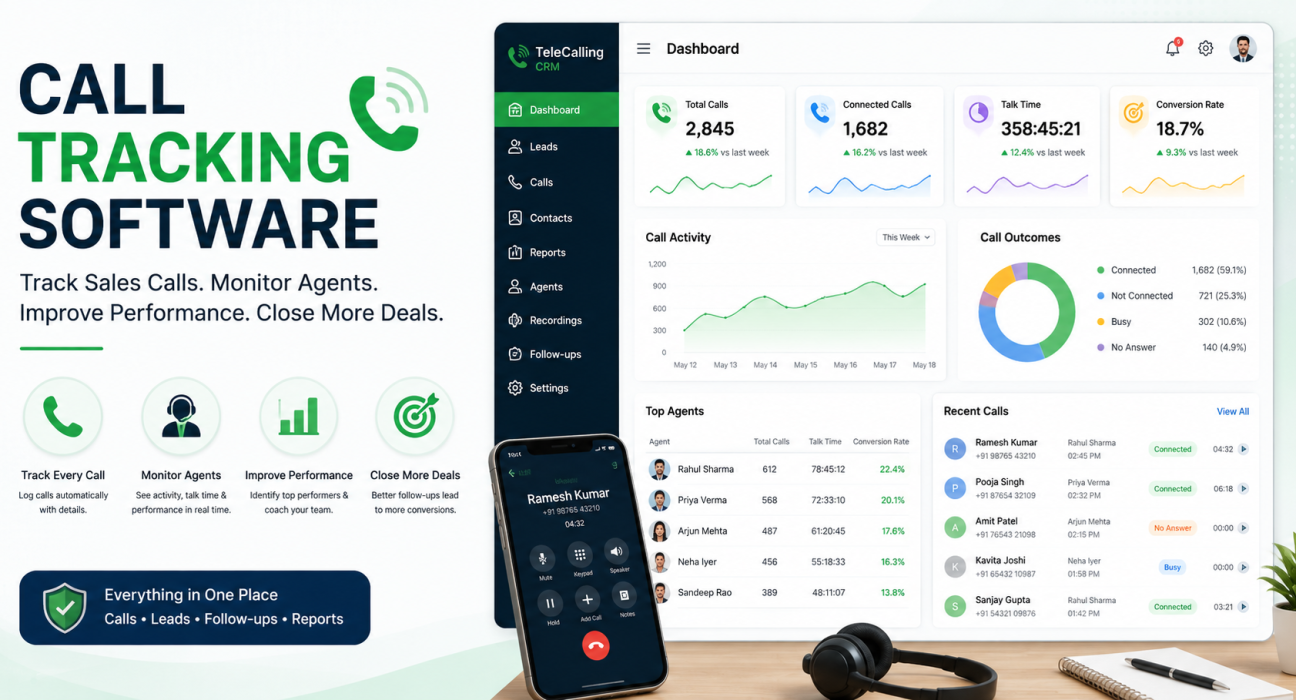
TeleCallingCRM brings call tracking, call recording, and lead management together in one system for outbound sales and telecalling teams, rather than as separate tools. Its auto-dialer logs call duration and outcome automatically, records calls with encrypted storage, and generates AI-based call summaries and quality scores that support coaching.
A real-time dashboard shows agent performance through talk time, idle time, and conversion metrics per agent, which teams have found useful for exactly the kind of coaching-focused review described above — you can read more about how this works in TeleCallingCRM’s live reporting and monitoring approach. Because call tracking sits inside the same platform as lead management and follow-up scheduling, call data stays connected to the lead it belongs to instead of sitting in a separate system.
Teams evaluating options for their industry, including call centres, real estate, insurance, and education, can review use-case details on the call center industry page or compare plans directly.
Frequently Asked Questions
What is call tracking software used for?
Teams use it to automatically log and analyse phone call activity — duration, outcome, and often the recording — so sales managers can review agent performance, identify missed follow-ups, and coach teams using real data instead of self-reported summaries.
Is call tracking software the same as call recording software?
No. Call tracking logs call metadata like duration, timestamp, and outcome, while call recording captures the actual audio. Many platforms, including telecaller CRMs, offer both together, but they serve different purposes.
What metrics should a sales manager track from call data?
Core metrics include call volume, connection rate, average talk time, follow-up completion rate, and conversion rate per agent. Reviewing three to five consistent metrics is usually more effective than tracking everything available.
Is it legal to record sales calls in India?
Practices vary by state and industry, and call recording for business purposes is common. Businesses should maintain clear internal consent and disclosure policies and stay aligned with applicable data protection and telecom regulations rather than assuming recording is unrestricted.
Can small businesses use call tracking software?
Yes. Call tracking isn’t only for large call centres. Small sales teams, including those with five to ten telecallers, use it to keep follow-ups consistent and to understand which agents or lead sources are performing best.
How is a telecaller CRM different from basic call tracking software?
A telecaller CRM includes call tracking as one part of a larger system that also manages leads, follow-ups, and the sales pipeline. Basic call tracking tools may only log call data without connecting it to lead records or automation.
Does call tracking software work with an auto-dialer?
Yes, in most modern systems. An auto-dialer places calls in sequence from an assigned list, and call tracking runs alongside it, automatically capturing duration and outcome for each call without manual entry.
Conclusion
Tracking sales calls isn’t about surveillance — it’s about giving managers and agents the visibility they need to improve consistently. Call volume alone doesn’t tell you much; call outcomes, follow-up discipline, and coaching based on real conversations do.
Whether you’re running a five-person telecalling team or a full call centre, the fundamentals stay the same: log calls automatically, connect that data to your leads, and review it regularly. Businesses that want these capabilities built into one platform, rather than pieced together from separate tools, can look at TeleCallingCRM’s pricing and plans to see what’s included at each tier.