Introduction
A vacant bed that goes unnoticed for weeks is lost rental income. Yet many PG owners still track occupancy in their heads or on paper, relying on memory to know which rooms are full and which beds are open. Good PG room management solves this by giving owners a clear, up-to-date view of every room and bed across their property.
In this article, you’ll learn why vacancy tracking gets harder as a PG grows, the difference between room-level and bed-level management, and how a PG and hostel management software can help you spot vacancies faster and fill them sooner.
What Is PG Room Management?
PG room management is the process of tracking and organizing a paying guest accommodation’s rooms and beds including occupancy status, tenant assignments, and vacancies, so owners always know exactly which spaces are occupied and which are available.
For single-occupancy PGs, this mostly means tracking rooms. For shared or multi-bed PGs, which make up a large share of the market in India, room management needs to go a level deeper: tracking individual beds within each room, since a room can be partially occupied.
Effective PG room management typically covers:
- Room details (floor, type, capacity, rent)
- Bed-level occupancy within shared rooms
- Current tenant assigned to each bed
- Vacancy status updated in real time
- Move-in and move-out history per room or bed
Why Vacancy Tracking Gets Harder as a PG Grows
A single PG with 10–15 beds is fairly easy to track mentally or on a whiteboard. Problems start appearing once a property has:
- Multiple buildings or floors, where checking every room individually takes time
- Shared rooms with several beds, where a room can look “occupied” at a glance even if one bed is actually vacant
- Frequent move-ins and move-outs, especially in areas with high tenant turnover, like near colleges or IT hubs
- Multiple people managing the property, such as an owner and an on-site warden, who may not always have the same information
In these situations, relying on memory or a paper register creates a real risk: a vacant bed sits empty for days or weeks simply because no one flagged it, directly costing the owner rental income.
Room-Level vs. Bed-Level Tracking
| Aspect | Room-Level Tracking | Bed-Level Tracking |
|---|---|---|
| Best suited for | Single-occupancy PGs | Shared/multi-bed PGs |
| Vacancy visibility | Shows if a room is fully vacant | Shows exactly which bed is vacant |
| Accuracy for shared rooms | Limited – can miss partial vacancies | Accurate down to individual beds |
| Common risk without it | Rooms appear “full” while a bed sits empty | Minimal, since every bed has a status |
How to Track PG Room and Bed Vacancies Easily
Tracking vacancies effectively comes down to three habits: keeping room and bed data structured, updating status the moment it changes, and reviewing occupancy regularly rather than only when a new tenant inquires.
1. Set Up a Clear Room and Bed Structure
Start by mapping out your property properly:
- List every building (if you manage more than one)
- List every room within each building, noting floor and room type
- List every bed within shared rooms
- Assign a unique identifier to each room and bed for easy reference
This structure becomes the foundation for everything else – without it, vacancy tracking has nothing accurate to sit on top of.
2. Update Occupancy Status the Moment It Changes
The biggest source of vacancy-tracking errors isn’t a lack of a system – it’s delayed updates. If a tenant moves out on a Friday but the vacancy doesn’t get logged until the following week, that’s several days of a bed sitting idle with no one actively trying to fill it.
Make it a habit (or a system-enforced rule) to update occupancy status:
- The same day a tenant moves out
- The same day a new tenant moves in
- Immediately if a tenant temporarily vacates a bed for an extended period
3. Review Occupancy Reports Regularly
Rather than only checking room status when a prospective tenant calls, review overall occupancy on a set schedule – weekly works well for most properties. A quick review helps you:
- Spot vacant beds that have gone unnoticed
- Identify rooms or floors with recurring vacancy patterns
- Plan ahead for known move-outs (such as end-of-lease tenants)
4. Keep Tenant and Bed Records Linked
Every bed’s status should connect directly to the tenant currently assigned to it – not tracked as two separate pieces of information. When a room shows “occupied,” it should be immediately clear who occupies it, since disconnected records are a common reason occupancy data drifts out of sync with reality.
Common Mistakes in PG Room Management
Even owners with a tracking system in place run into avoidable issues:
- Treating a room as one unit when it actually has multiple independently occupied beds
- Updating occupancy only during rent collection, which can leave vacancies unnoticed for weeks
- Not recording partial move-outs, such as a tenant leaving mid-month, which throws off rent and occupancy figures for that period
- Relying on a single person’s memory instead of a shared, accessible record that any manager or staff member can check
Avoiding these mistakes matters because unnoticed vacancies translate directly into lost rent, and inaccurate occupancy data makes it harder to plan for maintenance, staffing, or expansion.
How PGCRM Supports Room and Bed Management
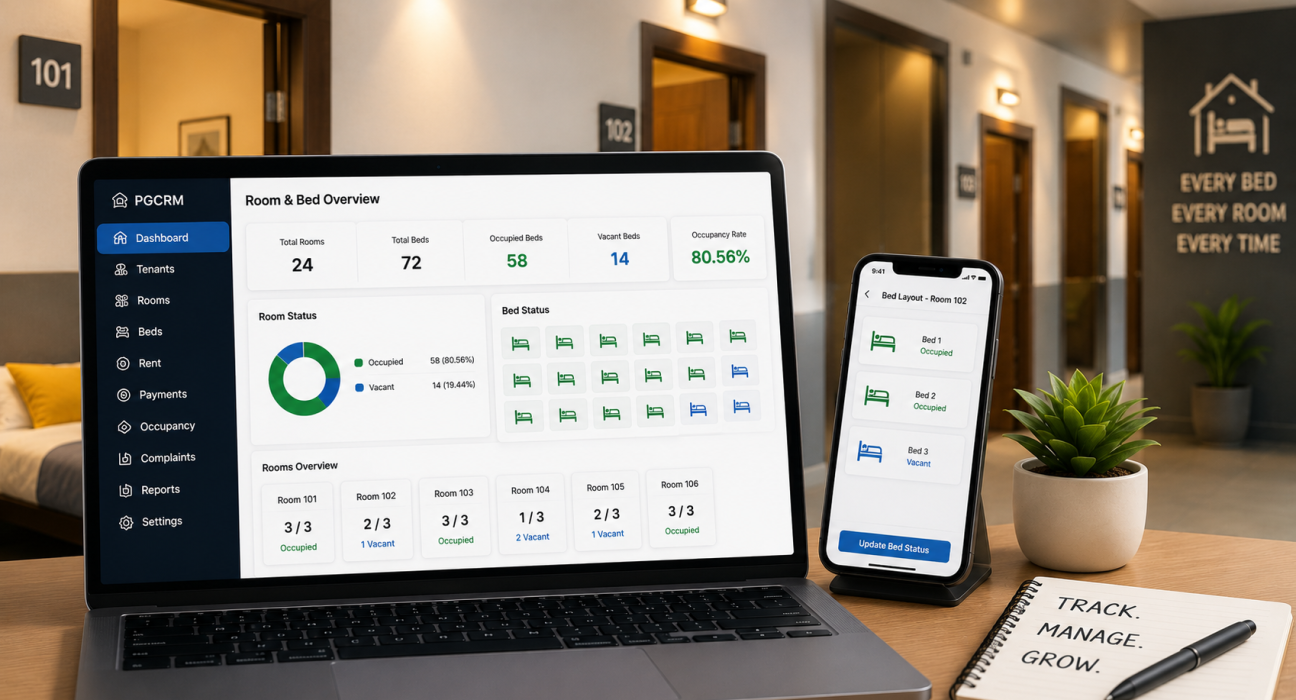
PGCRM organizes properties by building, room, and bed, so owners can see occupancy status at each level rather than guessing based on a room’s overall status. Using PG management software such as PGCRM can help owners centralize room and bed data, tenant assignments, and occupancy information, making it easier to spot vacancies without manually checking each room. This kind of visibility is particularly useful for owners managing shared rooms, where a single glance at a room isn’t enough to know whether every bed is filled.
FAQ
What is the difference between room management and bed management in a PG?
Room management tracks occupancy at the room level, useful for single-occupancy PGs. Bed management tracks each bed individually within a room, which matters for shared or multi-bed PGs where a room can be partially occupied. Most PGs with shared rooms need bed-level tracking for accurate vacancy visibility.
How often should I check for vacant beds in my PG?
A weekly review works well for most properties, though high-turnover PGs near colleges or business hubs may benefit from checking more often. The key is updating occupancy status immediately when a tenant moves in or out, rather than only noticing vacancies during a periodic review.
Why do vacancies get missed even when a PG owner tracks occupancy?
Vacancies often get missed when occupancy data updates late, when a room is treated as fully occupied without checking individual beds, or when only one person has visibility into the current status. Delayed updates are usually the biggest factor behind unnoticed vacant beds.
Can PG room management help reduce lost rental income?
Yes. Every day a vacant bed goes unnoticed is a day of lost potential rent. Tracking room and bed status accurately, and updating it the moment a tenant moves out, helps owners identify and fill vacancies faster instead of discovering them weeks later.
What information should I track for each room in my PG?
At minimum, track the room’s floor, type, bed capacity, rent amount, current occupancy status, and the tenant assigned to each bed. Move-in and move-out dates are also useful for spotting patterns and planning ahead for upcoming vacancies.
Is PG room management different for single-occupancy vs. shared PGs?
Yes. Single-occupancy PGs can often manage well with room-level tracking alone, since a room is either occupied or vacant. Shared PGs need bed-level tracking, because a room with four beds could have anywhere from zero to four vacancies at once.
Conclusion
Untracked vacancies quietly cost PG owners money every day they go unnoticed. Setting up a clear room and bed structure, updating occupancy the moment it changes, and reviewing status regularly turns vacancy tracking from a guessing game into a reliable process. If manually checking rooms and beds has become difficult to keep up with, explore PGCRM to see how a PG and hostel management platform can bring room, bed, and tenant data together for clearer occupancy visibility.