Offline Field Operations Software: How Offline-First Apps Keep Teams Working Without Internet
A rep walks into a basement warehouse, a rural dealer’s shop or a lift lobby, and the signal drops. If the app needs a connection to work, the visit stalls. The rep either waits, or notes everything on paper and enters it later.
That gap is exactly what offline field operations software is built to close. It lets field teams keep working when the network fails, then syncs everything once they are back online.
This guide explains what offline-first means, how it works, what should work offline, the challenges to plan for, and how to evaluate a platform.
What Is Offline Field Operations Software?
Offline field operations software is a mobile-first platform that lets field employees complete their core work without an internet connection. It stores their actions on the device and syncs them to the central system when connectivity returns.
In practice, a rep can do their job on the phone as usual. Managers see the data on the web console once the device reconnects.
The term you will see most often is offline-first. It means the app is designed to work without a network as its normal mode, not as an emergency fallback.
Why Connectivity Gaps Hurt Field Operations
Field work happens in places where networks are unreliable. Think of industrial estates, basements, construction sites, farms, highways and dense buildings. Coverage in these places changes from one lane to the next.
An app that depends on a live connection creates predictable problems:
- Stalled visits. Reps cannot open a job card, log an outcome or close a task.
- Lost or duplicated data. Reps retype notes later, or the same visit gets logged twice.
- Delayed reporting. Managers see yesterday’s work today, or nothing at all.
- Fallback to paper and WhatsApp. Data ends up scattered across chats and notebooks, with no proof attached.
- Frustrated reps. Teams stop trusting the app and use it only when they have to.
These are practical observations rather than statistics. If your team works across mixed-coverage areas, you have probably seen most of them.
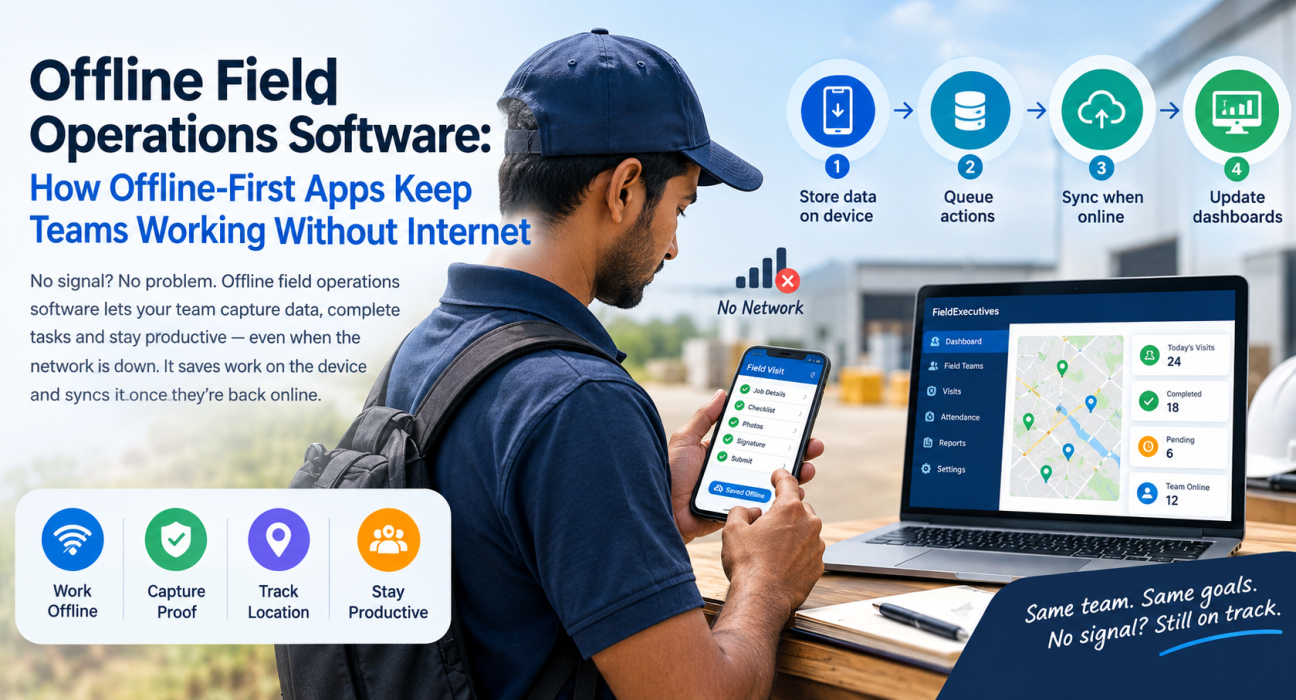
How Offline-First Field Apps Work
Different products implement this differently, but the pattern is consistent.
Step 1: The app stores data on the device
When a rep opens the app, the day’s tasks, visit details and forms are already available on the phone. New entries are saved to local storage instead of being sent immediately.
Step 2: Actions are queued
Each action becomes a queued record. Examples include a completed visit, a captured photo, a signature or a collected payment note. The app keeps the order and the details.
Step 3: The app syncs when a connection returns
As soon as the phone finds a usable network, the app sends the queued records to the server. The rep usually doesn’t need to do anything.
Step 4: The server updates dashboards
Once records arrive, the manager’s live view and reports reflect the work. Nothing has to be entered again.
Offline-First vs Online-Only vs “Offline-Tolerant” Apps
Not every app that claims offline support works the same way. This comparison helps separate them.
| Capability | Online-only app | Offline-tolerant app | Offline-first app |
|---|---|---|---|
| Works with no signal | No | Partly (limited screens) | Yes, for core workflows |
| Data entry without network | Blocked | Sometimes lost | Saved on the device |
| Sync on reconnect | Not applicable | Manual or unreliable | Automatic |
| Rep experience in weak coverage | Frustrating | Inconsistent | Consistent |
| Manager confidence in data | Depends on network | Mixed | Higher, once synced |
The word to watch is core workflows. Ask which tasks work offline, not just whether “offline mode” exists.
What Should Work Offline in Field Software?
Not everything needs to work offline. Live maps, for example, are inherently online. But the tasks reps perform at the point of work should keep going.
Look for offline support across these areas:
- Attendance and punch-in. Reps should be able to start their day even in a dead zone.
- Visit and job completion. Reps should be able to open a job card, follow a checklist and mark outcomes.
- Proof capture. This includes photos and signatures collected at the customer’s location.
- Notes and form entries. Reps should be able to log what they saw without waiting for a signal.
- Collections and expense entries. Reps should be able to record money-related details in the moment.
If a vendor cannot tell you exactly which of these work offline, treat the claim with caution.
Challenges to Plan For
Offline-first is not magic. Good buyers ask how the platform handles these issues.
Data integrity and timestamps
When an action happens offline, the time and place it happened matter. Ask how the platform records when and where each event occurred, and how it protects against clock tampering.
Location and geofence checks
Attendance and visit verification often depend on GPS. Ask how location checks behave when the phone is offline, and whether records are flagged for review when they sync.
Sync conflicts
If a manager edits a task while the rep is offline, both sides may change the same record. A mature platform has clear rules for this.
Storage and battery
Photos and forms consume phone storage. Check whether the app handles large queues without slowing down or draining the battery.
Data security
Data stored on a device needs protection. Ask about role-based access and what happens if a phone is lost.
Best Practices for Running Field Teams Offline-First
Software helps, but process decides whether offline mode actually works for you.
- Map your dead zones. Ask reps where the network fails most, and test the app there before rollout.
- Load the day’s work early. Encourage reps to open the app and let it refresh while they have a connection, such as at the start of the day.
- Train on what “synced” looks like. Reps should know how to confirm that their records have uploaded.
- Set a reconnect habit. Ask reps to open the app on a good connection at lunch or end of day, so queues do not build up.
- Review flagged records. Use the manager console to check anything that synced late or looks unusual.
- Keep forms lean. Shorter checklists and fewer mandatory fields make offline work faster and reduce errors.
How to Evaluate Offline Field Operations Software
Use this checklist when you compare platforms:
- Which workflows work fully offline, and which need a connection?
- Does the app sync automatically, or does the rep have to trigger it?
- How are timestamps and locations handled for offline actions?
- Can photos and signatures be captured offline?
- What happens if two users change the same record?
- Can you test the app in a low-network area during a trial?
- Does the platform connect offline capture to reporting, SLAs and approvals?
The last point matters more than it looks. Offline capture is only useful if the data flows into the same dashboards, approvals and reports your managers already use.
How FieldExecutives Supports Offline Field Work
Businesses looking to simplify these processes can use field force management software such as FieldExecutives.
According to the FieldExecutives website, the mobile app is built offline-first. Reps can punch in, finish visits and capture photos and signatures without a network. Everything syncs when they reconnect.
FieldExecutives ties that offline capture into the rest of the workflow:
- Guided job execution. Reps follow a job card with checklists and capture proof such as photos, signatures and OTP before a job can close.
- Live team visibility. Once records sync, managers see punch-ins, visits and outcomes on the live map and console.
- Attendance controls. Punch-ins use server time, geofencing and mock-location detection.
- Custom workflows. Job types, checklists, approvals and SLAs can be configured to match your process.
- Money tracking. Expense claims and collections are tracked through to approval and settlement.
If offline behavior is a deciding factor for you, ask for a demo and test the exact workflows your team uses, including how attendance and proof capture behave in low-network areas.
Conclusion
Weak connectivity is a normal condition in field work, not an exception. Offline field operations software keeps reps productive during outages by saving their work on the device and syncing it when the network returns.
When you evaluate options, focus on which workflows really work offline, how timestamps and locations are handled, and how synced data feeds into reporting and approvals. Then test it where your team actually works.