How to Improve Lead Qualification With CRM Software
Every sales team has the same problem: too many leads, too little time. Agents call everyone in the order leads arrived, spend 20 minutes on someone who was never going to buy, and reach the serious buyer two days late.
Better lead qualification fixes this. With lead qualification software that scores and routes leads, your team can decide who to call first, who to nurture and who to drop, using clear rules instead of guesswork. This guide explains how to set that up in a CRM, step by step.
What Is Lead Qualification?
Lead qualification is the process of checking whether a lead is a good fit and ready to buy, so your sales team spends time on the most promising ones. It usually looks at need, budget, decision-making authority and timeline. Leads that pass move forward. The rest are nurtured, recycled or closed.
What Is Lead Qualification Software?
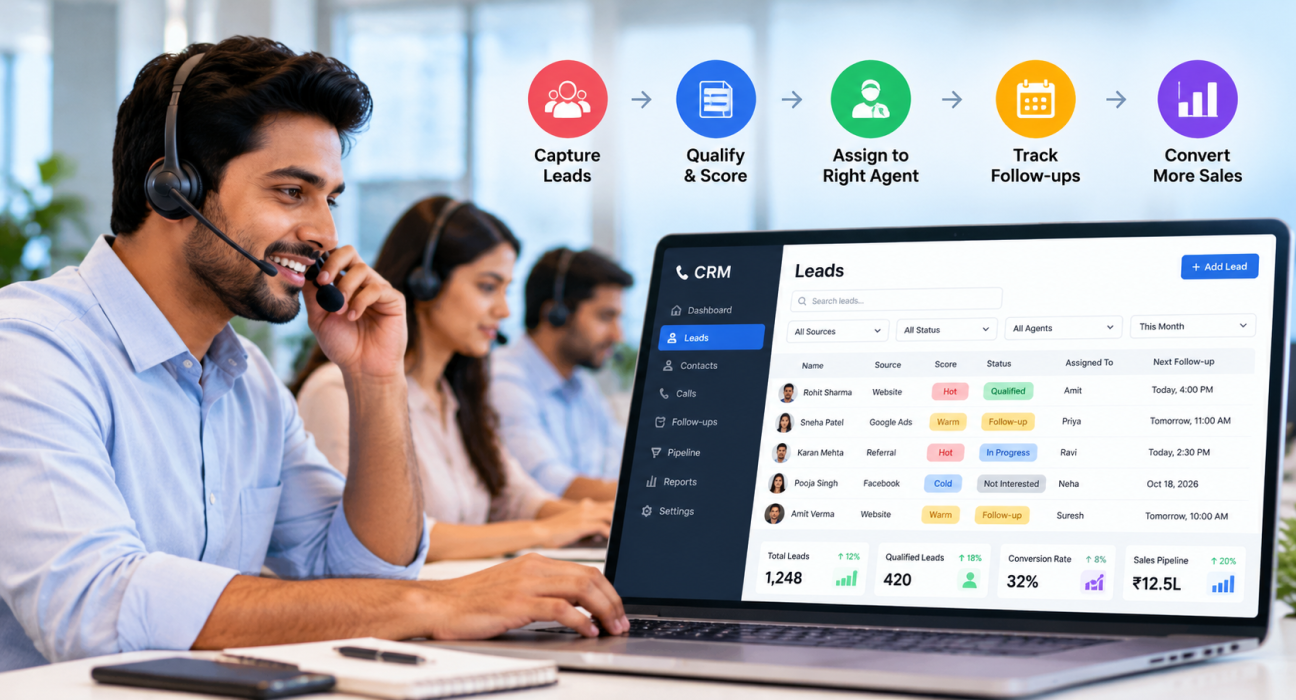
Lead qualification software helps you capture qualifying information, score leads, route them to the right agent and track what happens next. In most businesses, this is a feature set inside a CRM rather than a separate product.
A good setup does four jobs:
- Collects qualifying details in structured fields, not scattered notes
- Ranks leads by fit and interest
- Assigns each lead to the right person quickly
- Keeps a record of every call, outcome and follow-up
Why Lead Qualification Usually Breaks Down
Most qualification problems are process problems, not people problems. Common causes include:
- No shared definition of a “qualified” lead. One agent calls a lead hot, another calls it cold.
- Information lives in different places. Budget is in a WhatsApp chat, timeline is in a note, and the phone number is in a sheet.
- Slow response. The best leads cool off while agents work through old lists.
- Inconsistent questions. Each agent qualifies in a different way, so data cannot be compared.
- No feedback loop. Nobody checks which lead sources actually produce buyers.
A CRM does not fix these by itself, but it gives you a place to enforce one process.
How to Improve Lead Qualification With a CRM: 7 Steps
Step 1: Define what a qualified lead means for your business
Write down your ideal customer in plain terms. Include the type of customer, location, budget range, product interest and buying timeline. Then agree on two or three clear stages, such as New, Qualified and Not Interested.
Keep it simple. A definition that only one manager understands will not work.
Step 2: Choose a simple qualification framework
Frameworks give agents a consistent set of questions. BANT, which stands for Budget, Authority, Need and Timeline, is one of the most widely used, and Salesforce’s guide to qualification frameworks also covers alternatives such as CHAMP. For phone-based teams, BANT is usually easy to apply because the questions fit naturally into a short call.
| Criteria | Example question for a call | What to record in the CRM |
|---|---|---|
| Budget | “What budget range are you considering?” | Budget range field |
| Authority | “Will you decide this yourself, or is someone else involved?” | Decision-maker: Yes / No |
| Need | “What problem are you trying to solve?” | Requirement or product interest |
| Timeline | “When do you plan to start or buy?” | Expected timeframe |
Adapt the questions to your industry. A school admission team and a loan team will not ask the same things.
Step 3: Capture qualification data in structured fields
Notes are useful, but fields are searchable. Create custom fields for the items above, plus lead source, city and product interest. Tags help too, for example “site visit requested” or “needs callback in evening.”
Structured data lets managers filter the list later, for example “all leads with a budget confirmed and a timeline under 30 days.”
Step 4: Score and prioritise leads
Lead scoring gives each lead a rating so agents know where to start. Many teams begin with a simple Hot, Warm and Cold label, plus a priority level. You can base it on signals like:
- Budget confirmed
- Decision-maker on the call
- Clear timeline
- Requested a callback or visit
- Lead source with a good track record
Start with a few rules and review them every month. A scoring model that is too complex is hard to trust.
Step 5: Route leads to the right agent quickly
Speed and fit both matter. Set assignment rules so new leads reach an available agent without manual forwarding. Common rules include round-robin distribution, language matching and fixed owners for key accounts.
If your team works in shifts, make sure leads go only to agents who are actually working.
Step 6: Qualify on the call, then log the outcome right away
The qualification conversation should feel natural, not like an interrogation. Give agents a short call script with the key questions, and ask them to update the CRM immediately after the call while details are fresh.
Good outcome options might be: Qualified, Callback requested, Not reachable, Not interested, and Wrong number. Fewer, clearer options give you cleaner reports.
Step 7: Follow up, recycle and review
Not every lead is ready today. A lead who says “call me after Diwali” is not unqualified, just not ready. Schedule a follow-up for that date and move on.
Each month, review:
- Which lead sources produce the most qualified leads
- Which agents convert qualified leads best
- Where leads drop between stages
- Whether your scoring rules match real outcomes
Examples of Lead Qualification (Hypothetical)
These are illustrative scenarios, not customer case studies.
Real estate: An agent receives enquiries from several portals and ad campaigns. By recording budget, preferred location and purchase timeline on the first call, the team can send ready-to-visit buyers to site visits and keep early researchers on a follow-up list.
Education: A coaching institute gets many admission enquiries before a new batch begins. Counsellors qualify by course interest, student’s current class and parent’s decision timeline. Families who need time are scheduled for a callback rather than repeatedly called.
B2B services: A sales rep qualifies a small business enquiry by asking who decides, what tool they use now and when their current contract ends. A lead without a decision-maker is tagged accordingly, and the rep asks for an introduction.
Features to Look for in Lead Qualification Software
Use this checklist when comparing CRMs:
- Custom fields and tags for qualification data
- Lead scoring or priority levels
- Rule-based lead assignment
- Call logging with outcomes and notes
- Call scripts available during the call
- Follow-up scheduling with reminders and overdue alerts
- Custom pipeline stages
- Reports by lead source, agent and stage
- Duplicate detection and Do Not Call handling
- Mobile app for field and remote agents
If your team calls leads all day, give extra weight to call management. Our guide on how to choose the best telecalling CRM for your business covers this in more detail.
Common Lead Qualification Mistakes to Avoid
- Qualifying too late. Capture basic information on the first conversation, not after several calls.
- Asking too many questions. Four or five useful questions are better than fifteen that make the lead hang up.
- Treating “not now” as “no.” Schedule a follow-up instead of closing the lead.
- Never reviewing scoring rules. Compare scores with actual outcomes and adjust.
- Ignoring data quality. Duplicate and wrong numbers waste agent time and distort reports.
- Skipping consent and calling rules. Follow applicable Do Not Call and calling-hour requirements, and take legal advice for your own business.
How TeleCallingCRM Can Help With Lead Qualification
TeleCallingCRM is built for sales teams that qualify and sell mostly through phone calls. It is not a marketing automation suite, so it suits calling-led teams best. According to its website, the following features support the steps above:
- Lead management: CSV or Excel import with duplicate removal, Hot, Warm and Cold scoring, priority levels, tags, custom fields, capture forms, and call history and notes on every lead.
- Lead sources: integrations with sources such as Facebook and Instagram Lead Ads, Google Ads, 99acres, MagicBricks and JustDial. Setup details are in the integration documentation.
- Assignment rules: round-robin, language-match or fixed-agent routing, available only to agents who are punched in.
- Calling workflow: an auto dialer, stage-aware call scripts, one-tap outcome logging and automatic call duration capture.
- Follow-ups: one-tap scheduling, reminders, overdue alerts and smart timing that can create the next follow-up based on call outcome.
- Pipeline: custom stages with win probabilities, deal values and stage-change history.
- AI call analysis: transcripts, summaries, sentiment, action items and a quality score for recorded calls, including Hindi and Hinglish. The features page notes this is enabled per account.
- Reports: conversion funnel, source performance and agent comparison.
For industry-specific workflows, see the pages for real estate and education teams.
Honest limitation: TeleCallingCRM focuses on calling teams. If your qualification relies mainly on website behaviour and email engagement, check whether a marketing automation tool is also needed. The website mentions a 3-day free trial, which lets you test the process with your own leads.
Frequently Asked Questions
What is lead qualification software?
Lead qualification software helps sales teams capture lead details, score leads, assign them to agents and track outcomes. It is usually part of a CRM. Its purpose is to help agents focus on leads most likely to buy instead of calling everyone in the same order.
How does a CRM improve lead qualification?
A CRM stores qualification answers in one record, applies scoring and assignment rules, reminds agents to follow up, and reports which sources and agents perform best. This makes qualification consistent across the team rather than dependent on individual memory.
What is the BANT framework?
BANT stands for Budget, Authority, Need and Timeline. It is a simple set of four checks used to decide whether a lead is ready for a sales conversation. Many teams adapt the questions to their industry instead of using them word for word.
What is the difference between lead qualification and lead scoring?
Lead qualification is the overall process of judging whether a lead is a good fit. Lead scoring is one tool within it, giving each lead a rating based on fit and interest. Scoring helps prioritise, while qualification calls confirm the details.
How many questions should I ask to qualify a lead on a call?
Usually four to six focused questions are enough for a first call. Cover need, budget, decision-maker and timeline first. Save detailed questions for later conversations, once the lead shows genuine interest.
What should I do with leads that are not ready to buy?
Do not discard them. Record the reason, schedule a follow-up for a realistic date, and tag the lead so it is easy to find later. Review these leads regularly, since many become active when their timing changes.
Does TeleCallingCRM have lead scoring and follow-up reminders?
According to the TeleCallingCRM website, it includes Hot, Warm and Cold lead scoring, priority levels, and follow-up reminders with overdue alerts. Features and plans can change, so confirm the latest details on the features and pricing pages.
Conclusion
Better lead qualification does not need a complicated system. Define a qualified lead, ask a few consistent questions, store the answers in structured fields, score and route leads quickly, and review the results every month.
If your team qualifies leads by phone, you can see how lead management software for calling teams fits your process by requesting a demo and testing it with a small batch of your own leads.