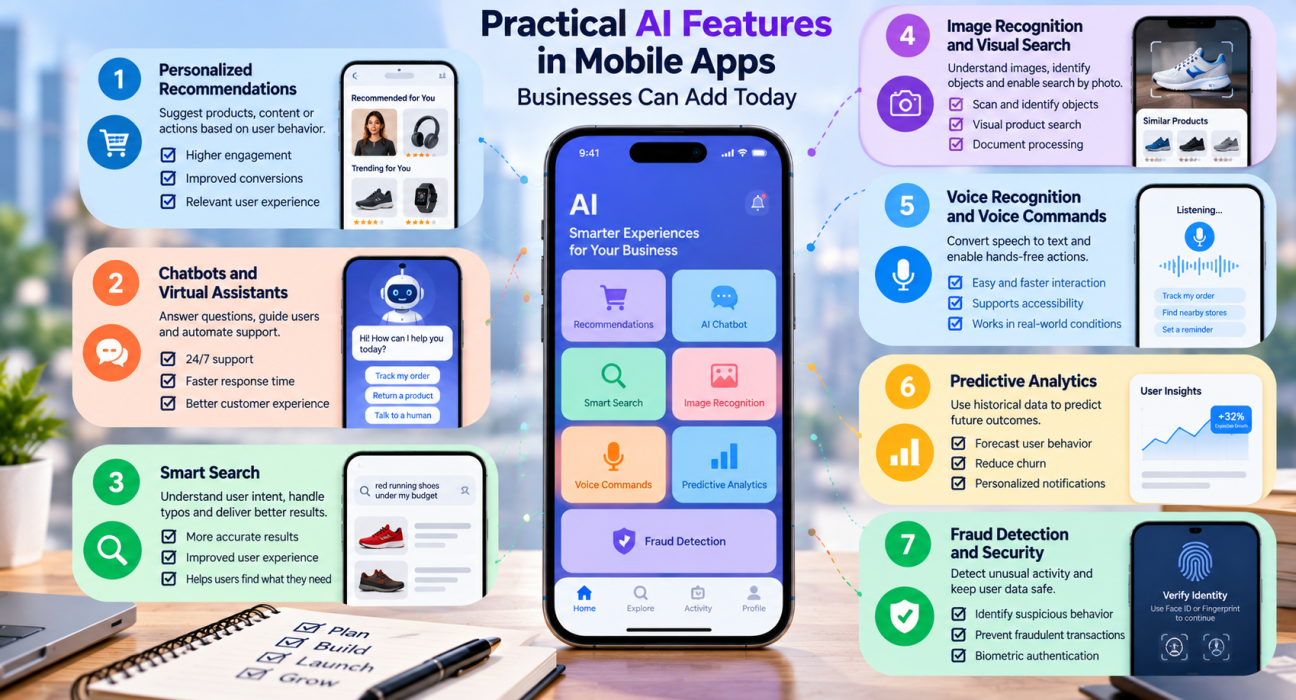
Quick answer: The most practical AI features in mobile apps are personalized recommendations, chatbots and virtual assistants, smart search, image and voice recognition, predictive analytics, fraud detection, and automated content or document processing. Start with the one that solves a clear user problem, test it with a small release, and expand only when it proves its value.
Every business owner has heard that mobile apps need artificial intelligence. Few get a clear answer on what that means in practice. Adding AI features in mobile apps can feel like a big, expensive bet, especially when the market is full of buzzwords and the roadmap is already crowded.
The good news is that AI does not have to mean a complex custom model. Many useful features rely on proven tools, ready-made APIs, and on-device capabilities that most development teams already know how to use. The real challenge is choosing features that fit your users, your data, and your budget.
This guide walks through the AI features that make practical sense for businesses, how to pick the right one, what to watch out for, and how to find a development partner who can build it.
What Are AI Features in Mobile Apps?
AI features in mobile apps are capabilities that use machine learning, natural language processing, computer vision, or similar technologies to make an app smarter. Instead of following fixed rules, the app learns from data and adapts its behavior, whether that means suggesting a product, understanding a spoken question, or flagging a suspicious transaction.
Some features run in the cloud, where the app sends data to a server for processing. Others run on the device itself. Both approaches are common, and the right one depends on speed, privacy needs, and cost.
7 Practical AI Features Businesses Can Add to Their Mobile Apps
1. Personalized Recommendations
Recommendation engines suggest products, content, or actions based on what a user has browsed, bought, or interacted with before. This is one of the most established uses of AI in apps.
Good fit for: e-commerce, media, food delivery, learning platforms, and travel apps.
Why it works: Users see relevant options faster, which reduces effort and can improve engagement. Even a basic version, built on purchase history and browsing behavior, can be useful before you move to more advanced models.
2. Chatbots and Virtual Assistants
An AI-powered assistant can answer common questions, guide users through tasks, and hand off to a human agent when needed. Modern language models have made these assistants far more conversational than older scripted bots.
Good fit for: customer support, banking, healthcare scheduling, retail, and onboarding flows.
Practical tip: Define what the assistant should and should not do. A bot that handles order tracking, returns, and FAQs well is more valuable than one that tries to answer everything and gets it wrong.
3. Smart Search
Traditional search depends on exact keyword matches. AI-powered search understands intent, handles typos, and can interpret natural phrases like “red running shoes under my budget.”
Good fit for: marketplaces, large catalogs, content libraries, and knowledge bases.
Why it works: If users cannot find what they want quickly, they leave. Smarter search removes that friction without changing the rest of your app.
4. Image Recognition and Visual Search
Computer vision lets an app understand photos and live camera input. Users can scan a product, identify an object, read text from a document, or search using a picture.
Good fit for: retail, real estate, insurance claims, field services, and healthcare support tools.
Examples: A retail app that finds similar items from a photo, or an insurance app that helps users capture and submit claim photos with guidance on image quality.
5. Voice Recognition and Voice Commands
Speech-to-text and voice assistants make apps easier to use hands-free or for people who prefer speaking over typing. They also support accessibility.
Good fit for: navigation, logistics, fitness, note-taking, and customer service apps.
Practical tip: Test voice features with different accents, speaking speeds, and background noise levels. Real-world conditions are very different from a quiet office demo.
6. Predictive Analytics
Predictive features use historical data to forecast what is likely to happen next. In a mobile app, this might mean predicting when a user may stop using the app, estimating delivery times, or suggesting the best time to send a notification.
Good fit for: subscription apps, logistics, fintech, health and fitness, and SaaS platforms.
Why it works: Instead of reacting to problems after they occur, your team can act earlier. This feature does need enough quality data, so it is often a second-phase addition rather than a launch feature.
7. Fraud Detection and Security
AI can spot unusual patterns, such as odd login behavior or abnormal transactions, and trigger extra verification or alerts. Biometric authentication, like face or fingerprint recognition, also relies on machine learning handled by the device.
Good fit for: banking, payments, e-commerce, and any app that stores sensitive user data.
Practical tip: Keep a human review process for edge cases. False alarms frustrate genuine users, so balance protection with a smooth experience.
Quick Comparison of AI Mobile App Features
| AI Feature | Main Benefit | Data Needed | Typical Complexity |
|---|---|---|---|
| Recommendations | Relevant suggestions | User behavior history | Medium |
| Chatbots / assistants | Faster support and guidance | FAQs, support content | Low to medium |
| Smart search | Easier discovery | Catalog or content data | Medium |
| Image recognition | Camera-based interaction | Image data or pre-trained models | Medium to high |
| Voice recognition | Hands-free use, accessibility | Often pre-trained services | Low to medium |
| Predictive analytics | Early insights and planning | Large historical datasets | High |
| Fraud detection | Risk reduction | Transaction and behavior data | High |
Complexity depends heavily on your existing data, tech stack, and whether you use ready-made services or build custom models. Treat this table as a starting guide, not a fixed rule.
How to Choose the Right AI Feature for Your App
Not every feature suits every business. Use this simple process to narrow the list.
- Start with a user problem. Identify where users struggle, drop off, or contact support. AI should solve something real.
- Check your data. Some features work with pre-trained models. Others need clean, well-organized data that you may not have yet.
- Estimate value against effort. A feature that saves users time or reduces support load is easier to justify than one that is simply impressive.
- Decide on cloud or on-device processing. On-device AI can be faster and better for privacy. Cloud AI offers more power and easier updates.
- Pick one feature and test it. Launch a focused version, collect feedback, and measure results before building more.
Should You Use Ready-Made AI Services or Build Custom Models?
Short answer: Most businesses should begin with ready-made AI services or APIs and move to custom models only when they have unique data or needs.
Ready-made tools let you add capabilities like speech recognition, translation, or chat quickly, without a data science team. Custom models make sense when your use case is specialized, when you hold proprietary data, or when off-the-shelf results are not accurate enough.
A common path is to prototype with existing services, learn what users actually want, and then invest in customization where it adds clear value.
Challenges to Plan For Before You Add AI
AI features bring real benefits, but they also bring responsibilities.
- Data privacy and consent: Be clear about what data you collect and why. Depending on your market and industry, privacy and data protection rules may apply, so confirm requirements with a qualified legal professional.
- Accuracy and bias: AI can make mistakes or reflect gaps in its training data. Test with diverse users and scenarios.
- Performance and battery use: Heavy processing can slow an app or drain a device. Test on mid-range and older phones, not just the latest models.
- Ongoing costs: Cloud AI usage, model updates, and monitoring all add to the budget after launch.
- User trust: Tell users when they are interacting with AI, and give them a way to reach a human or correct a mistake.
Real-World Examples of AI Features by Industry
- Retail and e-commerce: Personalized product feeds, visual search, and support chatbots.
- Healthcare: Appointment assistants, symptom-check guidance, and medication reminders, with appropriate safeguards and professional oversight.
- Finance: Fraud alerts, spending insights, and document scanning for onboarding.
- Travel and hospitality: Trip suggestions, price prediction, and multilingual assistants.
- Education: Adaptive learning paths, speech practice, and automated feedback.
- Logistics: Route suggestions, delivery time estimates, and damage detection from photos.
How to Find the Right Partner to Build AI Features
Building AI into a mobile app takes more than standard app development skills. You need a team that understands mobile engineering, data handling, and the practical limits of AI.
When evaluating a mobile app development company, look at:
- Relevant experience with AI or machine learning projects
- Portfolio examples and client feedback
- Their approach to data security and privacy
- How they test and measure AI feature performance
- Support and maintenance after launch
- Clear communication and transparent pricing
Platforms like GoFirms can help you research and compare mobile app development companies and AI service providers in one place, so you can shortlist partners based on services, focus areas, and available company information. Always follow up with direct conversations and, ideally, a small paid pilot before committing to a large project.
[Internal Link Suggestion: Relevant GoFirms Page/Article on mobile app development companies]
Frequently Asked Questions
What are the best AI features to add to a mobile app?
The best AI features depend on your users and business goals. Popular choices include personalized recommendations, chatbots, smart search, image recognition, voice commands, predictive analytics, and fraud detection. Start with the feature that solves your users’ biggest problem, then expand once you see measurable results.
How much does it cost to add AI to a mobile app?
Cost varies widely based on the feature, data readiness, and whether you use ready-made APIs or custom models. A chatbot built on an existing service costs far less than a custom predictive model. Request detailed estimates from several development companies and ask what ongoing costs, such as cloud usage, to expect.
Can small businesses use AI in their mobile apps?
Yes. Small businesses can use ready-made AI services for chat support, search, speech recognition, and recommendations without building models from scratch. Starting with one focused feature keeps costs manageable and lets you learn what your customers actually value before investing further.
Is on-device AI better than cloud AI for mobile apps?
Neither is always better. On-device AI offers faster responses, offline use, and stronger privacy because data stays on the phone. Cloud AI provides more processing power and simpler updates. Many apps combine both, using the device for quick tasks and the cloud for heavier ones.
Do AI features need a lot of data?
It depends on the feature. Many features, such as speech recognition or basic chatbots, use pre-trained models and need little of your own data. Recommendations, predictive analytics, and fraud detection generally perform better with larger, well-organized datasets collected over time.
How do I find a company to build AI features for my app?
Look for a mobile app development company with proven experience in AI or machine learning projects. Review portfolios, ask about data security, and compare several providers. Directories like GoFirms can help you research and compare companies before you reach out for proposals.
Conclusion
AI features in mobile apps do not have to be complicated or costly to be valuable. The most successful additions are simple, focused, and tied to a real user need, whether that is faster support, easier search, or more relevant recommendations.
Start by identifying one problem worth solving, choose the feature that addresses it, and test with real users. Build trust with clear data practices, and expand gradually as results come in. When you are ready to bring in a development partner, you can research and compare mobile app development companies on GoFirms to find a team that fits your project and budget.