Field Service Workflow Software: How to Build a Digital Workflow
Picture a Tuesday morning. A customer calls about a broken AC unit. Someone in the office writes it on a notepad, then messages a technician on WhatsApp. The technician replies “ok” and never sends a location. By evening, nobody can say whether the job was done, how long it took, or if the customer was happy.
That’s what an unmanaged field service workflow looks like, and plenty of businesses still run this way. This guide walks through how to build a digital workflow for field service operations, step by step. It also covers what to look for in field service workflow software so the process actually sticks.
What Is a Digital Workflow in Field Service?
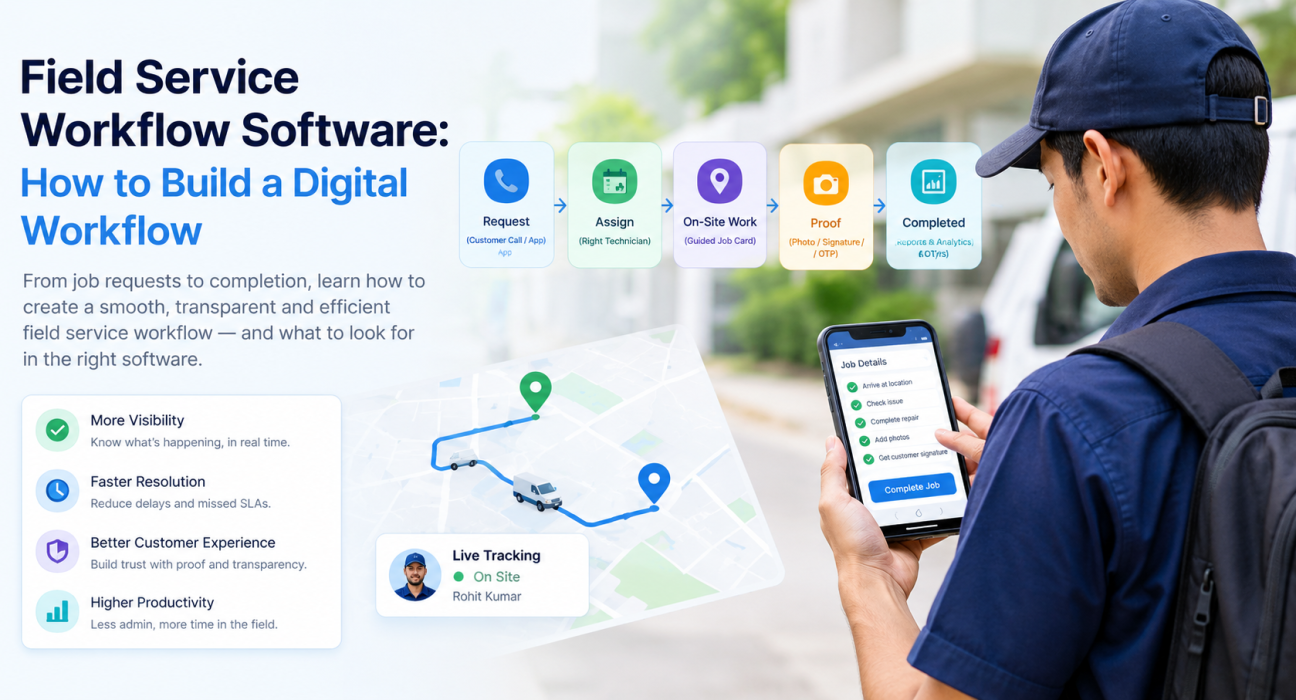
A digital field service workflow is a defined, software-driven path that every job follows: from request to assignment, on-site work, proof of completion, and reporting. Each step is recorded in one system instead of scattered across calls, chats and paper.
In practice, it answers five questions for every job:
- Who is doing it?
- Where do they need to go?
- What exactly should they do?
- How do we know it was done?
- How long did it take, and was it within the SLA?
Field service workflow software is the tool that enforces those answers. It assigns the job, guides the technician, captures evidence and gives managers a live view.
Why Paper, WhatsApp and Spreadsheets Stop Working
These methods work fine with three technicians. They crack at around fifteen.
Here’s where things usually go wrong:
- No visibility. Once the team leaves the office, managers don’t know who is where or which jobs are stuck.
- No proof. “I visited the customer” is a claim, not a record.
- Admin overload. Attendance, expenses and job updates get re-typed by someone in the back office.
- Missed SLAs. Nobody sees a deadline approaching until it has already passed.
- No usable data. You can’t coach people or fix routes when the data lives in chat threads.
None of this is a people problem. It’s a process problem, and a process can be designed.
How to Build a Digital Field Service Workflow in 7 Steps
Here’s the short version, then the detail.
- Map how a job moves today
- Standardize job types, checklists and SLAs
- Digitize job creation and dispatch
- Give technicians a guided, offline-ready job card
- Require proof before a job can close
- Connect approvals, expenses and collections
- Track KPIs and refine every month
1. Map how a job moves today
Before you buy or configure anything, write down the real journey of a job. Sit with a dispatcher and a technician and trace one job from the first call to the final invoice.
You’ll find handoffs nobody planned. A job waits for approval for two days. A technician calls the office just to get an address. Those gaps are what your digital workflow needs to close.
2. Standardize job types, checklists and SLAs
A good workflow starts with clear definitions. List every type of job your team handles, such as installation, repair, AMC visit, inspection or collection. Then decide what “done” means for each one.
For every job type, define:
- The checklist the technician follows
- The proof required (photo, signature, OTP, or a form)
- The priority level
- The SLA, meaning how fast it must be started and finished
Keep it simple at first. Five clear job types beat twenty vague ones.
3. Digitize job creation and dispatch
Dispatch is where most time quietly leaks. Instead of calling or messaging, create the job in one system and assign it to the right person with a due time and priority.
Good dispatch looks at location and workload, not just who picks up the phone first. Assigning the nearest available technician cuts travel time and gets customers served sooner.
4. Give technicians a guided, offline-ready job card
The technician’s phone is where your workflow lives or dies. If the app is slow or confusing, people will go back to WhatsApp within a week.
A good job card shows:
- Where to go and whom to meet
- What to do, as a short checklist
- What to collect, if payment is involved
- A one-tap way to navigate
It also has to work offline. Field staff often work in basements, factories and rural stretches with poor signal. The app should let them finish the job and sync automatically when the network returns.
5. Require proof before a job can close
This is the step that changes behavior the most. Make proof a condition of closing a job, not an optional extra.
Depending on the work, proof can be a photo, a customer signature, an OTP shared by the customer, or a filled form. Add geofencing so check-ins only count when the technician is actually at the customer site.
The result is two kinds of evidence: proof of presence (they were there) and proof of work (they did the job). That settles most customer disputes before they start.
6. Connect approvals, expenses and collections
A field job rarely ends at the customer’s door. There may be travel claims, spare-part costs or cash and payments collected on site.
If these still run through spreadsheets, you’ve only digitized half the workflow. Link them to the job itself: expense claims with receipt photos go through an approval chain, and collections get tracked until they’re settled. Finance stops chasing field staff, and field staff stop waiting weeks for reimbursement.
7. Track KPIs and refine every month
Once data flows through one system, review it on a schedule. Look at a handful of numbers rather than a giant dashboard:
- On-time arrival and SLA compliance
- Jobs completed per technician per day
- Average time per job type
- Travel time between stops
- Repeat visits and customer feedback
Use these to adjust routes, rebalance workloads and update checklists. A workflow is never really finished; it just gets better each month.
What to Look for in Field Service Workflow Software
Not every tool fits every team. Use this table to compare options on the things that matter in daily operations.
| What to check | Why it matters |
|---|---|
| Configurable job types and forms | Your workflow shouldn’t be forced into someone else’s template |
| Dispatch with live location | Assign the nearest, least-loaded technician |
| Offline mobile app | Work continues in low-signal areas |
| Proof capture (photo, signature, OTP) | Verifies that work was actually done |
| Geofenced attendance and check-ins | Keeps location data trustworthy |
| SLA timers and alerts | Flags late jobs before they become complaints |
| Expense and collection tracking | Closes the loop on money in the field |
| Real-time reports and KPIs | Gives managers something to act on |
| Simple setup and training | If it takes months, adoption drops |
One more tip: ask for a demo using your own workflow, not a generic sample. You’ll learn more in twenty minutes than from any feature list.
Common Mistakes When Digitizing Field Workflows
- Automating a broken process. Fix the steps first, then move them into software.
- Making forms too long. If a checklist takes ten minutes, technicians will skip it.
- Skipping training. A short session with real jobs beats a long manual.
- Treating tracking as surveillance. Explain that the goal is fewer disputes and less paperwork, and respect privacy by tracking only on-duty hours.
- Launching everywhere at once. Pilot with one team, learn, then expand.
How FieldExecutives Supports a Digital Field Service Workflow
Businesses looking to simplify these processes can use field force management software such as FieldExecutives. It’s built around the same flow described above.
Based on what’s published on the FieldExecutives website, the platform covers these workflow stages:
- Assign and dispatch: managers create tasks and visits with checklists, priorities and SLAs, which reach the rep’s phone instantly.
- Execute with proof: reps follow a guided job card and capture photo, signature or OTP, with offline-first sync.
- Live visibility: a real-time map shows punch-ins, routes and job status, with geofenced attendance and spoof detection.
- Route planning: AI-based beat and route optimisation. The company cites 20–30% less travel time, though it notes figures like this are illustrative and not guaranteed.
- Money tracking: receipt-backed expense claims with approvals, plus collection tracking to settlement.
- Custom forms and workflows: job types, checklists, approvals and SLAs configured without code.
If your team handles installations, AMC visits or repair jobs, the field service and repair solution page shows how this applies to your kind of work. You can also review the full feature list to match it against your own workflow.
Conclusion
A digital workflow doesn’t have to be complicated. Map how jobs move today, define job types and SLAs, dispatch from one place, give technicians a simple offline job card, require proof, connect expenses and collections, and review the numbers every month.
The common thread is visibility. When every job leaves a clear trail, you spend less time chasing updates and more time fixing real problems. That’s what good field service workflow software is for.