PG Software Without Setup Fee: What to Check Before You Sign Up
Searching for PG software without a setup fee usually means one of two things. You’ve been quoted an onboarding charge that felt too high, or you want to try software without paying anything up front. Both are sensible. Most PG owners run on thin margins, and paying a large fee for a tool you haven’t used yet is hard to justify.
But a missing setup fee isn’t the whole story. Subscription pricing, data entry, support and lock-in terms all affect what you really pay. This guide explains what setup fees are, what else to check, and how to test a tool before you commit. If you’re comparing PG and hostel management software, use it as a checklist.
What Is a Setup Fee in PG Software?
A setup fee is a one-time charge some software vendors collect before you start using the product. It may cover account creation, configuration, data migration or training. Not every vendor charges one, and the amount and what it covers vary widely, so always ask for it in writing.
For a small PG, the logic is simple. Setup for a PG app mostly means entering your buildings, rooms, beds and tenants. If the tool is easy to use, you can do that yourself, which makes a separate setup fee harder to defend.
Why owners look for “no setup fee”?
- Cash is tight early on. New PG owners spend heavily on furniture, deposits and deposits again.
- You don’t know if it will suit you yet. Paying first and testing later feels backwards.
- Fees can hide in the fine print. A low monthly price looks different after an onboarding charge.
- Switching is painful. If you’ve paid to get in, you’re less likely to leave, even if the tool isn’t working.
The Costs Beyond the Setup Fee
A “no setup fee” label tells you about one cost. Here are the others worth asking about.
| Cost | What to ask |
|---|---|
| Monthly or yearly subscription | What’s the price, and what does it include? |
| Pricing basis | Is it per building, per bed, per tenant or one flat price? |
| Plan limits | Is there a cap on rooms, beds, tenants or users? |
| Data entry or migration | Will you enter data yourself, or does the vendor charge to do it? |
| Training and support | Is help included, or charged separately? |
| Add-ons | Are reminders, reports or extra logins charged extra? |
| Payment charges | Are there fees on online payments? Who pays them? |
| Renewal price | Does the price change after the first term? |
| Cancellation | Can you cancel anytime, or are you locked in? |
You don’t need every answer to be “free.” You need every answer to be clear before you pay.
Questions to Ask Before You Choose
Put these to any vendor, and note the answers in writing.
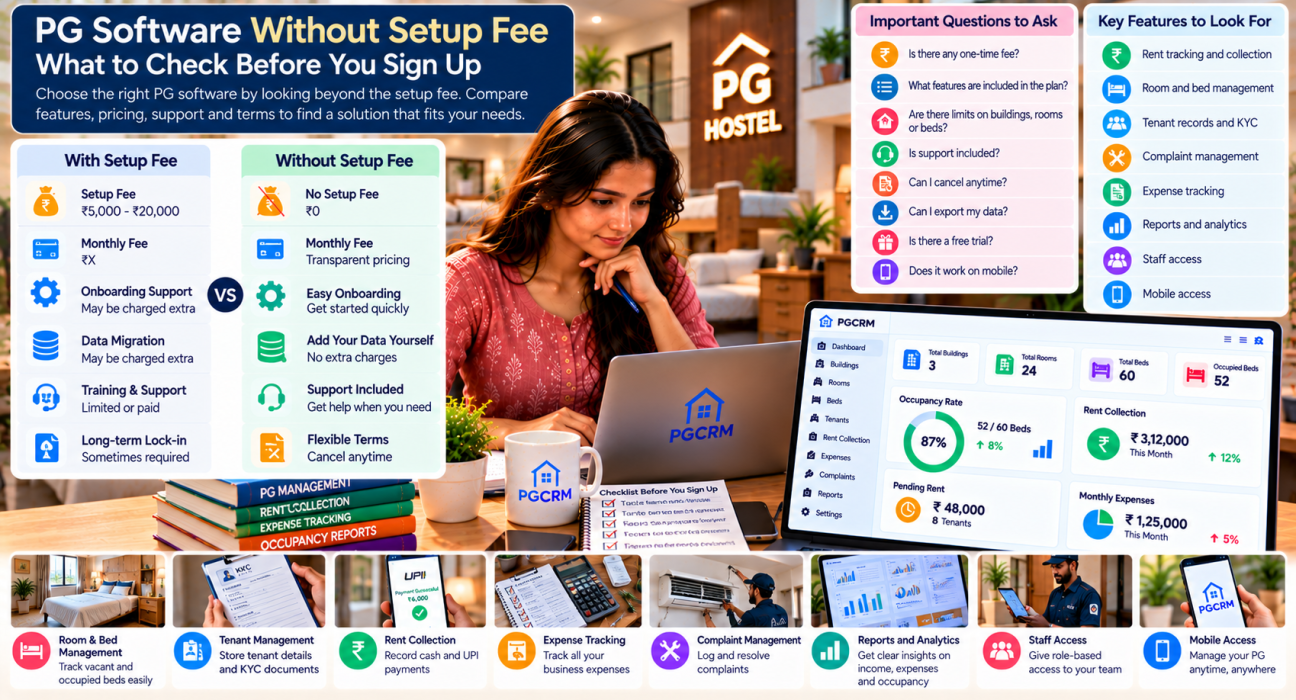
- Is there any one-time fee at all? This includes setup, onboarding, activation or training.
- What exactly is included in the subscription? Ask for a list of features, not a general description.
- Are there limits? Check buildings, rooms, beds, tenants and staff logins.
- What does support look like? Ask how you reach someone, and whether it’s included.
- Can I cancel anytime? And what happens to my data if I do?
- Can I export my data? Your tenant and payment records should stay yours.
- Is there a free trial, and does it need a card? Details can change, so check the vendor’s current offer.
- Does it work on my phone? Many owners and managers run the PG from a phone, not a desk.
A vendor who answers these plainly is usually easier to work with later.
Features That Matter More Than the Fee
A free start doesn’t help if the software doesn’t fit your daily routine. Think about the work that eats your time and check the tool against it.
Rent tracking and collection
You should be able to see who has paid and who is pending at any moment. Look for support for the way your tenants actually pay, which in many PGs means both cash and UPI. Automatic reminders reduce the number of follow-up messages you send yourself.
Room and bed tracking
Know which beds are occupied, which are free and which are under repair, ideally across all your buildings.
Tenant records and KYC
Tenant details, joining dates and documents should sit in one place instead of in files and photos on different phones.
Complaints and expenses
A complaint log with a clear status keeps repairs from being forgotten. Expense tracking by category tells you where the money goes.
Reports
You want a monthly view of income, expenses and occupancy without building it yourself in a spreadsheet.
Staff access
If a manager or caretaker helps you, look for separate logins with limited access, so not everyone sees everything.
How to Test PG Software During a Free Trial
A free trial only helps if you use it properly. Don’t just click around. Run a small, real test.
- Add one building, a few rooms and their beds. Notice how long it takes and whether it’s clear.
- Add three to five real tenants with their joining dates and rent. Try uploading a KYC document.
- Record a cash payment and a UPI payment. Check whether the records are easy to follow.
- Mark one tenant’s rent as pending. See how pending rent shows up.
- Log a complaint and close it. Check the status trail.
- Record a few expenses under different categories.
- Open the reports. Ask yourself if you’d understand them at month-end.
- Try it on your phone. Do the same tasks from your mobile.
- Ask the support team one question. See how fast and how clearly they reply.
- Ask for the full terms in writing before you pay for anything.
If you can’t finish this list comfortably within a short trial, the tool probably won’t fit your routine, whatever it costs.
Is Free to Start the Same as Cheap?
Not necessarily. Compare tools on what they cost over time and what they save you, not only on the day-one price.
Software cost per bed = monthly price ÷ total beds
Here’s an example with assumed figures. Replace them with real quotes.
| Option A | Option B | |
|---|---|---|
| One-time setup fee | ₹0 | ₹5,000 |
| Monthly price | ₹1,000 | ₹800 |
| First-year cost | ₹12,000 | ₹14,600 |
| Cost per bed per month (40 beds) | ₹25 | ₹20 |
Option B looks cheaper per month, but costs more in the first year. Over several years, the gap could narrow or flip. That’s why you should add up the full cost for at least a year before you decide.
Then weigh it against what the tool saves you. Think about hours spent chasing rent, rebuilding records at month-end or hunting for a tenant’s documents. Time has a cost too.
Where PGCRM Fits In
PGCRM lists “no setup fees” on its pricing page, along with the ability to cancel anytime with no lock-in. It also says no card is needed to start. It’s one plan with the full app, covering buildings, rooms and beds, tenants with KYC, rent collection by cash and UPI, automatic rent reminders; complaints; expense tracking; and income and occupancy reports. You can use it on a phone or a computer, and give staff their own manager logins.
As with any vendor, offers and plan details can change. Check the PGCRM pricing page for the current trial, price and terms before you decide, and run the trial checklist above so you can judge for yourself.
Common Mistakes When Choosing PG Software
- Choosing on the setup fee alone. Monthly cost, limits and support matter just as much.
- Not reading the terms. Lock-in periods and renewal prices hide here.
- Skipping the trial. A demo shows the best case, not your daily reality.
- Testing with fake data only. Real tenants and real payments reveal real problems.
- Ignoring mobile use. If you manage from your phone, the phone experience matters most.
- Forgetting data ownership. Make sure you can get your records out later.
- Buying features you won’t use. A simple tool you use daily beats a complex one you avoid.
FAQ
Is there PG management software without a setup fee?
Yes, some PG management tools don’t charge a setup fee. PGCRM lists no setup fees on its pricing page. Fees and plans can change, so confirm the vendor’s current terms in writing before you sign up, and check what the monthly subscription includes.
What does a setup fee cover in PG software?
It can cover account creation, configuration, data migration or training. What’s included depends entirely on the vendor. Ask what you actually get for the fee. If setup mostly means adding your buildings, rooms and tenants, you can often do it yourself.
Are there hidden costs in PG management software?
There can be. Check for per-bed or per-tenant pricing, caps on rooms or users, paid add-ons, support charges, payment fees and price changes at renewal. Ask for a written list of what’s included in the plan, so there are no surprises later.
Should I use a free PG management app?
Free tools can work for very small setups, but check their limits, support, and what happens to your data. Features like rent reminders, reports and multiple logins are sometimes missing or paid. Run a real trial before you rely on any tool for rent records.
How long does it take to set up PG software?
It depends on your size and the tool. Adding buildings, rooms and beds is usually quick. Entering tenants takes longer if you have many, because you need each person’s details and documents. Block out a few hours for a first pass and test it on real data.
Can I switch PG software later?
Usually yes, but it’s easier if you can export your data. Before you commit, ask whether you can download tenant records and payment history and what happens to your data if you cancel. A tool that locks in your data makes switching costly.
Conclusion
Looking for PG software without a setup fee is a reasonable starting point, but it shouldn’t be the only filter. Ask about every cost, check the limits, read the terms, and run a real trial with your own tenants and payments. The right tool is the one you’ll use every day without friction.
If you’d like to see how it works for your own PG, explore PGCRM to simplify your PG and hostel management