How to Improve Trade Promotion Execution at Retail Stores
A trade promotion can be well planned, fully funded and still fail at the shelf. The display never goes up, the offer isn’t visible, or the price tag is wrong. Nobody at head office finds out until the sales numbers come in. This is why many brands now look at trade promotion management software as part of their retail operations.
This guide explains why promotions break down at the store level and gives a step-by-step process to improve execution. It also covers how technology, including field force management software like FieldExecutives, helps you monitor what your field teams do in stores.
What Is Trade Promotion Execution?
Trade promotion execution is the process of making sure planned promotions are implemented correctly in retail stores. That means the right products are stocked, displays and signage are in place, prices and offers are accurate, and the promotion runs for the agreed period.
Trade promotion planning decides what to run and how much to spend. Execution decides whether it actually happens in the store. Most revenue is lost in the gap between the two.
Why Trade Promotions Fail at Retail Stores
Most execution failures have ordinary causes:
- Late or unclear instructions. Field reps and store staff don’t get promotion details in time, or the details are ambiguous.
- Stock-outs. The promoted product isn’t on the shelf, so the spend is wasted.
- Missing or misplaced materials. Posters, shelf strips, standees and other point-of-sale materials (POSM) are not installed, or are installed in poor locations.
- Pricing errors. The promotional price isn’t reflected on the shelf or at billing.
- No proof of execution. Managers rely on verbal reports, which are hard to verify and arrive late.
- Delayed reporting. Issues are found weeks later, when it is too late to fix them.
Note that most of these are visibility problems rather than planning problems. Teams can’t fix what they can’t see in time.
What Is Trade Promotion Management Software?
Trade promotion management (TPM) software helps companies plan, budget, run and analyse promotions with retailers and distributors. TPM tools typically cover promotion planning, trade spend tracking, claims and post-event analysis.
Execution is a related but separate need. Planning-focused TPM platforms are mainly used by larger consumer goods companies. Retail execution and field force tools focus on what happens in the store: who visited, what they checked, and what needs fixing. Many businesses use the two together, or use field execution tools to supply the on-ground data that planning tools lack.
7 Steps to Improve Trade Promotion Execution at Retail Stores
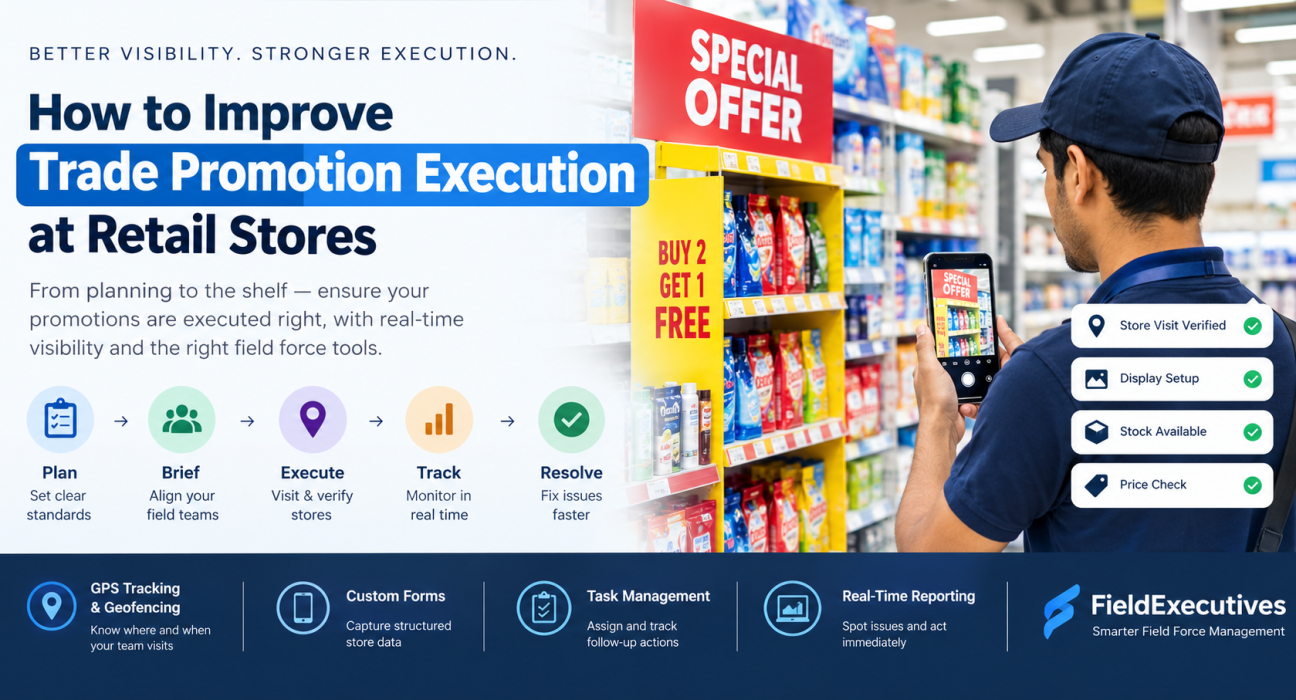
1. Define Clear Execution Standards
Spell out what a successfully executed promotion looks like. Include the stock required, display location, signage, price points and promotion dates. A short checklist per promotion works better than a long briefing document.
2. Brief Field Teams Before the Promotion Starts
Give every field representative the same information, on time. Cover the offer details, outlets covered, tasks to complete and any photos or data to be captured. Teams that understand the “why” behind a promotion execute it more carefully.
3. Plan Store Visits Around Promotion Priorities
Not every outlet needs equal attention. Prioritise high-volume stores and outlets with active promotions, and schedule visits at the start of a promotion when fixes matter most. Route and beat planning helps teams cover the right outlets without wasted travel.
4. Verify That Visits Actually Happen
Execution can’t be checked if you can’t confirm the visit took place. GPS-based check-ins and geofencing give managers a time and location record of each store visit. This also discourages false visit reporting.
5. Capture Structured Data During Every Visit
Replace informal updates with standard forms. Typical fields include:
- Promotional stock availability
- Display or POSM placement status
- Shelf price versus promotional price
- Competitor promotion activity
- Issues that need escalation
Standard data is easy to compare across stores, regions and teams.
6. Monitor Execution in Real Time
Waiting for monthly reports defeats the purpose. Live dashboards let managers spot stores where promotions are not set up, and send a team member to correct it while the promotion is still running.
7. Close the Loop With Follow-Up Tasks
Every issue found should become an assigned task with an owner and a deadline. Examples include restocking a store, replacing missing signage or correcting a price. Review completion rates and recurring problems to improve the next promotion.
Key Metrics to Track Promotion Execution
Track a small, meaningful set of measures rather than everything at once.
| Metric | What It Tells You |
|---|---|
| Promotion compliance rate | Share of visited stores where the promotion was set up as planned |
| Visit coverage | Percentage of target outlets visited during the promotion window |
| Stock availability | Whether promoted items were on the shelf |
| POSM / display compliance | Whether materials were installed correctly |
| Issue resolution time | How quickly problems found in stores were fixed |
| Sales lift versus baseline | Whether the promotion improved sales (requires sales data) |
Define each metric before the promotion starts, so results are comparable.
How Software Helps With Retail Promotion Execution
Spreadsheets and messaging apps can work for a handful of stores. They struggle once you have dozens of reps and hundreds of outlets. Software helps in four ways:
- Visibility: Managers see visit and task status without chasing updates.
- Accountability: Visit verification and time-stamped records reduce disputes.
- Consistency: Standard forms mean every store is assessed the same way.
- Speed: Issues are raised and assigned the same day.
When evaluating tools, ask whether they support store-level data capture, visit verification, task assignment, reporting dashboards and mobile use for field staff. Also decide whether you need promotion planning and trade spend management, or mainly better visibility into in-store execution.
How FieldExecutives Can Help
Businesses looking to simplify these processes can use field force management software such as FieldExecutives. The platform is built to help companies manage and monitor field teams and field operations, and several of its capabilities map directly to the execution steps above:
- Field visit management and customer visit verification to confirm that reps reached the planned outlets.
- GPS tracking and geofencing to record where and when visits happen.
- Route and beat planning to organise store coverage.
- Custom forms and workflows to capture structured information during visits.
- Task management to assign and track follow-up actions.
- Real-time reporting to give managers a live view of field activity.
FieldExecutives is a field force management platform rather than a dedicated trade spend or promotion planning suite. It fits best when your priority is ensuring field teams execute and report on promotions consistently across stores. Check the website or request a demo to confirm which features match your specific process.
Common Mistakes to Avoid
- Measuring only sales results and ignoring execution quality
- Collecting too many data fields, so reps skip them
- Treating audit findings as reports instead of tasks
- Failing to train reps on what good execution looks like
- Comparing stores without accounting for size or footfall differences
Conclusion
Better trade promotion execution comes down to clear standards, timely briefing, verified store visits, structured data and fast follow-up. When these are in place, you spend less on promotions that never reach the shelf and learn more from the ones that do.
Trade promotion management software helps on the planning side, while field execution tools help you see what is happening in stores. If your main gap is visibility into field teams and store visits, FieldExecutives can help you track visits, capture store data and act on issues sooner.