TeleCalling CRM vs Traditional CRM: Key Differences Explained
Telecalling CRM vs traditional CRM is a common question for teams that spend most of their day on the phone. A traditional CRM is built around accounts, emails and deals, while a telecalling CRM is built around calls, callbacks and agent activity. This guide explains the key differences so you can choose the right tool.
Picture a team that makes a hundred calls a day but logs results in a general-purpose system. Agents dial from one app, note outcomes in another and track callbacks in a notebook. That is usually a sign the tool does not match the work, and a calling-focused CRM may fit better.
Disclosure: this blog is published by TeleCalling CRM. We have tried to keep the comparison fair, and a traditional CRM is the better choice in some situations.
What Is the Difference Between a Telecalling CRM and a Traditional CRM?
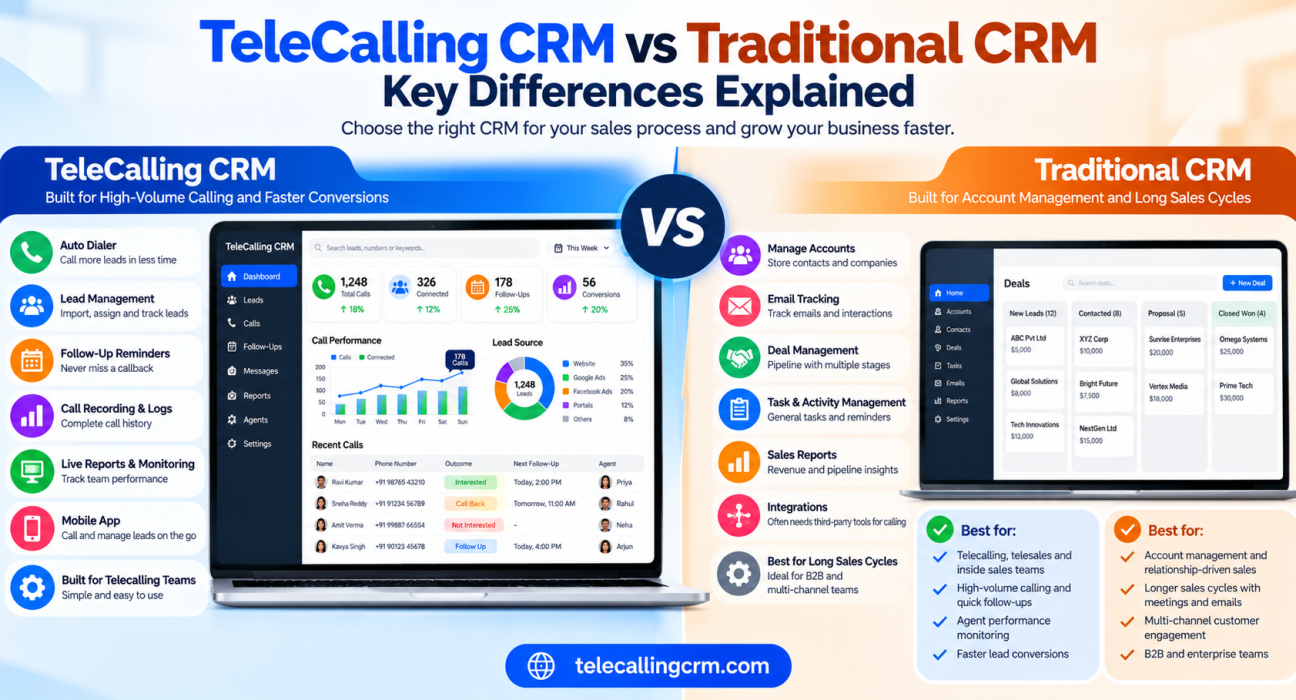
A telecalling CRM is built around phone-based selling, with dialling, call logging, follow-up reminders and agent monitoring at its core. A traditional CRM is a general-purpose system for managing customers, accounts and deals across many channels. Choose a calling-focused tool for high-volume calls, and a traditional one for longer, relationship-led sales.
What Is a Traditional CRM?
A traditional CRM, also called a general or standard CRM, stores contacts, companies, deals and past interactions. It usually supports email tracking, tasks, pipeline stages and reports. Many also add marketing or customer service modules.
Calling is typically one activity among many, and it may need an integration or add-on. This works well when each deal involves several people, long discussions and detailed account history.
What Is a Telecaller CRM?
A telecaller CRM, also called a CRM for telecallers or telecalling software, is designed for teams that spend most of the day on the phone. Its screens, reports and automation revolve around the call: who to call next, what happened and when to call back.
Side-by-Side Comparison
“Traditional CRM” varies by product, so that column describes typical behaviour. Always verify with the vendor.
| Area | Telecalling CRM | Traditional CRM |
|---|---|---|
| Core focus | Calls, leads and follow-ups | Accounts, contacts, deals and relationships |
| Dialling | Auto dialer and call queues are central | Click-to-call or integration, often an add-on |
| Typical sales motion | High-volume, fast, repeat calls | Longer cycles with meetings and emails |
| Follow-up handling | Callback scheduling and overdue alerts built into the call flow | Tasks and reminders, less call-specific |
| Call data | Duration, outcome, notes and recordings per lead | May need extra tools for recordings and call metrics |
| Lead distribution | Rules by round-robin, language or fixed owner | Available, but often configured separately |
| Team monitoring | Agent activity, talk time and idle time | Mostly pipeline and deal reports |
| Reporting | Connection rate, answer rate, calls per agent | Revenue, pipeline stages, account activity |
| Setup effort | Usually lighter and quicker | Often heavier, with more customisation |
| Best for | Telesales and inside sales teams | Account management and multi-channel teams |
7 Key Differences Explained
1. The unit of work
In a calling-focused tool, the lead and the next call are the unit of work. Agents open a queue and start dialling. In a traditional system, the unit of work is usually an account or a deal, and activity is spread across emails, meetings and tasks.
2. Dialling and call handling
A telecalling CRM usually includes an auto dialer, pause and resume controls, automatic call duration capture and one-tap outcome logging. In many traditional systems, calling depends on a telephony integration, and logging may need more manual steps.
3. Follow-up discipline
Phone sales depend on callbacks such as “call me after 4 pm”. A calling-focused tool lets agents schedule these in one tap and flags overdue ones. Traditional systems offer tasks and reminders too, but the flow is rarely designed around dozens of short calls per agent.
4. Lead distribution speed
When leads arrive from ads and portals, response time matters. Calling tools usually focus on assigning each new lead to an available agent at once. Traditional systems can do this as well, but it often needs extra configuration.
5. Visibility for managers
A calling manager wants to know who is on a call, who is idle and how many connected calls each agent made today. A traditional CRM manager often wants pipeline value, deal stages and account health. Both are valid, but they answer different questions.
6. Compliance in calling
Outbound calling in India is regulated by TRAI under the Telecom Commercial Communications Customer Preference Regulations, 2018. Some calling tools include DNC list handling and calling-hour controls. A traditional system may not, so check. In either case, compliance remains the business’s responsibility.
7. Cost and complexity
Traditional systems can be powerful but may need configuration, training and extra modules. Calling tools are often simpler to start with, but they may offer less depth for complex account management. Compare pricing models too, because some vendors charge per user and others charge a flat price per plan.
When a Traditional CRM Is the Better Choice
A calling-focused tool is not always the answer. A traditional CRM may suit you better if:
- Your sales cycle is long, with many meetings and decision-makers
- Most communication happens over email and video calls
- You need deep account hierarchies, quotes or contracts
- Marketing automation and customer service matter as much as sales
- You need heavy customisation across departments
When a Calling-Focused Tool Is the Better Choice
A telecalling CRM fits better if:
- Your team makes many calls every day
- Leads come from ads, portals or forms and need quick contact
- Missed callbacks are a recurring problem
- Managers need live visibility of agent activity
- You want a simple setup without a long implementation
Which One Do You Need?
These examples are hypothetical.
| Situation | Likely fit |
|---|---|
| A coaching institute calling hundreds of enquiries every week | Calling-focused tool |
| A real estate team handling portal and ad leads (see how property teams manage calls and follow-ups) | Calling-focused tool |
| A software firm selling to large companies over several months | Traditional CRM |
| A call centre or BPO with many agents (see the call centre use case) | Calling-focused tool |
| A company with both a calling team and an account management team | Possibly both |
Can You Use Both Together?
Yes. Some businesses keep a traditional CRM for accounts, marketing and customer records, while the calling team uses a dedicated tool for daily outreach. The risk is duplicate data and inconsistent records.
If you use both, decide upfront:
- Which system holds the “master” customer record
- How leads move between systems: manually, by CSV or through an integration
- Who is responsible for keeping data clean
Check the integration options of any tool you consider. TeleCalling CRM lists 12+ lead-source integrations, including Google Sheets and Zapier, but verify that your specific systems are supported.
How TeleCalling CRM Fits the Comparison
Based on its website, the platform is built for outbound sales teams in India. It lists:
- A smart auto dialer with automatic call duration capture and one-tap outcome logging
- Lead import, de-duplication, DNC checks and rule-based assignment
- Follow-up scheduling with reminders and overdue alerts
- Encrypted call recording and AI call analysis, including transcripts, summaries and sentiment
- A sales pipeline with deal values and weighted forecasting
- SMS, email and WhatsApp messaging
- A live war room, reports and an Android and iOS app
Plans start at ₹999 per month, excluding GST, and the website mentions a 3-day free trial. If you need deep account management or complex customisation, a traditional CRM may suit you better. If you need inbound call routing or IVR, these are not listed on its features page, so confirm before deciding. For a full evaluation approach, read our guide on choosing the right calling software for your team.
Common Mistakes When Choosing Between the Two
- Choosing by brand name. Pick the tool that matches how your team actually works.
- Assuming calling is “included”. Ask exactly how dialling, logging and recording work.
- Over-customising early. Start simple and add complexity later.
- Ignoring agent experience. Agents who find the tool slow will skip logging calls.
- Not testing with real data. Run a short trial with your own leads before deciding.
Frequently Asked Questions
What is the main difference between a telecalling CRM and a traditional CRM?
A telecalling CRM is designed around phone-based selling, with dialling, call logging and follow-ups at its core. A traditional CRM manages relationships, accounts and deals across many channels, and calling is only one part of it.
Can a traditional CRM be used for telecalling?
Yes, often with a telephony integration or add-on. It can work for smaller call volumes, but teams making many calls a day may find the workflow slower than a dedicated calling tool.
Is a calling-focused tool cheaper than a traditional CRM?
Not always. Pricing varies by vendor, user count and add-ons. Compare the yearly cost for your team size, including calling, messaging and extra modules. TeleCalling CRM plans start at ₹999 per month, excluding GST.
Which is better for small businesses?
If your sales depend mainly on phone calls, a simple calling tool is often easier to start with. If you need email marketing, customer service and account management together, a traditional CRM may serve you better.
Does a telecalling CRM replace a traditional CRM?
Not necessarily. It replaces the calling and follow-up part of the workflow. Some businesses keep both, with clear rules on which system holds the master record.
Who should use a telecaller CRM?
Teams that make or receive many calls, such as real estate, education, insurance, finance, recruitment and call centre teams.
Does it help with TRAI and DND compliance?
It can help through DNC list checks and calling-hour controls, but it cannot guarantee compliance. Review TRAI’s current requirements and take professional advice where needed.
Conclusion
The telecalling CRM vs traditional CRM decision comes down to how your team sells. If calls, callbacks and agent activity drive your results, a calling-focused tool is usually the closer fit. If your sales rely on long relationships, accounts and multi-channel marketing, a traditional CRM may serve you better.
Whichever you pick, test it with real leads first. If calling is your main channel, you can see how sales calling software handles dialling, follow-ups and reports.