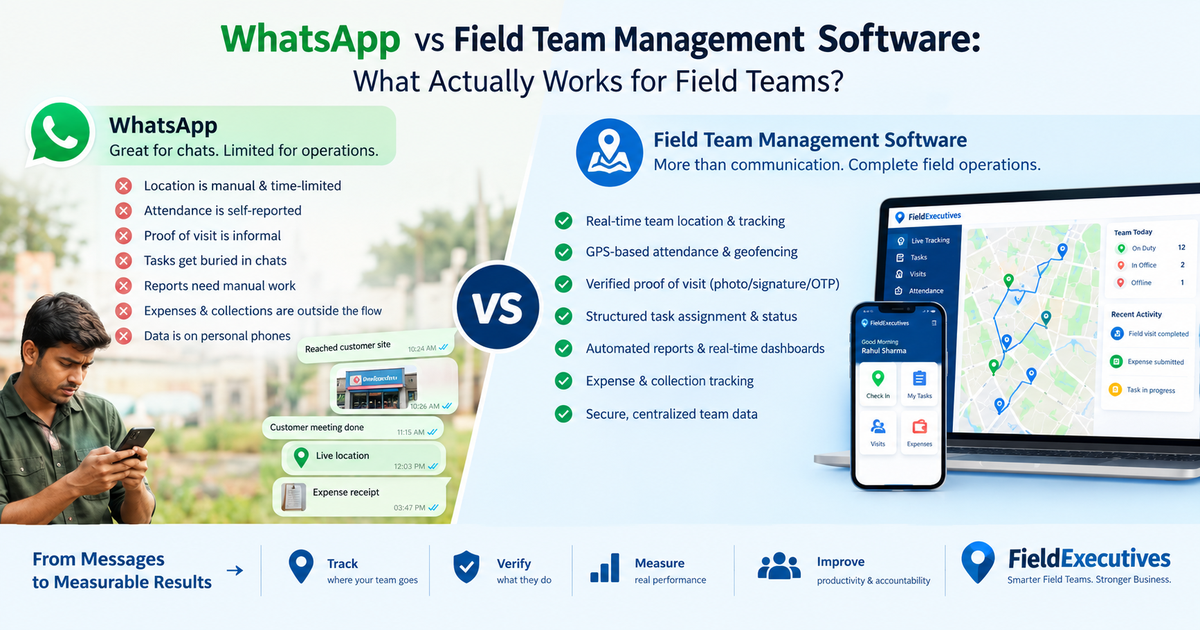
WhatsApp vs Field Team Management Software: What Actually Works for Field Teams?
If your field team reports through WhatsApp, you already know how it goes. Photos arrive at random hours. A “reached the site” message can’t be verified. The month-end report means scrolling through hundreds of messages.
WhatsApp is a good communication tool, and that is why so many businesses start there. But communication is only one part of managing a field team. Field team management software covers the rest: attendance, tracking, task assignment, proof of work, expenses and reporting.
This guide compares the two honestly. You’ll see where WhatsApp works, where it stops working, and how to decide when to move on.
What Is Field Team Management Software?
Field team management software is a platform that helps businesses assign work to field employees, track their location and attendance, verify visits, and measure performance from one system. It typically includes a mobile app for field staff and a web dashboard for managers.
It is also called field force management software, field workforce management software, or field service management software, depending on the industry. The core idea is the same. Your field activity becomes structured, verifiable data instead of scattered messages.
Why Businesses Start Managing Field Teams on WhatsApp
WhatsApp is the default for good reasons:
- Everyone already has it. There is no training or onboarding.
- It’s free. Small teams don’t want another subscription.
- It’s fast. A message reaches a rep in seconds.
- It handles media well. Photos, voice notes and documents are easy to share.
- It has basic live location sharing. A rep can share a live location for a set time, such as 15 minutes, 1 hour or 8 hours, according to WhatsApp’s own help documentation.
For a team of two or three people with simple tasks, this can work fine. The trouble starts as the team, the number of customers and the need for accountability grow.
Where WhatsApp Falls Short for Field Team Management
WhatsApp was built for conversations, not operations. Here is where the gaps show up.
1. Location depends on the rep
Live location on WhatsApp is started by the person sharing it, and it stops when the timer ends. A manager cannot get a continuous, reliable view of the whole team. You also cannot see where each rep went during the day unless they chose to share it.
2. Attendance is based on trust
A “Good morning, reached” message can be sent from home, from a cafe, or from the customer’s location. Nothing confirms where the person actually was. This is one of the most common reasons managers start looking for field employee tracking tools.
3. Proof of visit is informal
A photo in a chat is easy to lose and easy to dispute. There is no rule that a visit cannot be closed until a photo, signature or OTP is captured. Managers end up asking for proof instead of receiving it automatically.
4. Tasks get buried
Work assigned in a group chat competes with jokes, greetings and unrelated updates. There is no clear status such as assigned, in progress or completed. There are no deadlines or escalations either. Nothing tells you a job is about to breach its SLA.
5. Reporting means manual work
Somebody has to read the messages and copy the data into a spreadsheet. That is slow and error-prone, and it makes questions like “How many visits did each rep complete this week?” hard to answer quickly.
6. Expenses and collections stay outside the flow
Travel claims arrive as photos of receipts. Collections are confirmed by a screenshot. Reconciling them later takes time, and small leaks go unnoticed.
7. Customer and team data sits on personal phones
Business conversations, customer details and photos live in personal chat apps. When a rep leaves, that history can leave with them. Access controls, audit trails and role-based permissions are limited or absent.
WhatsApp vs Field Team Management Software: Side-by-Side Comparison
| Capability | Field Team Management Software | |
|---|---|---|
| Team communication | Excellent | Available (in-app messaging) |
| Live location of the whole team | Manual, per-rep, time-limited | Continuous live map for on-duty staff |
| Attendance | Self-reported message | GPS-stamped, geofenced punch-in |
| Task assignment and status | Informal, in chat | Structured, with status, priority and deadlines |
| Proof of visit | Photo in chat | Photo, signature or OTP required before closing |
| Route and beat planning | Manual | Planned and optimized in-app |
| Expense claims | Receipt photos in chat | Receipt-backed workflow with approvals |
| Reports and KPIs | Manual compilation | Real-time dashboards |
| Offline use | Limited | Built to work with poor connectivity |
| Cost | Free | Paid subscription |
The pattern is clear. WhatsApp wins on cost and familiarity. Field software wins on visibility, control and proof.
What Should You Look for in Field Team Management Software?
If you decide to move beyond WhatsApp, these are the capabilities worth checking.
Reliable attendance and tracking
Look for server-based time stamps, geofencing and detection of fake GPS apps. These prevent the most common attendance disputes.
Guided visit execution
The app should tell reps where to go, whom to meet and what to capture, then require proof before the visit closes.
Route and beat planning
Good planning reduces travel time and increases the number of customer visits per day.
Custom forms and workflows
Every business collects different information. A survey form for retail audits is not the same as a job card for service calls, so the software should adapt to yours.
Expense and collection tracking
Expense approvals and collection records should live in the same system as the visit, not in a separate spreadsheet.
Offline support
Field teams often work in areas with weak network coverage. The app should keep working and sync when the connection returns.
Simple setup for reps
If the app is hard to use, adoption will fail. Big buttons, few steps and a familiar mobile experience matter more than a long feature list.
How to Move from WhatsApp to Field Team Management Software
You don’t have to switch overnight. A gradual approach works better.
- List your current WhatsApp workflows. Write down what your team reports and where things go wrong: attendance, visit updates, expenses or task follow-ups.
- Pick the top two problems. Start with what costs you the most, such as unverified visits or slow reporting.
- Choose a platform that fits your industry. Check that it supports your workflow, not just generic tracking.
- Run a pilot with one team. Ten to twenty users is enough to learn what works.
- Keep WhatsApp for casual communication. Use the software for structured work such as attendance, visits and approvals.
- Review the data after two to four weeks. Compare visit counts, punctuality and reporting time before and after.
Should You Stop Using WhatsApp Completely?
Not necessarily. WhatsApp remains useful for quick conversations and informal coordination. The goal is not to remove it. The goal is to stop using it as your system of record.
A sensible split looks like this:
- WhatsApp: Quick questions, greetings, informal coordination.
- Field software: Attendance, assignments, visit proof, expenses, collections and reports.
How FieldExecutives Helps Replace WhatsApp-Based Field Management
Businesses looking to simplify these processes can use field force management software such as FieldExecutives. It is built to bring the scattered parts of field work into one place.
Based on the FieldExecutives website, the platform offers:
- Live map and GPS tracking: See on-duty field staff, their status and their route on one screen.
- Attendance with geofencing: Punch-ins use server time and are checked against location, with mock-GPS detection.
- Proof of visit: Photo, signature or OTP capture before a job can be closed.
- Task assignment with SLA timers: Managers assign jobs with checklists and priorities, and reps receive them on their phones.
- Route and beat-plan optimization: Plans help reps cover more customers with less travel.
- Expense and collection tracking: Receipt-backed claims and collection records sit inside the workflow.
- Custom forms and workflows: Build forms and job types without writing code.
- Offline-first mobile app: Reps can keep working without network coverage and sync later.
- Real-time KPIs and reports: Managers see performance without compiling it by hand.
The platform works across industries such as FMCG and distribution, pharma, field service and repair, logistics, banking and collections, and facility management. Location features apply only to on-duty staff who have granted permission, which keeps tracking tied to working hours.
You can compare plans on the pricing page or see how it fits your workflow through a demo.
When Is WhatsApp Still Enough?
Being honest here helps you make a better decision. WhatsApp may be enough if:
- Your team has fewer than three or four people.
- Visits are infrequent and don’t need proof.
- You don’t handle field expenses or collections.
- You don’t need reports beyond an occasional check-in.
You should consider field team management software if:
- You can’t verify where reps were or what they did.
- Managers spend hours building daily or weekly reports.
- Attendance or visit disputes happen regularly.
- Expenses or collections are hard to reconcile.
- You want to plan routes and coverage rather than react to them.
- The team is growing and messages are getting lost.
Conclusion
WhatsApp is a good messaging tool, but it wasn’t designed to run a field operation. Once you need verified attendance, reliable tracking, proof of work and real-time reporting, you need a system built for the job.
Field team management software turns field activity into structured, checkable data. Your team keeps talking on WhatsApp if they like, while the work itself is assigned, verified and measured in one place.
If you’re ready to see how that would work for your team, FieldExecutives can walk you through your workflow and show what your reporting would look like.