Best CRM for Digital Marketing Agencies to Manage Leads
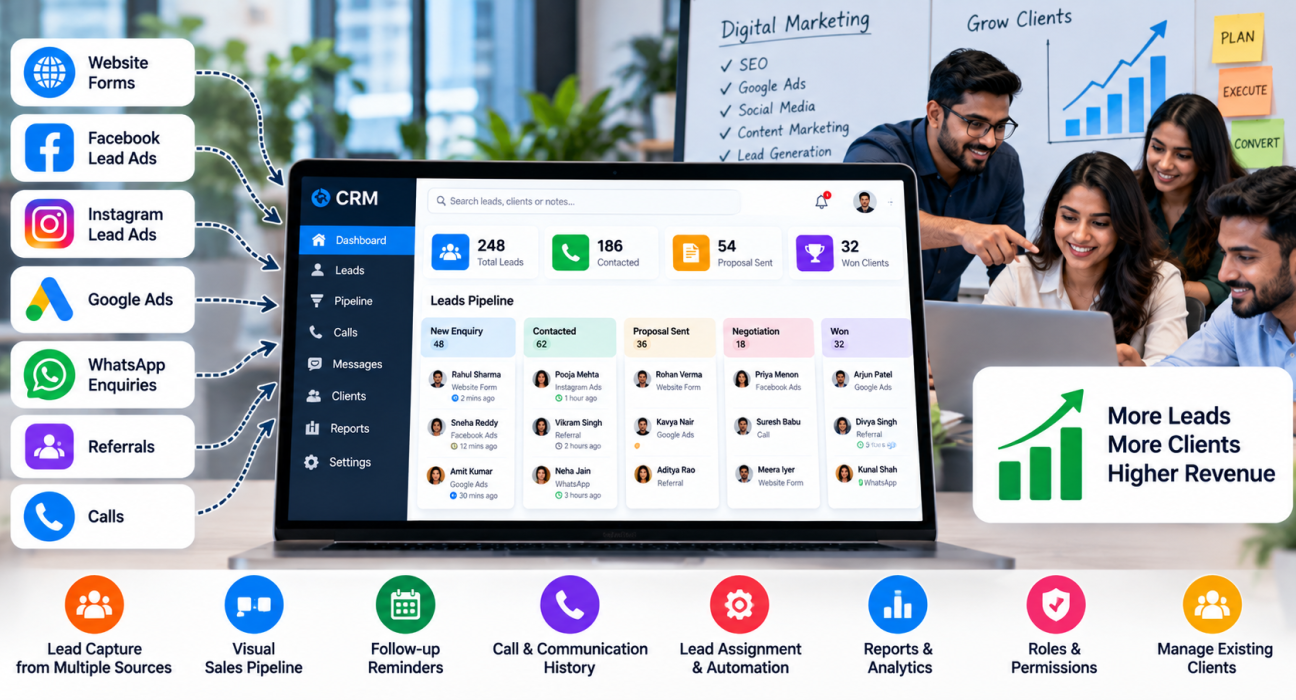
A digital marketing agency usually gets leads from many places at once: website forms, Facebook and Instagram lead ads, Google Ads, referrals, WhatsApp enquiries and cold calls. If these enquiries sit in different inboxes and spreadsheets, some will be answered late and some will never be answered. A good CRM for digital marketing agencies brings all of them into one place, shows who is handling what, and reminds the team to follow up.
This guide explains what an agency CRM should do, which features matter most, how to set up a simple lead workflow, and how to choose between tools.
What Is a CRM for Digital Marketing Agencies?
A CRM for digital marketing agencies is software that helps an agency capture enquiries, track conversations, manage its sales pipeline and stay in touch with clients. It stores contact details, call and message history, follow-up dates and deal stages, so no lead depends on one person’s memory.
There are two broad jobs an agency needs a CRM for:
- Winning new clients: capturing enquiries, calling prospects, sending proposals and following up.
- Keeping existing clients: logging communication, tracking renewals and noticing when an account needs attention.
Some tools focus on the first job, some on the second, and some try to do both along with project management. Decide which problem hurts most before you compare products.
Why Agencies Struggle to Manage Leads
Agencies often grow through referrals and personal relationships, which works at first. Problems begin when the team grows or paid campaigns start bringing in volume. Typical issues include:
- Leads arriving in many places. Form submissions, ad leads and calls are not in one system.
- Slow first response. A lead who enquired in the morning is called back two days later, or not at all.
- No follow-up discipline. Proposals are sent, but nobody checks back.
- Unclear ownership. Two people call the same prospect, or nobody does.
- No visibility for the founder. It is hard to say how many leads came in, how many were contacted and how many turned into clients.
Note that agencies also generate leads for their clients. If you run lead-generation campaigns for others, you may need a way to track or hand over those leads as well. That is a separate need from your own sales pipeline.
Key Features to Look For
Not every agency needs every feature. These are the ones that matter most for lead handling.
1. Lead capture from multiple sources
Your CRM should connect to the places your leads come from, such as website forms, Facebook and Instagram lead ads, Google Ads and spreadsheets. If integrations are not available, check whether the tool supports CSV import or a connector such as Zapier.
2. A visual sales pipeline
You should be able to see each prospect’s stage, for example: new enquiry, contacted, proposal sent, negotiation, won or lost. Deal values help you forecast expected revenue.
3. Follow-up reminders
This is the feature that saves the most deals. Look for scheduled callbacks, reminders and overdue alerts.
4. Call and communication history
For agencies that sell over the phone, call logs, recordings and notes should sit inside the lead’s profile. Messaging through WhatsApp, SMS or email is also useful.
5. Lead assignment and automation
Rules for auto-assigning leads, for example by source or service, prevent leads from waiting for a manager to distribute them.
6. Reports
At minimum, you should see leads by source, response speed, conversion by stage and performance by team member.
7. Roles and permissions
Sales executives should see their own leads, while managers see everything.
8. Fit with your pricing and team size
Check whether pricing is per user or flat, and whether all features are included or locked behind higher plans.
Types of CRM Tools Agencies Choose From
| Type of tool | Best for | Trade-off |
|---|---|---|
| Sales-focused CRM | Managing leads, calls and pipeline | May not handle projects or client reporting |
| Calling-focused CRM (telecaller CRM) | Agencies that sell mainly through phone calls and follow-ups | Less suited for deep project management |
| All-in-one platform (CRM plus projects) | Agencies wanting sales and delivery in one tool | Can be complex and costly for small teams |
| Spreadsheets | Very small teams starting out | No reminders, weak history, breaks as volume grows |
There is no single “best” tool for every agency. The right choice depends on how your leads arrive and how your team sells.
A Simple Lead Workflow for Agencies
Here is a practical process you can set up in most CRMs.
- Capture every lead in one place. Connect ad forms and website forms, and import old lists.
- Tag the source and service. For example: Facebook lead ad, SEO enquiry, referral.
- Assign an owner automatically. Use rules so every lead has a named person.
- Contact the lead quickly. Set an internal target for first response and track it.
- Log the call outcome. Record notes, budget, timeline and decision-maker.
- Move the lead to the right stage. Update the pipeline after every conversation.
- Set the next follow-up. Every open lead should have a date and a reason for the next contact.
- Review weekly. Check lead sources, conversion by stage and lost reasons.
Example (hypothetical)
Imagine an agency that runs Meta ads to generate its own enquiries from local businesses. A restaurant owner fills a lead form on Sunday. The CRM assigns the lead to a sales executive, who calls on Monday morning and notes that the owner wants a proposal for social media management. The executive sets a follow-up for Thursday, sends a WhatsApp message with the package details and moves the lead to “proposal sent”. If the owner does not answer, the reminder makes sure someone tries again.
Lead Follow-Up: Where Agencies Win or Lose
Follow-up is usually the difference between a busy pipeline and a productive one. Prospects often need several touchpoints before signing a retainer, and they rarely say yes on the first call.
Good follow-up habits include:
- Follow up right after sending a proposal, not weeks later.
- Refer to the last conversation, so the prospect does not feel like a number.
- Use different channels, such as a call, then WhatsApp, then email.
- Close leads clearly after a set number of unanswered attempts, so the pipeline stays honest.
Also check your obligations under Indian rules on unsolicited commercial communication, such as DND and DLT requirements, before calling or messaging leads at scale.
How TeleCallingCRM Can Help
TeleCallingCRM is a CRM built for outbound and telecalling sales teams in India. It is calling-first, so it suits agencies that generate and close leads mainly through phone calls, WhatsApp and follow-ups. Based on the information on its website, relevant capabilities include:
- Lead integrations: Facebook and Instagram Lead Ads, Google Ads, WordPress, Wix, Google Sheets, Zapier and several Indian lead portals, so leads can flow in automatically.
- Custom web forms and CSV import: With automatic de-duplication and DNC checks.
- Auto dialer and call tracking: Calls are logged with duration, outcome, recording and notes.
- Follow-ups and reminders: Callback scheduling, overdue alerts and recurring follow-ups.
- Sales pipeline: Custom stages, deal values and weighted forecasting.
- Automations: Auto-assign leads, schedule follow-ups, send WhatsApp nudges and alert managers when a stage changes.
- WhatsApp, SMS and email: Templates and bulk messaging.
- Reports and team monitoring: Analytics by agent and source, leaderboards and a live view of team activity.
- AI call analysis: Transcripts, summaries, sentiment and coaching notes.
To be clear about the limits: the website does not describe project management, campaign tracking or client reporting dashboards. If your main need is managing client deliverables, you may need a separate project tool alongside your CRM. Agencies with a B2B sales process can also read about the B2B CRM approach on the website.
Common Mistakes When Choosing a CRM
- Buying for features you will not use. A complex tool that nobody updates is worse than a simple one that everybody uses.
- Ignoring lead sources. Check that your ad platforms and forms can connect before you commit.
- Skipping the trial. Test the tool with real leads and real team members.
- Not defining pipeline stages first. Write your stages on paper before configuring the software.
- Mixing up new-business and client management. They are different processes and may need separate views.
- Forgetting training. A CRM only works when the team logs calls and updates stages consistently.
- Ignoring compliance. Keep DND rules and consent in mind for calling and messaging.
Checklist: How to Choose the Right CRM
Ask these questions before deciding:
- Where do our leads come from, and can the CRM connect to those sources?
- Do we sell mainly by phone, email or meetings?
- Can every lead have an owner and a next follow-up date?
- Can managers see response times and conversion by stage?
- Is pricing clear, and does it suit our team size as we grow?
- Is there a mobile app for team members who work outside the office?
- Can we try it before paying, and is support available?
Shortlist two or three tools, run a pilot with one team for a few weeks and compare results before choosing.
Frequently Asked Questions
What is the best CRM for digital marketing agencies?
There is no single best option. Agencies that focus on sales calls and follow-ups may prefer a calling-focused CRM. Agencies that want sales and project delivery together may prefer an all-in-one platform. Choose based on your lead sources, sales process, team size and budget, and test before committing.
Why does a digital marketing agency need a CRM?
An agency needs a CRM to keep all leads and conversations in one place, assign owners, schedule follow-ups and see the pipeline. Without it, leads get lost in inboxes and spreadsheets, and managers cannot see what is happening.
What features should an agency CRM have?
Key features include lead capture from ads and forms, a visual pipeline, follow-up reminders, call and message history, lead assignment, reports and role-based access. Client reporting and project tools are helpful if you want to manage delivery in the same system.
Can a CRM connect to Facebook and Google lead ads?
Many CRMs can, but not all. Check the integration list before buying. TeleCallingCRM lists Facebook and Instagram Lead Ads and Google Ads among its lead integrations. If a direct connection is missing in another tool, a connector such as Zapier may help.
Is a spreadsheet enough for a small agency?
A spreadsheet can work for a very small number of leads. But it has no reminders, weak history and no automation, so it becomes hard to manage as lead volume grows. A simple CRM is usually a better step once you have more than a handful of active prospects.
How is a telecaller CRM different from a normal CRM?
A telecaller CRM puts calling at the centre. It usually includes an auto dialer, call logging, call outcomes, follow-up scheduling and agent performance tracking. A general CRM may offer broader contact management but less calling support.
How quickly should we respond to a new lead?
There is no universal number, but faster is better. Set an internal target, such as contacting each new lead within the same working day, and track it in your CRM reports. Automatic assignment and alerts help teams meet the target.
Conclusion
The best CRM for a digital marketing agency is the one your team will actually use every day. Start with your real problems: scattered leads, slow response and missed follow-ups. Then choose a tool that captures leads from your sources, gives each lead an owner and makes follow-ups hard to forget.
If your agency sells mainly through calls and WhatsApp, a telecaller CRM may be worth including in your shortlist. Try it with your own leads, compare it with one or two alternatives and pick the one that fits your process.