Best Inside Sales CRM for Inside Sales Teams in India
If your sales team spends most of its day on the phone rather than meeting clients in person, you already know that a regular CRM does not cut it. Inside sales runs on volume — dozens or hundreds of calls a day, quick follow-ups, and leads that go cold within hours if nobody picks up the phone. Choosing the right inside sales CRM can be the difference between a team that calls efficiently and one that spends half its day hunting for the next number to dial.
This guide walks through what an inside sales CRM actually does, the features that matter most for Indian sales teams, and how to avoid the common mistakes businesses make when picking one.
What Is an Inside Sales CRM?
An inside sales CRM is a system built for sales teams who sell over the phone rather than in the field. It combines lead management, calling tools, follow-up tracking and reporting into one place, so agents don’t have to switch between a spreadsheet, a dialer app and a notebook.
Unlike a general-purpose CRM that’s built around email and account management, an inside sales CRM puts the phone call at the centre of the workflow — because that’s where the actual selling happens.
Why Inside Sales Teams Need a Different Kind of CRM
Field sales and inside sales work very differently, and that difference shows up in what the CRM needs to do.
A field sales rep might handle 10–15 accounts and spend most of the week visiting them. An inside sales agent, on the other hand, might dial 80–150 leads in a single day. That level of volume creates problems a generic CRM was never designed to solve:
- Lead overload — hundreds of leads coming in from ads, portals and referrals, with no easy way to prioritise them.
- Missed follow-ups — a lead promises to “call back tomorrow” and nobody remembers to chase it.
- No visibility into calling activity — managers can’t tell who is actually dialing, who is idle, and who is closing.
- Manual dialing fatigue — agents waste time looking up numbers and dialing manually instead of talking to prospects.
- Compliance risk — calling numbers on the Do Not Call (DNC) registry can lead to complaints and penalties.
An inside sales CRM is built specifically to solve these problems, rather than being a general database that a sales team tries to adapt for calling.
Key Features to Look For in an Inside Sales CRM
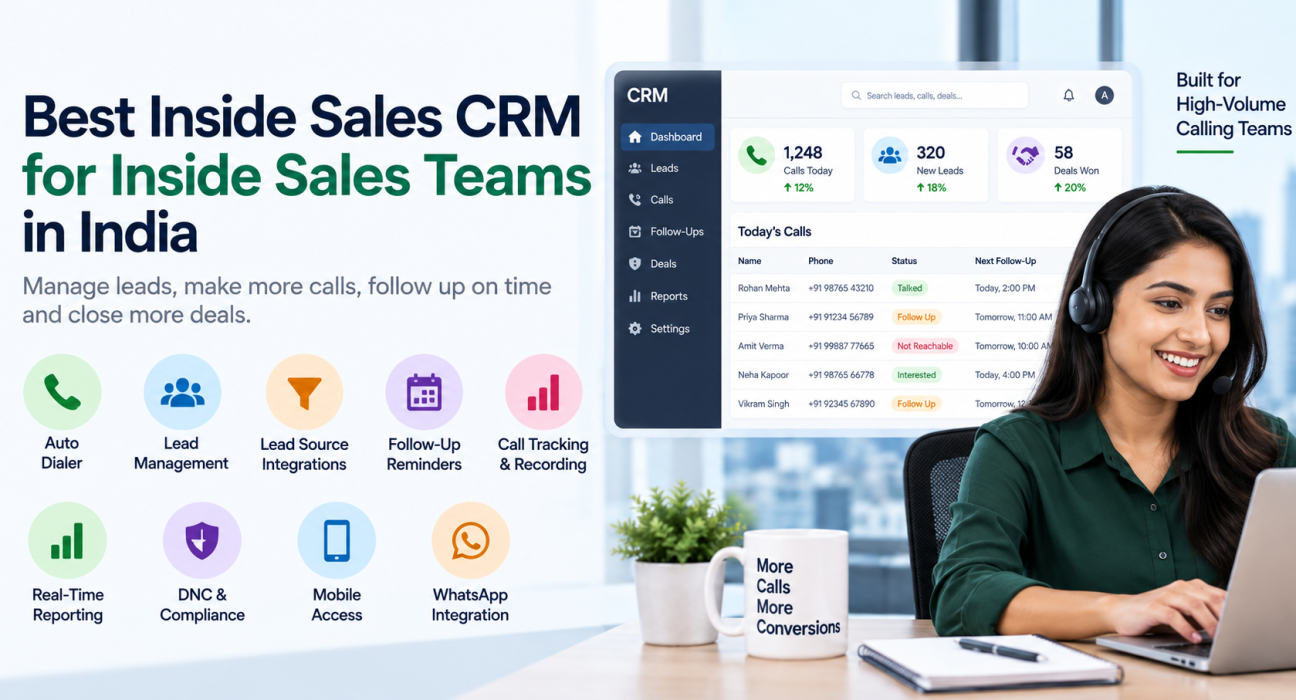
Not every CRM labelled “for sales teams” is actually built for high-volume calling. Here are the features that genuinely matter for inside sales, especially for teams operating in India.
1. Auto Dialer
An auto dialer moves agents through a lead list automatically, so they spend their time talking instead of dialing numbers one by one. This alone can meaningfully increase the number of calls an agent makes in a day.
2. Lead Management and Scoring
Leads should be organised, assigned, and prioritised automatically. Smart lead scoring helps agents call the most promising prospects first instead of working through a list in random order.
3. Lead Source Integrations
Most Indian sales teams get leads from multiple places — Facebook and Instagram ads, Google Ads, property portals like 99acres, Housing or MagicBricks, directories like JustDial and Sulekha, or simple Google Sheets. A good inside sales CRM should pull these leads into one pipeline automatically instead of forcing someone to copy-paste them manually every day.
4. Follow-Up Scheduling and Reminders
In inside sales, the sale rarely happens on the first call. A CRM needs a reliable way to schedule callbacks, send reminders, and flag overdue follow-ups so leads don’t get forgotten.
5. Call Tracking and Recording
Every call should be logged automatically — duration, outcome, and notes — so managers and agents don’t have to rely on memory or manual entry.
6. Real-Time Reporting and Team Visibility
Sales managers need to know, in real time, how many calls are happening, who is on a call, who is idle, and which leads are converting. This kind of live visibility (sometimes called a “war room” view) helps managers coach agents while the day is still in progress, not two days later.
7. DNC and Compliance Management
Calling numbers registered under India’s Do Not Call list can create compliance problems. A CRM that checks numbers against DNC lists automatically reduces this risk.
8. Mobile Access
Many inside sales agents, especially in real estate, insurance and education, work partly from the field or from home. A mobile app lets them call, log outcomes and check follow-ups without being tied to a desktop.
9. WhatsApp and Messaging Integration
A large share of Indian sales conversations continue on WhatsApp after the first call. Built-in messaging templates save agents from switching apps every time they need to send a brochure or a quote.
Inside Sales CRM Features at a Glance
| Feature | Why It Matters for Inside Sales |
|---|---|
| Auto dialer | Reduces idle time between calls, increases daily call volume |
| Lead scoring | Helps agents call the hottest leads first |
| Multi-source lead integration | Stops leads from getting lost across platforms |
| Follow-up reminders | Prevents leads from going cold |
| Call recording & notes | Gives context for every future conversation |
| Real-time dashboards | Lets managers coach and course-correct daily |
| DNC checks | Reduces compliance risk |
| Mobile app | Supports agents working outside the office |
| WhatsApp integration | Matches how Indian customers actually communicate |
Real-World Example: How This Plays Out for a Sales Team
Consider a hypothetical inside sales team at a mid-sized insurance company handling 200 leads a day across three agents. Without a proper system, leads sit in a spreadsheet, follow-ups get missed when an agent is on leave, and the manager only finds out about a slow week once monthly numbers come in.
With an inside sales CRM in place, leads from ads and referrals land automatically in one pipeline, get assigned to agents based on rules, and get called through an auto dialer. Follow-ups are scheduled automatically, and the manager can see call volume and outcomes in real time instead of waiting for a report at month-end.
This is a hypothetical scenario meant to illustrate the difference a proper system can make — actual results will vary by business, team size and how well the CRM is used.
Common Mistakes Businesses Make When Choosing a CRM
- Choosing a generic CRM built for field sales or account management. These systems often lack a real dialer or calling-first workflow.
- Ignoring per-user pricing until the bill arrives. Many CRMs charge per agent, which becomes expensive as the team grows.
- Overlooking DNC compliance. This can lead to complaints and regulatory issues later.
- Not checking mobile support. A CRM that only works on desktop limits field and remote agents.
- Skipping the trial period. Agents should actually test the calling workflow before a business commits.
How TeleCallingCRM Can Help
TeleCallingCRM is built specifically for telecalling and inside sales teams in India. It includes a smart auto dialer, lead management with scoring, more than 12 lead-source integrations (including Facebook and Instagram Lead Ads, Google Ads, 99acres, Housing, MagicBricks, JustDial, Sulekha, TradeIndia, WordPress and Google Sheets), follow-up scheduling, a live team monitoring dashboard, DNC list management, and a mobile app for Android and iOS.
It also includes AI-powered call analysis — automatic transcription, sentiment scoring, and coaching notes — built into every plan rather than sold as a separate add-on. Businesses evaluating telecaller CRM options can compare these features against their own requirements before deciding.
Plans are priced flat per team rather than per user, which can work out cheaper for growing teams. You can review current plan details on the pricing page.
This article is meant to help you evaluate any inside sales CRM, not only TeleCallingCRM — the checklist above applies regardless of which platform you eventually choose.
Frequently Asked Questions
What is the difference between a CRM and an inside sales CRM?
A general CRM manages contacts and deals broadly, often built around email and meetings. An inside sales CRM is built around high-volume phone calling, with tools like auto dialers, call tracking and follow-up scheduling at its core.
Is an inside sales CRM only useful for large teams?
No. Even small teams of two or three agents benefit from lead organisation, automated follow-ups and call tracking, since manually managing this in a spreadsheet becomes unmanageable quickly.
Which industries in India use inside sales CRMs the most?
Real estate, insurance, education, financial services, recruitment and B2B sales are among the heaviest users, since these industries rely on high call volumes to convert leads.
Does an inside sales CRM help with DNC compliance?
A good one does. It should check numbers against the Do Not Call registry automatically before an agent dials, reducing the risk of complaints.
Can an inside sales CRM work for remote or field agents?
Yes, provided it has a mobile app. Agents can call, log outcomes and check follow-ups from their phone instead of being tied to a desktop.
How is pricing usually structured for inside sales CRMs?
Some charge per user per month, which gets expensive as teams scale. Others, including TeleCallingCRM, offer flat plans covering a set number of users with every feature included.
Do I need a separate dialer app if I have an inside sales CRM?
Not if the CRM includes a built-in auto dialer. This is one of the features worth checking carefully before signing up, since some CRMs treat dialing as a separate add-on.
Conclusion
Picking the right inside sales CRM comes down to matching the tool to how your team actually works — high call volume, quick follow-ups, and leads coming in from multiple sources. Focus on the fundamentals: a working auto dialer, reliable lead management, real-time visibility, and DNC compliance, rather than getting distracted by features your team won’t use.
If you’re evaluating options for your own telecalling team, it’s worth trying out a lead management software built specifically for this workflow before settling on a generic CRM.