Customer Enquiry Management System: How to Choose the Best CRM in India
A buyer submits an enquiry on a property portal at 11 am. One agent calls and updates nothing. Another agent calls the same person at 3 pm. By evening, the buyer has also spoken to two competitors.
This is rarely a people problem. It is a process problem, and a customer enquiry management system is built to fix it. It collects every enquiry in one place, gives each one a clear owner and keeps follow-ups on schedule.
This guide explains what such a system does, which features matter for Indian businesses, and how to choose the right CRM for your type of enquiry.
What Is a Customer Enquiry Management System?
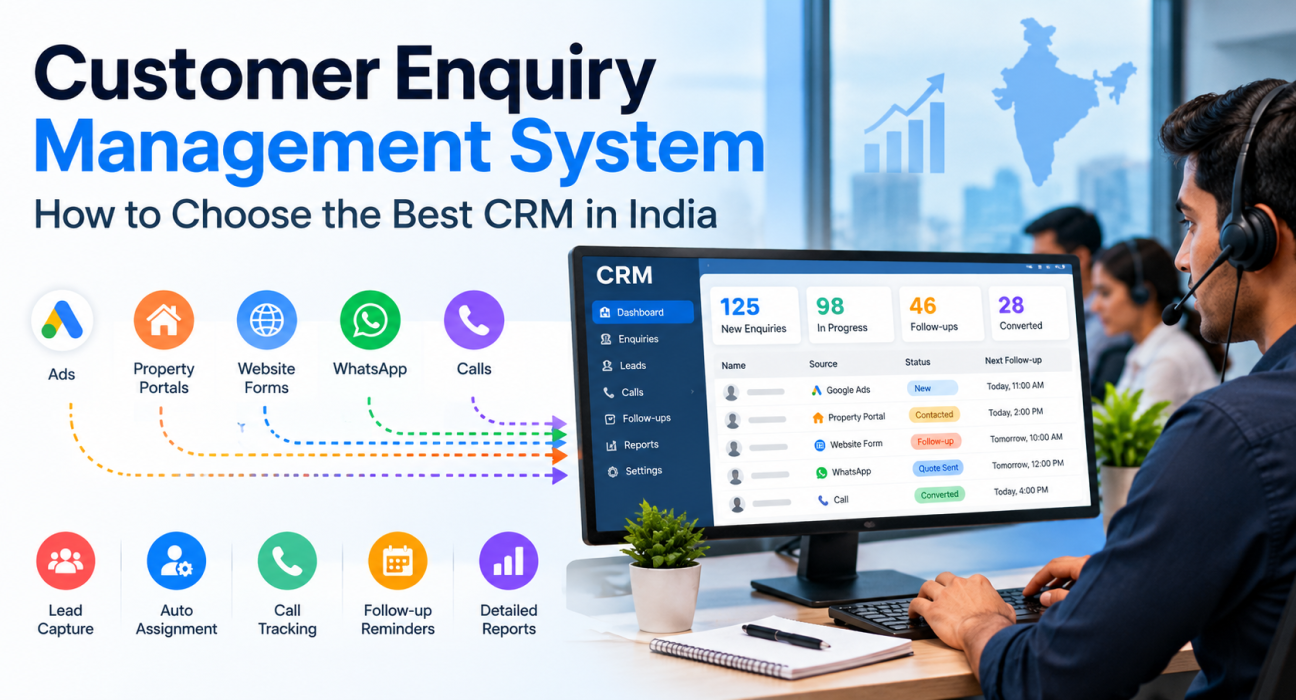
A customer enquiry management system is software that collects enquiries from calls, ads, portals, website forms and messages in one place. It assigns each enquiry to a team member and tracks follow-ups until the enquiry becomes a sale or is closed. In India, businesses usually use a CRM with lead management and calling features for this.
A good system can answer four questions at any moment:
- Who sent this enquiry, and from which source?
- Who owns it right now?
- What was discussed in the last conversation?
- What is the next step, and when is it due?
If your team cannot answer these in a few seconds, some enquiries are probably slipping away unnoticed.
Why Spreadsheets and WhatsApp Groups Stop Working
Spreadsheets and shared WhatsApp groups are a reasonable start. Trouble begins when enquiries arrive from several sources or more than two people handle them.
- Duplicates: The same person enquires through an ad and a portal, and two agents call.
- No clear owner: Everyone assumes someone else will call.
- Missed callbacks: “Call tomorrow” lives only in an agent’s memory.
- Lost history: When an agent leaves, their notes leave too.
- No visibility: Managers cannot see response time, pending calls or conversion by source.
A CRM fixes this by keeping one record per customer, with every call, note and follow-up attached to it.
Which CRM Is Best for Customer Enquiries in India?
The best CRM depends on how your enquiries arrive and how your team responds. If enquiries come from ads and portals and your team replies by phone, a calling-focused CRM fits well. If they are support tickets, a helpdesk tool fits better. No single product suits every business.
| Type of enquiry | What you need | Better-fit tool |
|---|---|---|
| Sales enquiries answered by phone (real estate, education, insurance, loans) | Lead capture, auto-assignment, calling, follow-up reminders | Telecalling-focused CRM |
| Long sales cycles with email campaigns and marketing automation | Broader sales and marketing suite | General-purpose CRM |
| After-sales complaints and service requests | Tickets, SLAs, knowledge base | Helpdesk software |
| High-volume chat enquiries (WhatsApp, Instagram) | Shared inbox, chat routing | Messaging-first tool or CRM with WhatsApp |
Many businesses have a mix. Start with the channel that brings the most revenue, then add tools only when a real gap appears.
Features to Look for in a Customer Enquiry Management System
Use this as a checklist while comparing options.
- Capture from every source. Enquiries should flow in automatically from ad forms, listing portals, your website and Google Sheets. Check that the CRM connects to the sources you actually use.
- Duplicate detection. One customer should mean one record. Otherwise, reports overcount enquiries and customers get repeated calls.
- Rule-based assignment. Rules should decide who gets which enquiry, such as round-robin, language match or a fixed owner. Assigning only to agents who are on shift stops enquiries from waiting in an absent agent’s queue.
- Fast calling and call logging. Speed to first call matters for ad and portal enquiries. Look for one-tap calling, automatic call-duration capture and simple outcome logging.
- Follow-up reminders. Most enquiries need more than one contact. The system should schedule callbacks, remind agents and flag overdue ones to managers.
- Editable pipeline stages. Stages like “New Enquiry”, “Contacted” or “Quote Sent” should match your sales process, so managers can see where enquiries get stuck.
- Practical reports. Response time, connection rate, conversion by source and agent-wise performance are enough to start. If a report needs an analyst, nobody will use it.
- Mobile app and messaging. Many Indian teams work from their phones. WhatsApp, SMS and email from the same lead record keep the history together.
- Access control and data security. Role-based access, encrypted recordings and Do Not Call (DNC) controls protect both customers and your business.
For a wider checklist on calling software, read our guide on how to choose the best telecalling CRM.
How to Set Up Enquiry Management in Six Steps
- List your enquiry sources. Ads, portals, website forms, referrals, walk-ins and inbound calls.
- Define one owner rule. Decide how enquiries are assigned and what happens if the owner does not respond.
- Set four to seven stages. Fewer stages get used properly.
- Set a response-time target. For example, first call within 15 minutes during working hours. This is only a starting suggestion. Choose a target your team can meet, then measure it.
- Standardise call outcomes. For example: Interested, Call Back, Not Reachable, Not Interested, Wrong Number.
- Review weekly. Check overdue follow-ups, unassigned enquiries and conversion by source.
Realistic Examples (Hypothetical)
These are illustrations, not customer case studies.
- Real estate: A builder gets enquiries from portals and ads. The CRM removes duplicates and assigns each enquiry to a pre-sales agent, who calls, notes the budget and moves the lead to “Site Visit Scheduled”. A reminder fires before the visit. You can see a similar setup in this real estate CRM workflow.
- Education: A coaching institute receives admission enquiries in Hindi and English. Language-based assignment routes each enquiry to the right counsellor, and a daily follow-up list shows who needs a callback. An education CRM is built around this kind of counselling flow.
- Insurance: An agency tracks renewal enquiries. Policy details sit in custom fields, calls are recorded for reference, and agents are reminded before each renewal date.
Common Mistakes to Avoid
- Buying for features you will not use. Start with capture, assignment, calling and follow-ups.
- Skipping a pilot. Test with a small batch of real enquiries before rolling out.
- No owner rule. Shared queues without ownership create delays.
- Importing messy data. Clean duplicates and wrong numbers first.
- Not training agents on outcomes. Inconsistent call outcomes make reports unreliable.
- Ignoring consent. The next section explains why this matters.
Compliance: TRAI and DPDP Basics
Enquiry data is personal data, so two Indian frameworks matter.
TRAI’s Telecom Commercial Communications Customer Preference Regulations, 2018 govern commercial calls and messages, including customer preferences such as Do Not Disturb. The Digital Personal Data Protection Act, 2023 covers notice and consent for personal data, and its Rules were notified on 13 November 2025.
A CRM can help by skipping DNC numbers, limiting who can see data and supporting retention controls. Compliance still remains your responsibility, so check specifics with a legal advisor.
How TeleCallingCRM Can Help
TeleCallingCRM is a telecalling CRM built for Indian sales teams that follow up on enquiries by phone. Based on its website, it offers:
- Lead capture: Facebook and Instagram Lead Ads, Google Ads, 99acres, Housing.com, MagicBricks, JustDial, Sulekha, TradeIndia, Wix, WordPress and Google Sheets, plus CSV import with de-duplication. Setup steps are in the integration guides.
- Assignment: Round-robin, language-match or fixed-agent rules, limited to agents who are on shift.
- Calling: An auto dialer, call recording, notes and one-tap outcome logging, with DNC numbers skipped and a calling-hours window.
- Follow-ups and pipeline: Reminders, overdue alerts and custom stages with deal values.
- Messaging and mobile: WhatsApp templates, SMS (via MSG91 with DLT) and email through your own SMTP, plus Android and iOS apps.
- Visibility: A live war room, reports and leaderboards. AI call analysis is available as an opt-in feature.
Plans start at ₹999 a month for up to 5 users, excluding GST, with a 3-day free trial. Check the pricing page for current details and seat limits.
One limitation to keep in mind: it is designed around calling workflows. If most of your enquiries are post-sales support tickets that need SLAs and a knowledge base, a helpdesk tool is a better fit.
Frequently Asked Questions
What is a customer enquiry management system?
It is software that captures enquiries from different sources, assigns them to team members and tracks follow-ups until they are closed. In most Indian businesses, this is a CRM with lead management features.
Is a CRM the same as an enquiry management system?
Not exactly. A CRM is the wider category. An enquiry management system is one use of it: handling new enquiries from first contact to conversion. Some CRMs focus on marketing, others on support, so check the fit.
Which is the best CRM for customer enquiries in India?
There is no single best option. Choose a calling-focused CRM if your team answers enquiries by phone, a helpdesk tool for support tickets, and a broader suite if you need marketing automation. Shortlist two or three and trial them with real enquiries.
How quickly should we respond to a new enquiry?
There is no universal rule. Set a target your team can meet, such as a first call within 15 minutes during working hours, and review it weekly. Faster responses generally help with ad and portal enquiries, because the customer is still comparing options.
Can we manage enquiries on WhatsApp?
Yes, but a shared phone or group gets messy as volume grows. A CRM that links WhatsApp messages to the lead record keeps history and ownership clear.
Do small teams need a CRM for enquiries?
If a spreadsheet works and you rarely miss a callback, you may not. Consider a CRM when you have several agents, several sources or repeated missed follow-ups.
Does TeleCallingCRM handle customer support tickets?
No. It is built for lead and enquiry follow-up through calling, not ticketing. Support teams that need ticket queues and SLAs should look at helpdesk software.
Does a CRM make my calling TRAI-compliant?
No tool can guarantee compliance. A CRM can skip DNC numbers and enforce calling hours, but you still need valid consent and must follow TRAI and data protection rules.
Conclusion
Good enquiry management comes down to a few habits: capture every enquiry, give it one owner, follow up on time and review the numbers. The right tool makes these habits easier to keep.
Before you decide, list your enquiry sources, shortlist two or three tools and test them with real leads. If your team works mainly by phone, you can ask for a demo to see how a telecaller CRM handles your own enquiry flow.