Lead Follow-Up Software: How to Stop Losing Potential Customers
A prospect asks about your product, sounds interested, and then goes quiet. A week later, someone finally remembers to call back but by then, the lead has already bought from a competitor. This happens in almost every sales team, and it usually has nothing to do with the quality of the pitch. It happens because there was no system tracking when and how that lead should have been followed up.
This is exactly the gap that lead follow-up software is built to close. Businesses that rely on spreadsheets, sticky notes or memory to manage callbacks can use dedicated tools like lead management software to make sure every lead gets a timely, tracked follow-up instead of falling through the cracks.
In this article, we will look at why leads get lost, what lead follow-up software actually does, how to choose one, and how teams across different industries use it in practice.
What Is Lead Follow-Up Software?
Lead follow-up software is a system that tracks every lead’s contact history and automatically schedules, reminds or triggers the next follow-up action a call, message or email so no prospect is forgotten between the first inquiry and the final decision.
Unlike a plain contact list or spreadsheet, this kind of software keeps a live record of what has already happened with a lead and what needs to happen next. It usually works alongside a broader CRM or telecalling system, since follow-up is only one part of a larger lead management and sales calling process.
Why Businesses Lose Leads Without a Follow-Up System
Most lead loss is not caused by poor sales skills. It is caused by process gaps that are easy to overlook until they add up.
Common reasons leads get lost:
- No record of when a lead was last contacted
- Follow-ups depend on one person remembering to do them
- Leads sit in a shared spreadsheet nobody owns
- No alert when a promised callback date passes
- Leads from multiple sources (website, ads, walk-ins) never get merged into one list
- New team members don’t know the history of an old lead
- High call volume makes manual tracking unrealistic
For a small team handling a handful of leads a day, a spreadsheet might just about work. But once a business is handling dozens or hundreds of leads weekly across multiple telecallers, manual tracking breaks down quickly.
How Lead Follow-Up Software Actually Works
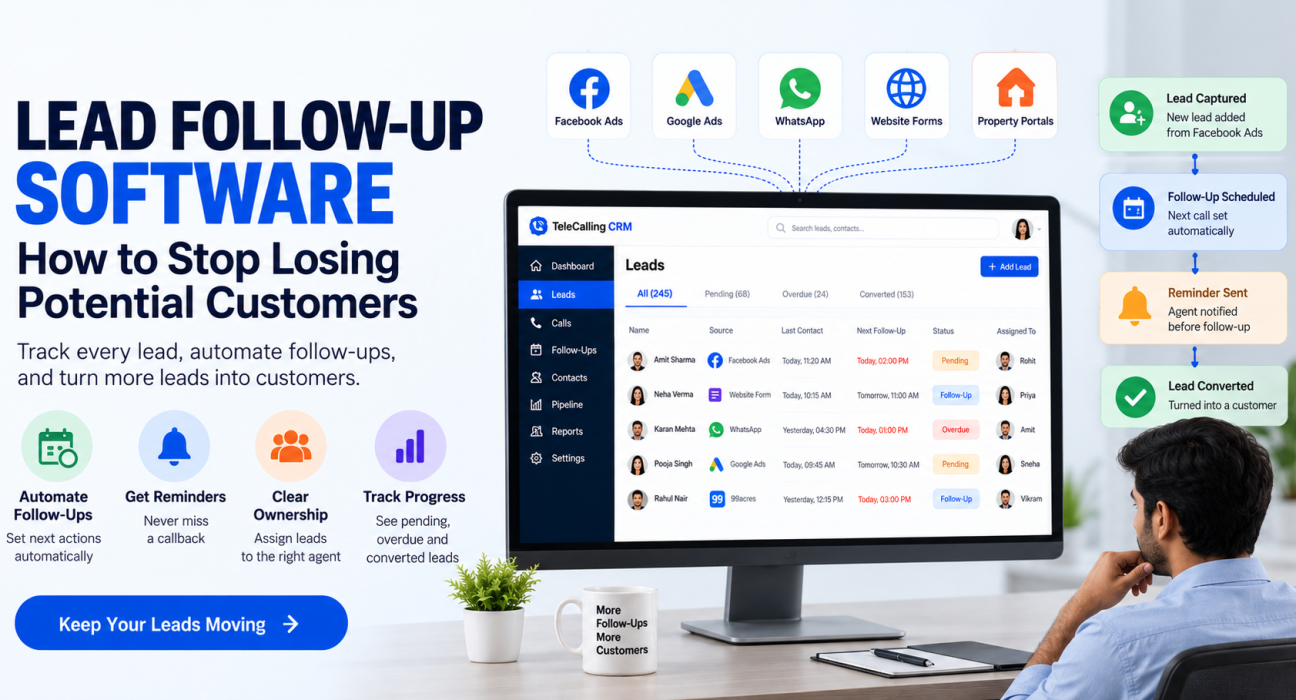
Most lead follow-up systems are built around a simple cycle: capture, log, schedule, remind, and report.
- Lead capture – Leads come in from ads, websites, portals or walk-ins and are added to a central list, rather than staying scattered across notebooks or personal phones.
- Assignment – Each lead is assigned to a specific telecaller or sales executive, so ownership is clear.
- Call logging – Every call outcome is recorded busy, interested, not interested, callback requested and so on.
- Follow-up scheduling – Based on the outcome, the system schedules the next follow-up date automatically or lets the agent set one.
- Reminders and alerts – The telecaller and, where needed, the manager get a reminder when a follow-up is due or overdue.
- Reporting – Managers can see how many follow-ups are pending, overdue, or completed across the team.
This structure means a lead is never dependent on one person’s memory. If a telecaller is on leave or leaves the company, the next person can pick up exactly where the conversation left off.
Direct Answer: Why Does Follow-Up Timing Matter So Much?
Buyers researching a product or service are usually comparing multiple options at the same time. A delayed callback often means the prospect has already spoken to a competitor, lost urgency, or simply moved on. Consistent, timely follow-up keeps a business in the conversation while the lead is still actively deciding.
Key Features to Look For in Lead Follow-Up Software
Not every tool labelled as “lead management” actually solves the follow-up problem well. When evaluating options, look for these capabilities:
| Feature | Why It Matters |
|---|---|
| Automatic follow-up scheduling | Removes dependency on manual reminders |
| Overdue follow-up alerts | Flags leads that are at risk of being forgotten |
| Call history per lead | Gives full context before every callback |
| Lead assignment rules | Ensures every lead has a clear owner |
| Recurring follow-up support | Useful for long sales cycles like insurance or real estate |
| Team-level reporting | Lets managers see pending and missed follow-ups |
| Mobile access | Useful for field agents or remote telecallers |
A system that only stores contact details without scheduling and reminders is closer to a basic contact list than true follow-up software.
Real-World Examples of Lead Follow-Up in Action
These examples are illustrative scenarios based on how different industries typically use follow-up systems, not documented case studies.
Real estate: A property inquiry from a portal like 99acres or MagicBricks often needs three to five follow-ups before a site visit is booked. Without scheduled reminders, a telecaller handling 40 leads a day is likely to lose track of who was due for a call this week.
Education: A prospective student may enquire about a course, go quiet during exam season, then return closer to the admission deadline. A follow-up system with recurring reminders helps counsellors re-engage such leads at the right time instead of writing them off too early.
Insurance: Policy renewals and cross-sell opportunities depend heavily on follow-up discipline. Missing a renewal reminder by even a few days can mean a lapsed policy and a lost customer.
B2B sales: Enterprise deals often involve multiple stakeholders and a longer decision cycle. Tracking who was last spoken to, what was discussed, and when the next check-in is due becomes difficult without a shared system, especially when more than one person on the team is involved in the deal.
Benefits of Using Lead Follow-Up Software
- Fewer leads slip through the cracks since every lead has a scheduled next action.
- Faster response times, which matters because buyers often choose whichever business responds first.
- Better handovers when a telecaller is unavailable or a lead is reassigned.
- Clearer visibility for managers into how many follow-ups are pending, overdue, or completed.
- More consistent customer experience, since follow-ups don’t depend on individual memory or discipline.
- Better use of call time, since agents spend less time figuring out who to call next and more time actually talking to prospects.
Common Mistakes Businesses Make with Lead Follow-Up
- Treating follow-up as optional rather than a scheduled, tracked task.
- Relying on one telecaller’s personal notes instead of a shared system.
- Following up too aggressively without checking previous call history, which can irritate leads.
- Not distinguishing between hot, warm and cold leads, so urgent follow-ups get the same priority as low-interest ones.
- Ignoring overdue follow-up alerts until leads have already gone cold.
- Switching tools frequently without migrating call history, losing context on existing leads.
Avoiding these mistakes usually matters more than picking the “perfect” software. Even a simple system, used consistently, outperforms an advanced one that is ignored.
How TeleCallingCRM Can Help
TeleCallingCRM includes follow-up scheduling with reminders and overdue alerts, so telecallers get a clear list of who to call and when, instead of relying on memory or scattered notes. Every call is logged with its outcome and duration, so the next follow-up always has full context from previous conversations.
For teams handling leads from multiple sources such as Facebook and Instagram ads, Google Ads, or property portals like 99acres, Housing and MagicBricks, leads can be brought into a single pipeline rather than tracked separately across platforms. Managers can also view team-level follow-up activity through real-time reporting, making it easier to spot leads that are at risk of being missed. This is useful whether a team is using it primarily as telecalling software for outbound calling or as a broader lead management system.
This is not a claim that software alone guarantees more sales it depends on how consistently a team uses it. But having a system in place removes one of the most common and avoidable reasons leads are lost.
Frequently Asked Questions
What is the difference between a CRM and lead follow-up software?
A CRM is a broader system for managing customer relationships, including data, pipeline stages and reporting. Lead follow-up software is usually a feature within a CRM that specifically handles scheduling, reminders and tracking of the next action for each lead.
Do small businesses really need lead follow-up software?
If a small business handles more than a handful of leads a week, manual tracking becomes unreliable fairly quickly. Even simple automated reminders can prevent leads from being forgotten as volume grows.
Can lead follow-up software work for teams that call from personal phones?
Yes, many systems including mobile-based CRMs allow telecallers to log calls and get follow-up reminders directly from a phone, which is useful for field sales or remote teams.
How many follow-ups does a lead typically need before converting?
This varies significantly by industry and deal size. Real estate and insurance often need several follow-ups over weeks, while a simple transactional sale may convert in one or two calls. The key is tracking follow-ups consistently rather than assuming a fixed number.
Does follow-up software work for both inbound and outbound leads?
Yes. Whether a lead comes from an inbound enquiry (website, ad, portal) or an outbound calling list, the same follow-up scheduling and tracking process applies once the lead enters the system.
Is lead follow-up software only useful for large sales teams?
No. Even a two- or three-person team benefits from having follow-up dates tracked in one place, since it removes the risk of leads being forgotten when someone is busy or on leave.
Conclusion
Losing a potential customer rarely comes down to a bad sales pitch. More often, it comes down to a missed callback, a forgotten follow-up date, or a lead that fell through a gap in the process. Building a consistent follow-up habit backed by a proper system is one of the simplest ways to recover revenue that many businesses are already losing without realising it.
For teams looking to bring structure to this process, using dedicated lead follow-up software can help ensure that every lead, regardless of source or sales cycle length, gets the timely attention it needs to convert