Lead Tracking Software: How to Track Every Sales Lead
A lead comes in through a Facebook ad on Monday. Another calls after seeing your listing on 99acres. A third messages on WhatsApp after a friend’s referral. By Friday, one is being followed up from a notebook, one is buried in an Excel sheet, and one has been forgotten entirely.
This is the exact problem that lead tracking software is built to solve. Instead of leads sitting in different places — notebooks, spreadsheets, someone’s phone — they all land in one system the moment they arrive, with a clear record of who owns them and what needs to happen next.
If your team is losing leads between channels, forgetting follow-ups, or simply can’t say how many leads came in last month and what happened to them, this guide covers what lead tracking software actually does, how to evaluate one, and the mistakes worth avoiding.
What Is Lead Tracking Software?
Lead tracking software is a system that records every sales lead in one place — its source, its owner, every call or message exchanged with it, and its current stage in the sales process. It replaces scattered notebooks, spreadsheets, and memory with a single, searchable record that updates in real time.
Depending on the vendor, this category is sometimes called lead management software or lead follow-up software. The label matters less than the job it does: making sure no lead depends on one person remembering it.
For a business with a handful of enquiries a week, a spreadsheet might just about work. For teams handling dozens or hundreds of leads a day across telecalling, WhatsApp and web forms, tracking becomes the difference between consistent follow-up and leads quietly going cold.
Why Manual Lead Tracking Breaks Down
Most businesses don’t set out to lose leads. It happens gradually as volume grows. The common failure points look like this:
- Leads scattered across channels — enquiries from Facebook, Google Ads, property portals, WhatsApp and walk-ins never get merged into one list.
- No record of what was said — a telecaller who is on leave for two days leaves no notes for whoever picks up the lead next.
- Follow-ups depend on memory — a callback promised for “next Tuesday” only happens if someone remembers or writes it down somewhere they’ll actually check.
- No visibility for managers — a sales manager can’t see, at a glance, how many leads are open, how many follow-ups are overdue, or which agent is sitting on the hottest prospects.
- Duplicate and dead leads — the same enquiry gets entered twice from two different sources, wasting a call and confusing the pipeline.
None of these are agent failures. They’re the natural result of tracking leads in a system that was never built to track leads.
How Lead Tracking Software Works
Most lead tracking systems follow a similar flow, whatever industry they serve:
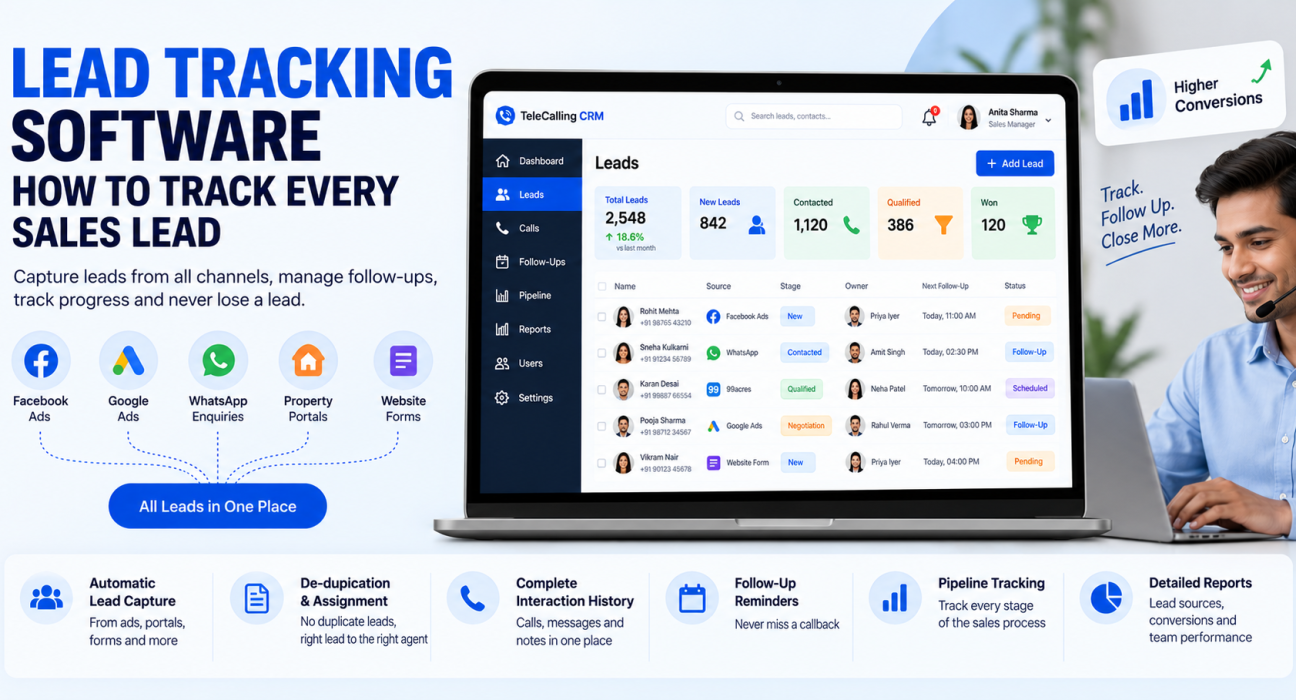
- Capture — leads are pulled in automatically from ad platforms, web forms, portals or spreadsheet uploads, instead of being copy-pasted by hand.
- De-duplicate and assign — the system checks whether the lead already exists, then assigns it to an agent based on rules such as round-robin, language, or availability.
- Log every interaction — calls, messages and notes are attached to the lead automatically, so anyone opening the record sees the full history.
- Schedule the next follow-up — a callback date is set at the end of every interaction, with a reminder that fires before it’s due.
- Track pipeline stage — the lead moves through defined stages (New, Contacted, Qualified, Negotiation, Won/Lost) so its position in the sales process is always visible.
- Report on the whole funnel — managers can see lead volume by source, conversion rates, and which follow-ups are overdue, without asking agents for updates.
This is what separates lead tracking software from a plain contact list: it doesn’t just store leads, it actively manages what needs to happen to each one next.
What to Look For in Lead Tracking Software
Not every tool labelled a “CRM” or a “lead tracker” covers the same ground. Before choosing one, check that it actually covers these basics:
- Automatic lead capture from the channels you actually use (ads, portals, WhatsApp, web forms)
- Built-in de-duplication, so the same enquiry isn’t worked twice
- A full history of calls, messages and notes on every lead
- Follow-up reminders that don’t rely on an agent’s memory
- Lead scoring or prioritisation, so hot leads surface before cold ones
- Pipeline stage tracking with visibility for managers, not just agents
- Reporting on source performance, conversion rate and response time
- Mobile access for agents who call from the field
Manual Tracking vs. Lead Tracking Software
| Aspect | Spreadsheet / Notebook | Lead Tracking Software |
|---|---|---|
| Lead capture from multiple sources | Manual copy-paste | Automatic |
| Duplicate leads | Common, hard to catch | Flagged or blocked automatically |
| Follow-up reminders | Depends on memory or calendar | Automatic alerts |
| Call/interaction history | Scattered across notes | Logged against the lead automatically |
| Manager visibility | Requires asking agents | Real-time dashboard |
| Works well up to | A handful of leads a week | Any volume |
A spreadsheet isn’t wrong for a very small operation. It simply stops working once lead volume, team size, or the number of channels you advertise on starts to grow.
Real-World Examples
These are illustrative examples of how lead tracking plays out across industries — not case studies of specific businesses.
- Real estate: Enquiries arrive from 99acres, MagicBricks and Facebook property ads. Without tracking, a site-visit request from Saturday can sit unanswered until Wednesday. With it, the lead is assigned the moment it lands, and a follow-up reminder is set automatically after every call.
- Education: A coaching institute runs Google Ads during admission season. Hundreds of enquiries come in over a few weeks. Tracking software lets counsellors see which parent has already spoken to someone, instead of calling the same family three times.
- Insurance: A renewal reminder that depends on an agent remembering the date is a renewal that sometimes gets missed. Tracking software surfaces renewal-due leads automatically, before the policy lapses.
- Recruitment: A recruiter juggling fifty candidates across three job openings needs to know, without checking notes, who has been interviewed and who is still waiting on a callback.
- B2B sales: A long sales cycle with multiple stakeholders needs a record of every call and email, so a deal doesn’t stall just because the original point of contact went on leave.
Common Mistakes to Avoid
- Tracking leads in more than one place. A CRM plus a personal notebook plus a WhatsApp chat means there’s no single source of truth.
- Not logging the outcome of every call. A missed note here means the next person to call has no context.
- Treating every lead the same. Without basic scoring, hot leads and cold ones get equal attention, and hot ones cool down waiting their turn.
- Setting reminders that no one checks. A follow-up date is only useful if it triggers an alert someone will actually see.
- Ignoring lead source data. If you don’t know which channel a lead came from, you can’t tell which advertising spend is actually working.
How TeleCallingCRM Can Help
TeleCallingCRM is a telecalling software built around this exact problem for outbound sales teams. Leads from Facebook and Instagram ads, Google Ads, property portals like 99acres, Housing and MagicBricks, and other sources are pulled in automatically, de-duplicated, and assigned to agents by rule — such as round-robin or language match.
Every call is logged with duration and outcome, follow-ups are scheduled with automatic reminders, and each lead carries a full history of what was said and when. This makes it a practical CRM for telecallers handling high call volumes, not just a place to store contact details. A sales pipeline with deal values gives managers a live, weighted revenue forecast instead of a guess, and a real-time dashboard shows which leads are overdue for a follow-up without anyone having to ask.
If you’re evaluating options more broadly, our guide on how to choose the right telecalling CRM covers the wider checklist — auto dialers, integrations, analytics and security — beyond lead tracking alone.
Frequently Asked Questions
What is lead tracking software?
Lead tracking software is a system that records every sales lead in one place — its source, owner, interaction history and current stage — so nothing depends on memory or a scattered spreadsheet.
Is lead tracking software the same as a CRM?
Lead tracking is usually a core part of a CRM, but not every CRM tracks leads well. A telecaller CRM, for example, is built specifically around call logging and follow-up tracking, which a generic CRM may only handle loosely.
Can I track sales leads in Excel instead of using software?
Yes, for very low volumes. Excel has no automatic reminders, no de-duplication, and no call logging, so it becomes unreliable once lead volume or team size grows past a handful of enquiries a week.
What features matter most in lead tracking software?
Automatic lead capture, de-duplication, follow-up reminders, call/interaction history, and manager-level reporting matter most. Extras like scoring and mobile access help, but these five cover the core job.
How does lead tracking software help with follow-ups specifically?
It sets a reminder the moment a follow-up is due, flags overdue ones, and keeps a record of every previous conversation, so the next follow-up picks up where the last one left off.
Is lead tracking software useful for telecalling teams specifically?
Yes — it’s often built with telecalling in mind, since outbound teams generate large call volumes and need every call outcome and follow-up logged against the right lead automatically, not typed up after the fact.
What mistakes should businesses avoid when tracking leads?
The most common ones are tracking leads in more than one place, skipping call notes, treating every lead identically, and ignoring which channel each lead came from.
Conclusion
Every lead your business generates has already cost you something — a rupee spent on advertising, a portal listing fee, or a referral you now need to honour. Losing it to a forgotten follow-up or a duplicate entry is an avoidable cost, not bad luck.
A proper lead tracking system doesn’t need to be complicated. It needs to capture every lead automatically, remind your team when to follow up, and give managers visibility without extra effort. If you’re ready to see this in practice, TeleCallingCRM brings lead tracking and follow-up software together with calling, in one platform built specifically for telecalling and outbound sales teams.