How to Manage Leads for a Telecalling Team
A telecalling team is only as good as the leads it can actually reach, track and follow up on. Most teams don’t lose deals because their agents can’t sell — they lose deals because a lead sat unassigned for two days, a follow-up was forgotten, or nobody could tell which numbers had already been called that morning.
This is what proper lead management for telecalling solves. It is the process of capturing leads, organising them, assigning them to the right agent, tracking every call and follow-up, and reviewing performance — so no lead is worked on by chance. Teams that want this structured from day one often set it up using lead management software built specifically for outbound calling, rather than trying to manage it through spreadsheets and reminders.
This article walks through how to build a lead management process for a telecalling team, step by step, along with common mistakes to avoid.
What Is Lead Management for a Telecalling Team?
Lead management for telecalling is the structured process of capturing enquiries, distributing them to agents, tracking every call outcome, scheduling follow-ups, and measuring results — so leads move through a clear pipeline instead of sitting in someone’s notebook or a shared Excel sheet.
Unlike lead management for email or field sales, telecalling lead management is built around the call itself: who calls whom, when, how many times, and what happens after each conversation.
Why Lead Management Breaks Down in Most Telecalling Teams
Before setting up a process, it helps to understand where things usually go wrong. Most telecalling teams face the same handful of problems, regardless of industry.
- Leads arrive from multiple places. Facebook ads, Google ads, a website form, walk-ins, referrals — and each source often lives in its own spreadsheet or inbox.
- Assignment is manual and inconsistent. One manager assigns leads over WhatsApp or verbally, which means some agents get more leads than others, and some leads get missed entirely.
- Follow-ups depend on memory. An agent promises to call back “next week” and there is no system reminding them.
- No single view of a lead’s history. A second agent calling the same lead has no idea what was already discussed.
- Duplicate and dead leads waste calling time. The same number gets entered twice from two different sources, and agents end up calling numbers on the Do Not Call (DNC) registry.
These problems compound as the team grows. A team of 3 telecallers can survive on spreadsheets. A team of 15 usually cannot.
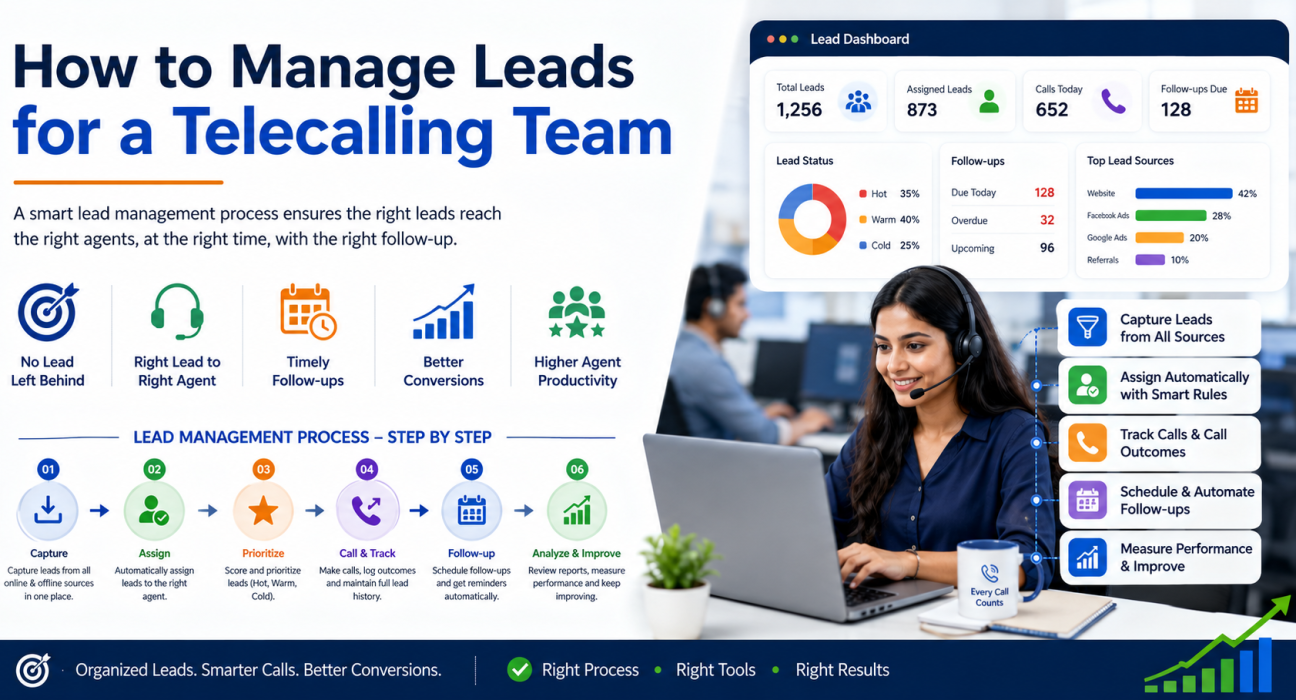
Step-by-Step: How to Manage Leads for a Telecalling Team
1. Capture Leads From All Sources in One Place
The first step is getting every lead — regardless of where it came from — into a single system. This includes:
- Website enquiry forms
- Facebook and Instagram lead ads
- Google Ads
- Property or listing portals (for real estate)
- Walk-ins and referrals entered manually
- Existing spreadsheets from past campaigns
If leads sit scattered across email, WhatsApp and spreadsheets, everything downstream — assignment, follow-up, reporting — becomes harder to manage. Bringing leads into one pipeline, with duplicates and DNC numbers filtered out automatically, is usually the first real improvement a telecalling team makes.
2. Assign Leads to the Right Agent, Automatically
Manual lead assignment does not scale. As soon as a team has more than a handful of agents, leads should be routed using clear rules, such as:
- Round-robin — leads are distributed evenly, one by one
- Language or region match — a Hindi-speaking lead goes to a Hindi-speaking agent
- Fixed ownership — a returning customer always reaches the same agent
- Availability-based routing — leads only go to agents who are currently on shift
Automated, rule-based assignment removes bias, prevents a few agents from getting overloaded, and makes sure leads are picked up within minutes of arriving, not hours.
3. Score and Prioritise Leads
Not every lead deserves the same urgency. A basic scoring system — Hot, Warm, Cold — helps agents decide who to call first, especially during a busy day.
A simple way to think about scoring:
| Lead Status | Typical Signal | Suggested Action |
|---|---|---|
| Hot | Recently enquired, asked for pricing or a callback | Call within minutes |
| Warm | Showed interest but hasn’t confirmed a need | Call same day |
| Cold | Old enquiry, no response in past attempts | Call in scheduled batches |
Prioritisation matters most in the first hour after a lead comes in — response speed is one of the biggest factors in whether a lead converts at all.
4. Track Every Call and Its Outcome
Every call an agent makes should be logged against the lead — not written on paper, not remembered informally. At minimum, this should capture:
- Call duration
- Outcome (interested, not reachable, callback requested, not interested, converted)
- Notes from the conversation
- Next action, if any
This call history becomes valuable the moment a second agent, or a manager, needs context on a lead. It also becomes the basis for coaching — a manager can see exactly how a call went without having to ask the agent to recall it from memory.
5. Set Up Follow-Up Reminders That Don’t Depend on Memory
Most leads are not converted on the first call. Real estate, insurance, education and B2B leads typically need multiple touchpoints before a decision is made. This is where teams lose the most ground — follow-ups that were promised verbally and then forgotten.
A reliable follow-up system should:
- Let an agent schedule a callback in one step, right after the call
- Send a reminder before the follow-up is due
- Flag overdue follow-ups so managers can see what’s slipping
- Auto-create the next follow-up based on how the previous call went (for example, “call back in 3 days” after a hot lead)
Tools like follow-up management inside a telecalling CRM remove the dependency on an individual agent’s memory or personal to-do list.
6. Give Managers a Live View of the Team
A sales manager should not need to ask “how many calls has the team made today?” — they should be able to see it. A live view typically includes:
- Who is currently on a call, idle, or on a break
- Total calls made and connected today, by agent
- Pipeline value and today’s conversions
- Which leads are overdue for follow-up
This kind of visibility is especially useful for larger teams, where a manager cannot personally track 15–20 agents through conversation alone.
7. Review Reports and Improve the Process
Weekly or monthly, it’s worth reviewing a few numbers:
- Connection rate — how many dialled calls actually connect
- Conversion rate by source — which lead sources bring in better-quality leads
- Average follow-ups before conversion — how persistent agents need to be
- Agent-wise performance — calls made, talk time, and deals closed
These numbers tell you where the process is leaking. For example, a low connection rate might mean calling hours need adjusting, while a low conversion rate from one lead source might mean that source isn’t worth the ad spend.
Real-World Example: Lead Management Across Industries
The core process stays the same, but the details shift depending on the industry.
Real estate: Leads arrive from property portals and Facebook ads at a high volume, often at odd hours. Fast assignment and same-day follow-up matter more than almost anything else, since a hot lead can go cold within a day.
Education: Admissions counsellors typically handle leads that need several follow-ups spread across weeks, tied to admission deadlines. Scheduled reminders matter more here than instant response speed.
Insurance: Renewal reminders and policy follow-ups depend on accurate call history — an agent needs to know exactly what was discussed and promised in the last call before dialling again.
B2B sales: Leads often move through a longer pipeline with multiple stages (enquiry, demo, proposal, negotiation), so tracking deal stage alongside call activity becomes important.
These are illustrative examples of how the same lead management steps apply differently by industry, not guarantees of specific outcomes.
Common Mistakes in Telecalling Lead Management
- Relying on spreadsheets past the point they can handle the volume. A shared Excel sheet works for a few agents; it breaks down once multiple people are editing it at once.
- Assigning leads manually, unevenly, or without urgency. Delayed assignment is one of the most common reasons hot leads go cold.
- Not tracking DNC (Do Not Call) numbers. Calling numbers on the DNC registry creates compliance risk and wastes agent time.
- No follow-up system beyond personal reminders. This is the single biggest reason genuinely interested leads are lost.
- Measuring only “calls made,” not connection or conversion rate. Call volume alone doesn’t tell you whether the process is actually working.
- Duplicate leads from multiple sources. The same person entering a form twice can lead to two agents calling the same number, which looks unprofessional.
How TeleCallingCRM Supports This Process
A dedicated telecalling CRM brings the steps above into one system, instead of stitching together spreadsheets, WhatsApp reminders and a separate calling app. TeleCallingCRM includes lead import with automatic de-duplication and DNC checks, rule-based lead assignment, lead scoring, an auto dialer, follow-up scheduling with reminders, and real-time reporting on connection and conversion rates — all built for outbound telecalling teams rather than adapted from a generic sales CRM.
This doesn’t mean a CRM is the only way to manage leads well — smaller teams can run a disciplined process manually for a while. But as the number of agents and leads grows, the manual approach tends to reach its limits fairly quickly.
FAQs
What is the best way to manage leads for a small telecalling team? For a small team (2–5 agents), a shared spreadsheet with clear rules on assignment and follow-up dates can work initially. The key is discipline: every lead logged, every call outcome recorded, and follow-ups tracked somewhere everyone can see.
How many times should a telecaller follow up with a lead before giving up? This varies by industry, but 3–5 follow-up attempts spread over one to two weeks is a common range. Real estate and education leads often need more persistence than a simple product enquiry.
What is lead scoring in telecalling? Lead scoring is the practice of ranking leads by how likely they are to convert — typically Hot, Warm or Cold — based on signals like recency of enquiry, response to previous calls, and stated intent. It helps agents prioritise who to call first.
Should telecalling leads be assigned manually or automatically? Automatic, rule-based assignment (round-robin, language match, or availability-based) is generally more consistent and faster than manual assignment, especially once a team has more than a handful of agents.
How do I stop telecallers from calling the same lead twice? This usually happens when leads aren’t de-duplicated at the point of import, or when multiple agents don’t have visibility into who already called a number. A shared system with de-duplication and a visible call history prevents this.
What metrics should a telecalling manager track weekly? Connection rate, conversion rate by lead source, average follow-ups before conversion, and agent-wise call and conversion numbers are a reasonable starting set for most teams.
Is a CRM necessary for telecalling lead management, or can a spreadsheet work? A spreadsheet can work for very small teams in the early stages. Once a team crosses roughly 5–10 agents, or leads start arriving from multiple sources, most teams find a dedicated system saves time and reduces missed follow-ups.
Conclusion
Good lead management for a telecalling team isn’t about having fancy software — it’s about making sure no lead is left to chance. Capture leads from every source, assign them quickly and fairly, track every call, and make follow-ups automatic instead of optional. Once these basics are solid, the reporting and coaching layer on top becomes far more useful.
Teams that outgrow spreadsheets often move to a purpose-built telecaller CRM to keep the process consistent as the team scales, without adding manual overhead for every new agent or lead source.