Every business generates data – sales numbers, website traffic, customer feedback, marketing performance, operational costs. The challenge isn’t collecting this data; it’s making sense of it fast enough to act on it. This is exactly the problem business intelligence solves.
If you’ve ever felt like your business has plenty of data but not enough clarity, you’re not alone. Many companies sit on spreadsheets, CRM exports, and analytics dashboards that never quite turn into decisions. Business intelligence closes that gap by turning raw data into insights that leadership teams can actually use.
In this article, we’ll break down what business intelligence really means, how it works, the tools involved, and how businesses of different sizes use it to make smarter decisions.
What Is Business Intelligence?
Business intelligence (BI) is the process of collecting, organizing, analyzing, and presenting business data so that companies can make informed decisions. It combines technology, processes, and analysis to turn raw data – from sales, operations, marketing, finance, and customer interactions – into clear, actionable insights.
Rather than relying on guesswork or gut instinct, business intelligence gives decision-makers a factual, data-backed view of what’s happening inside their business and why.
At its core, business intelligence answers three types of questions:
- What happened? (Descriptive analysis – sales trends, past performance)
- Why did it happen? (Diagnostic analysis – root causes behind trends)
- What should we do next? (Prescriptive insight – recommended actions based on data)
How Does Business Intelligence Work?
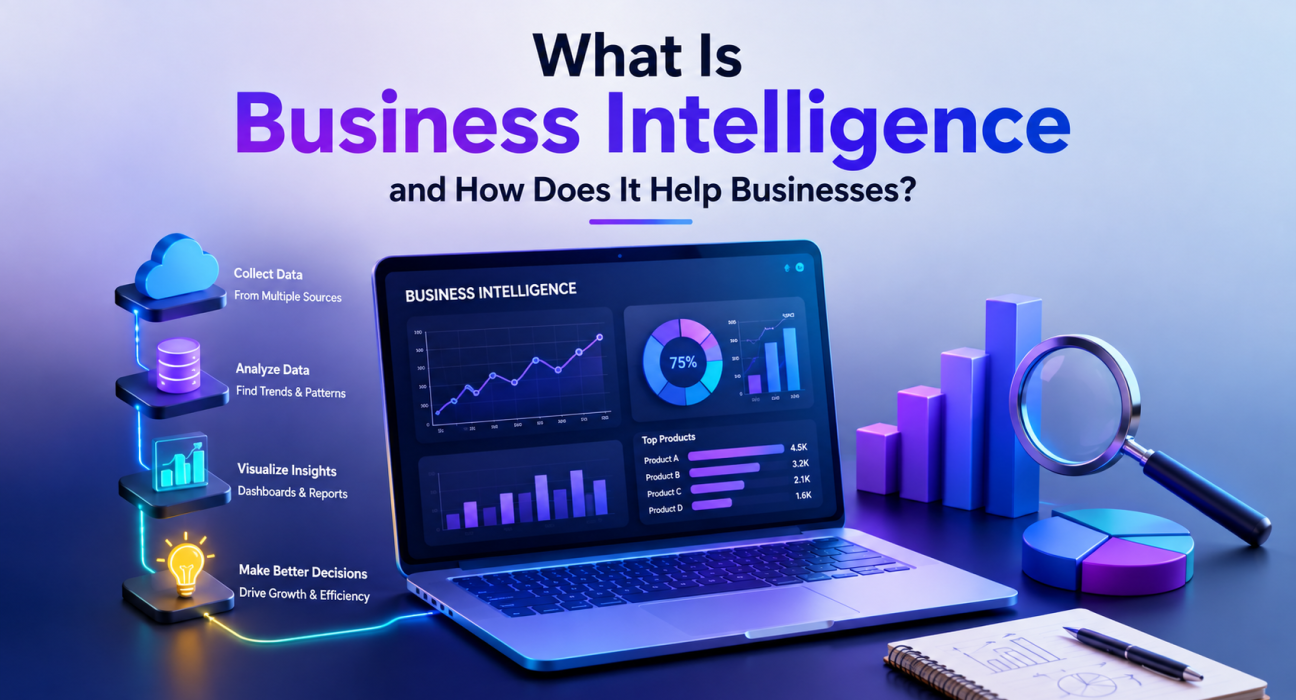
Business intelligence isn’t a single tool – it’s a workflow. Understanding the steps helps clarify how scattered data becomes a usable business asset.
1. Data Collection
BI systems pull data from multiple sources: CRMs, ERPs, e-commerce platforms, marketing tools, financial systems, spreadsheets, and even social media. The goal is to bring fragmented data into one place.
2. Data Integration and Storage
Once collected, data is cleaned, standardized, and stored – typically in a data warehouse or data lake. This step ensures that numbers from different systems can actually be compared accurately.
3. Data Analysis
Analytical tools process the stored data to identify patterns, trends, and correlations. This can range from simple reporting to advanced statistical modeling.
4. Data Visualization
Insights are translated into dashboards, charts, and reports that are easy to interpret – even for non-technical stakeholders.
5. Decision-Making
Leadership and teams use these insights to guide strategy: adjusting budgets, launching new products, refining marketing campaigns, or improving operational efficiency.
Why Business Intelligence Matters for Businesses
Business intelligence isn’t just an “enterprise” concept anymore. Startups, SMBs, and large organizations alike rely on it to stay competitive. Here’s why it matters.
1. Faster, Data-Backed Decisions
Instead of waiting weeks for manual reports, BI tools provide near real-time dashboards. Decisions that once took days can now be made in minutes.
2. Improved Operational Efficiency
BI highlights inefficiencies – such as underperforming products, bottlenecked processes, or wasted marketing spend – so businesses can address them proactively.
3. Better Customer Understanding
By analyzing customer behavior, purchase history, and engagement patterns, businesses can personalize offerings and improve retention.
4. Competitive Advantage
Companies that understand their data faster and more accurately can respond to market shifts before competitors do.
5. Accurate Forecasting
BI tools use historical data and trend analysis to support more reliable sales, revenue, and demand forecasting.
6. Reduced Risk
Data-driven insight helps identify financial risks, operational issues, or compliance gaps earlier, reducing costly surprises.
Key Components of a Business Intelligence System
| Component | Purpose |
|---|---|
| Data Warehousing | Centralized storage for structured business data |
| ETL (Extract, Transform, Load) | Moves and prepares data from multiple sources |
| Reporting Tools | Generates structured summaries of business performance |
| Dashboards | Visual, real-time snapshots of key metrics |
| Data Mining | Identifies hidden patterns and correlations |
| Predictive Analytics | Uses historical data to forecast future outcomes |
Not every business needs all of these components at once. Many start with basic reporting and dashboards, then scale into predictive analytics as their data maturity grows.
Common Business Intelligence Tools
Some of the most widely used BI platforms include:
- Microsoft Power BI
- Tableau
- Google Looker Studio
- Qlik Sense
- Domo
- SAP BusinessObjects
The right tool depends on your existing tech stack, budget, data complexity, and the technical skill level of your team. Many businesses also build custom BI dashboards tailored to their specific KPIs, especially when off-the-shelf tools don’t fit their workflow.
Business Intelligence Use Cases by Industry
E-commerce: Tracking customer lifetime value, cart abandonment trends, and inventory turnover.
SaaS: Monitoring churn rate, customer acquisition cost, and product usage patterns.
Healthcare: Analyzing patient outcomes, resource allocation, and operational efficiency.
Finance: Detecting fraud patterns, tracking cash flow, and forecasting revenue.
Retail: Understanding foot traffic, sales seasonality, and product performance across locations.
Manufacturing: Monitoring supply chain performance, downtime, and production efficiency.
Business Intelligence vs. Data Analytics: What’s the Difference?
These terms are often used interchangeably, but they aren’t identical.
- Business Intelligence focuses on analyzing historical and current data to support ongoing business decisions – typically through dashboards and reports.
- Data Analytics is a broader field that includes BI but also covers deeper statistical analysis, predictive modeling, and even machine learning to uncover insights not immediately visible in standard reports.
In short: BI tells you what’s happening in your business right now. Data analytics can go further, helping predict what might happen next.
How to Get Started With Business Intelligence
If your business is new to BI, here’s a practical starting point:
- Identify your key business questions. What decisions do you need better data for – sales performance, customer retention, marketing ROI?
- Audit your existing data sources. List where your data currently lives (CRM, spreadsheets, e-commerce platform, etc.).
- Choose the right BI tool or partner. Depending on complexity, you may need an off-the-shelf tool or a custom-built solution.
- Start small. Begin with a few key dashboards rather than trying to track everything at once.
- Train your team. BI only creates value when people actually use the insights to make decisions.
For businesses that don’t have in-house data expertise, working with an experienced software development or data analytics company can significantly speed up implementation. Platforms like GoFirms can help businesses research and compare technology companies that specialize in business intelligence, data analytics, and custom dashboard development, making it easier to find a partner suited to your specific industry and data needs.
Challenges Businesses Face With Business Intelligence
Business intelligence isn’t without challenges. Common obstacles include:
- Data quality issues – inconsistent or incomplete data leads to inaccurate insights.
- Tool complexity – some BI platforms require significant technical expertise to implement properly.
- Low adoption – dashboards are only useful if teams actually use them in decision-making.
- Integration difficulties – connecting multiple data sources isn’t always straightforward.
- Cost – advanced BI solutions can require meaningful investment in tools, infrastructure, and talent.
Being aware of these challenges early helps businesses plan realistic BI implementations instead of over-investing in tools they aren’t ready to use effectively.
Frequently Asked Questions
What is business intelligence in simple terms? Business intelligence is the process of turning raw business data into clear insights – usually through dashboards and reports – so companies can make informed decisions instead of relying on guesswork.
Is business intelligence only for large companies? No. While enterprises use advanced BI systems, many startups and SMBs use simpler BI tools like Power BI or Google Looker Studio to track sales, marketing, and customer data affordably.
What industries benefit most from business intelligence? Nearly every industry benefits, but e-commerce, SaaS, finance, healthcare, and retail businesses often see the fastest impact due to the volume of measurable, decision-relevant data they generate.
How much does business intelligence implementation cost? Costs vary widely depending on tool choice, data complexity, and whether you build custom dashboards or use off-the-shelf platforms. Small businesses may start with low-cost tools, while enterprises often invest in custom BI development.
What’s the difference between BI and a regular dashboard? A regular dashboard may only display isolated metrics, while a true BI system integrates data from multiple sources, cleans and organizes it, and presents connected insights that support strategic decisions.
Do I need a data analyst to use business intelligence tools? Not necessarily for basic reporting, but as your data complexity grows, having a data analyst or BI specialist helps ensure accurate analysis and meaningful insights.
Can business intelligence predict future trends? Traditional BI focuses mainly on historical and current data. Predicting future trends typically requires predictive analytics, which is a more advanced extension of BI.
Conclusion
Business intelligence gives companies the ability to move from guessing to knowing. By collecting, organizing, and visualizing data, businesses can make faster, more confident decisions across sales, marketing, operations, and finance.
Whether you’re a startup just starting to track key metrics or an enterprise refining a mature BI strategy, the goal remains the same: turn data into decisions that move your business forward. If you’re exploring BI tools or looking for a technology partner to help build a custom data analytics solution, GoFirms can help you research and compare relevant software development and data analytics companies suited to your business needs.