Lead Nurturing Software: How to Turn Old Leads Into Sales
Most sales teams have a folder of old leads: people who enquired, spoke to an agent once and then went quiet. These leads already showed interest, and they cost money to generate. Yet they are often ignored because no one has the time or a clear system to follow up. With the right lead nurturing software, a team can track these leads, schedule follow-ups and decide who to call next, instead of relying on memory and Excel sheets.
This guide explains what lead nurturing software is, how it works for calling-led sales teams, and how to use it step by step to revive old leads.
What Is Lead Nurturing Software?
Lead nurturing software is a tool that helps sales teams stay in touch with leads who are not ready to buy yet. It stores lead history, schedules follow-ups, sends reminders and messages, and shows which leads deserve attention now. The goal is to keep a lead warm until they are ready to decide.
For a telecalling team, nurturing mostly means a well-timed phone call, supported by WhatsApp, SMS or email. Because of this, a telecaller CRM with calling, follow-up and lead-tracking features often works as lead nurturing software for such teams.
Why Old Leads Go Cold
Leads rarely go cold because the customer lost interest. In most cases, the process fails on the business side. Common reasons include:
- No fixed follow-up date. The agent says “I will call you next week” but never logs it.
- Scattered data. Notes are in WhatsApp chats, personal phones and spreadsheets.
- Agent changes. When an executive leaves, their leads are often left untouched.
- One-size-fits-all calling. Every lead gets the same pitch, whatever their stage.
- No priority. Agents call in list order, not in order of interest.
Each of these is a process problem, and software helps by making the process visible and repeatable.
Lead Nurturing vs Lead Management vs Follow-Up Software
These terms overlap, so here is a quick comparison.
| Term | Main focus | Example activity |
|---|---|---|
| Lead management software | Capturing, storing and assigning leads | Importing leads and assigning them to agents |
| Lead follow-up software | Reminders and callbacks | Scheduling a call for Tuesday 11 AM |
| Lead nurturing software | Building interest over time | Sending relevant messages and calls based on lead stage |
In practice, a good tool combines all three. You cannot nurture a lead you cannot find, and you cannot nurture it without follow-ups.
Key Features to Look For
Not every business needs every feature. These are the ones that matter most for reviving old leads:
- Complete lead history. Every call, note, outcome and recording should sit in one profile.
- Follow-up scheduling with reminders. Callbacks should trigger alerts, including overdue alerts.
- Lead status and tagging. You should be able to filter leads by stage, source or interest.
- Lead scoring or prioritisation. Agents should know whom to call first.
- Automation. Rules for auto-assigning leads and creating follow-ups save manual effort.
- Messaging support. WhatsApp, SMS and email help you stay visible between calls.
- Reports. You need to see how many old leads were contacted and what happened next.
- Compliance tools. Indian teams calling leads should respect DND/DNC rules. Check the current TRAI guidelines for your use case.
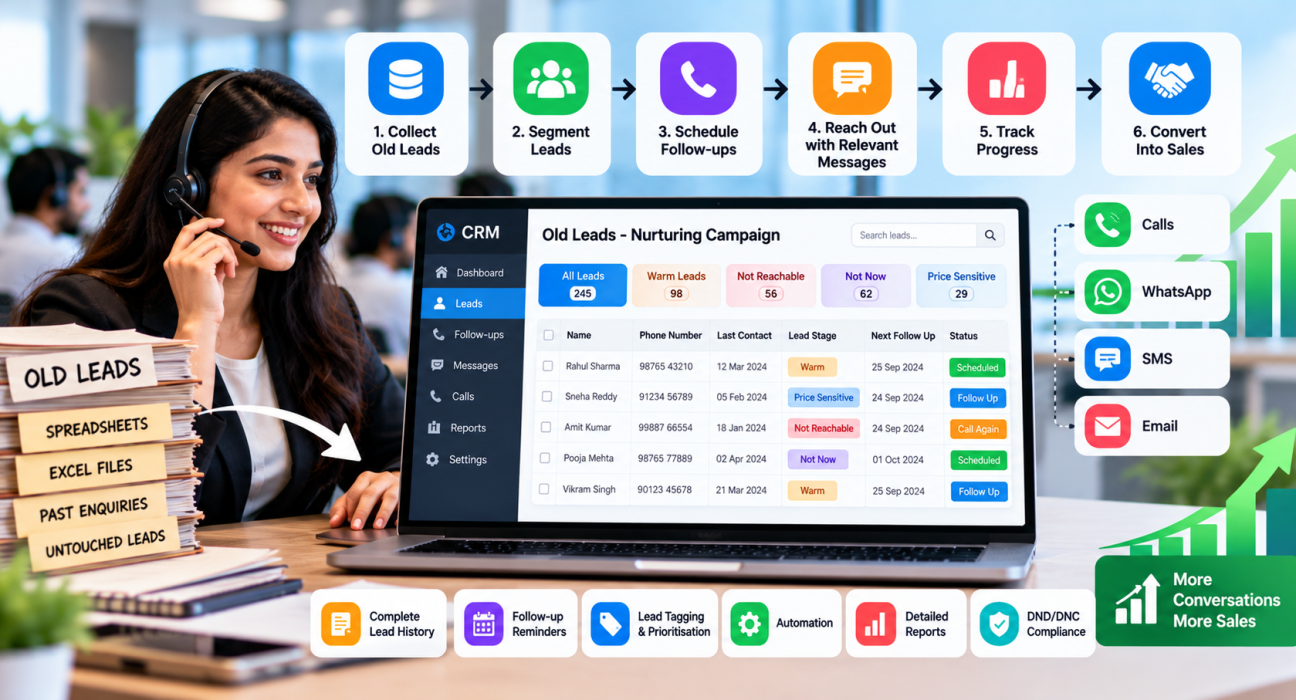
How to Turn Old Leads Into Sales: A 6-Step Process
Step 1: Collect all old leads in one place
Gather leads from spreadsheets, old CRMs, ad platforms and portals. Import them into one system and remove duplicates. Most CRMs accept CSV files, so this step is usually quick.
Step 2: Segment leads by their last stage
Do not treat every old lead the same. A simple segmentation looks like this:
| Segment | Description | Suggested approach |
|---|---|---|
| Warm but stalled | Showed interest, asked for details, then stopped responding | Personal call referring to the last conversation |
| Price-sensitive | Liked the product but delayed due to budget | Call with a new offer, payment option or comparison |
| Not reachable | Phone was switched off or unanswered | Retry at different times, then send a message |
| Not now | Said “call after 3 months” | Call on the date promised |
| Never connected | Lead was never called | Treat as a fresh lead |
Step 3: Read the history before calling
Before dialling, the agent should check the last note, call outcome and any recording. Opening with “Last month you asked about the 2 BHK in Kondapur” is far better than “Sir, are you still interested?” (this is a hypothetical example).
Step 4: Set a follow-up on every call
End each call with a clear next action and date, and log it immediately. If the lead does not answer, schedule a retry. A lead without a next step is a lead likely to be lost again.
Step 5: Combine calls with messages
A call works best when supported by a short WhatsApp or SMS message with useful information, such as a brochure, fee structure or price sheet. Keep messages relevant and infrequent, and do not spam.
Step 6: Review results weekly
Track how many old leads were called, how many connected, how many moved to a new stage and how many converted. Use this to decide which segments deserve more effort and which should be closed.
Realistic Examples by Industry
These are hypothetical examples to show how the process might work.
- Real estate: A site-visit lead from three months ago is tagged “waiting for loan approval”. The team schedules a call for when approval was expected and shares an updated price sheet. Teams can explore this in a real estate CRM workflow.
- Education: A student enquired about a course in March but missed the batch. The counsellor calls before the next intake and shares the new schedule. This suits an education CRM setup.
- Insurance: A customer asked for a renewal quote and disappeared. The agent calls a month before expiry with a fresh comparison.
- Recruitment: A candidate rejected an offer earlier. A recruiter calls when a better-matching role opens.
In each case, the lead is contacted at a relevant moment with relevant information, which is the core idea of nurturing.
What Nurturing Cannot Do
Lead nurturing software has limits, and it is better to know them early:
- It cannot fix a weak product, unclear pricing or poor calling skills.
- It cannot revive leads with wrong or fake numbers.
- It will not replace conversation quality. Software organises the process, but the agent still has to build trust.
- Automation without personalisation can feel robotic to the customer.
Also, not every old lead is worth chasing. Setting a rule, such as closing a lead after a fixed number of unsuccessful attempts, keeps the team focused.
Common Mistakes to Avoid
- Calling too often. Repeated calls in the same week can annoy leads and damage the brand.
- Ignoring consent and DND status. Check your compliance obligations before calling or messaging.
- Using the same script for everyone. Warm leads and cold leads need different conversations.
- Not logging call outcomes. Without notes, the next agent starts from zero.
- Measuring only call volume. More calls do not always mean more conversions. Track connection rate and stage movement too.
- No ownership. Every lead should have a named owner, especially when agents leave.
How TeleCalling CRM Can Help
TeleCalling CRM is a telecalling CRM built for Indian outbound sales teams. Based on the information on its website, the following features are relevant to nurturing old leads:
- Lead import and management: Import leads through CSV, with automatic de-duplication and DNC checks.
- Follow-up scheduling: Callback scheduling with reminders, overdue alerts and recurring follow-ups.
- Smart lead scoring: Helps agents focus on likely prospects first.
- Call tracking: Calls are logged with duration, outcome, recording and notes.
- AI call analysis: Calls are transcribed and summarised, with sentiment, action items and coaching notes.
- Automations and workflows: Auto-assign leads, schedule follow-ups, send WhatsApp nudges and alert managers when a lead’s stage changes.
- Sales pipeline: Track leads by stage with deal values.
- WhatsApp, SMS and email: Templates and bulk messaging for staying in touch.
- Reports and live monitoring: Team-level analytics and a live view of agent activity.
Teams can use these to run the six-step process described above. Since features and plans can change, it is best to check the features page and try the product before deciding whether it suits your workflow.
How to Choose the Right Software
Ask these questions before selecting any tool:
- Does it keep full call and lead history in one place?
- Can agents set and see follow-ups easily on mobile?
- Can managers see overdue follow-ups across the team?
- Does it work with your lead sources, such as ad platforms and property portals?
- Is the pricing clear, and does it suit your team size?
- Can you test it with a trial before committing?
Run a small pilot with one team and one lead segment. Measure results for a few weeks before rolling out further.
Frequently Asked Questions
What is lead nurturing software?
Lead nurturing software helps businesses stay in touch with leads who are not ready to buy yet. It records lead history, schedules follow-ups, sends reminders and messages, and helps teams prioritise who to contact. It is used to move leads gradually towards a purchase decision.
How do you turn old leads into sales?
First, collect old leads in one system. Then segment them by their last stage, review past conversations, call with a relevant reason and set a follow-up after every interaction. Support calls with WhatsApp or SMS and review results weekly to see which segments respond best.
Is a CRM the same as lead nurturing software?
Not exactly. A CRM stores customer and lead data. Lead nurturing software focuses on follow-up and engagement over time. Many CRMs include nurturing features such as reminders, automation and messaging, so the two often overlap, especially in telecalling CRMs.
How often should I follow up with old leads?
There is no fixed rule, as it depends on your industry and sales cycle. A common approach is to follow the timeline promised by the lead, and otherwise space attempts several days apart. Stop after a set number of unanswered attempts and revisit later.
Which industries benefit most from lead nurturing?
Industries with longer decision cycles benefit most, such as real estate, education, insurance, finance, healthcare and B2B sales. In these, customers often take weeks or months to decide, so consistent follow-up matters.
Can small teams use lead nurturing software?
Yes. Small teams often benefit most because they have limited time and cannot afford to lose leads. Start with basic features such as lead history, reminders and call tracking before adding automation.
Do I need WhatsApp or email for nurturing, or are calls enough?
For telecalling teams, calls are the main channel, but messages help. A short WhatsApp or SMS after a call gives the lead information to review at their own pace. Use messages sparingly and respect consent and DND rules.
Conclusion
Old leads are not dead leads. Many were lost because of missing follow-ups, scattered records and unclear priorities. Lead nurturing software fixes these gaps by keeping history, reminders and next steps in one place, so the right lead gets the right call at the right time.
Start small: import your old leads, segment them, and set a follow-up on every conversation. If you want a calling-focused tool for this, you can compare telecaller CRM plans and try one with your own data before making a decision.